

Dynamic number insertion swaps the phone number on a website for each visitor so every call can be traced back to the exact channel, campaign, or keyword that drove it. The immediate payoff: you stop guessing which ads produce phone calls and start measuring them. Getting there requires three things.
- A DNI JavaScript snippet running on every page with a phone number
- A pool of trackable numbers large enough to cover your traffic
- Call routing tied to your analytics and CRM so the data actually lands somewhere useful
Key Takeaways
Dynamic number insertion works because it ties phone calls to their originating channel, campaign, and keyword in real time, turning an untracked conversion into measurable data.
| Point | Details |
|---|---|
| Definition | DNI swaps on-page phone numbers per visitor using a JavaScript snippet, a number pool, and session tracking. |
| Size the pool correctly | Base pool size on peak concurrent visitors, not daily uniques, with a 20 to 30% safety buffer. |
| Watch for silent failures | Caching, hardcoded numbers, and pool exhaustion break attribution without triggering visible errors. |
| Compliance goes beyond cookies | Call recording consent laws and CCPA/GDPR data rights apply to call metadata independent of cookie disclosures. |
| Connect data to action | Leapify Media routes DNI attribution into AI-driven lead scoring and dispatch, not just a reporting dashboard. |
Table of Contents
- How Does Dynamic Number Insertion Actually Work?
- What Marketing Benefits Does DNI Deliver?
- How Do You Set Up Dynamic Number Insertion?
- How Many Tracking Numbers Do You Actually Need?
- Why Do Tracked Numbers Sometimes Fail to Swap?
- How Leapify Media Turns DNI Into a Revenue System
- What Compliance Rules Apply to Dynamic Number Insertion Beyond Cookies?
- How Does DNI Connect to Call Tracking Platforms and CRMs?
- How Should You Analyze and Report DNI Data?
- Where Does Dynamic Number Insertion Deliver the Most Value?
- What Actually Matters Once You Look Past the Setup Checklist
- Get Dynamic Number Insertion Built Into Your Revenue Infrastructure
- Sources
How Does Dynamic Number Insertion Actually Work?
The mechanics are simpler than most marketers expect. A JavaScript snippet loads on the page, reads the visitor's source data (referrer URL, UTM parameters, Google Click ID), then swaps the displayed phone number with one pulled from a managed pool. CallRail's documentation confirms this swap requires a detectable target, either a visible phone number in the HTML or a defined CSS selector the script can find and replace.
The process breaks into four steps:
- Detection. The script captures referrer, UTM tags, or gclid the instant the page loads.
- Assignment. A number from the pool gets matched to that visitor, either at the session level (one number per visit) or the source level (one number per traffic segment, shared across visitors from that channel).
- Persistence. A cookie stores the assignment so the same visitor sees the same number across pages, and in most configurations, across subdomains during that session.
- Logging. When the call comes in, the platform matches the dialed number back to the stored session data and attaches campaign, landing page, and gclid details to the call record.
The swap itself is fast. CallScaler notes that it typically completes in under 100 milliseconds, meaning visitors rarely notice a flicker or delay. Session-level assignment is what makes keyword-level Google Ads attribution possible. Capture the gclid at the moment of assignment, and you can trace a phone call all the way back to the specific keyword that triggered the ad click, not just the campaign.
One privacy note worth flagging early: the cookie that stores session assignment is sometimes classified as strictly necessary, but CallRail still recommends disclosing its use and following applicable privacy rules for your market, not just relying on that classification.
What Marketing Benefits Does DNI Deliver?
For any business where the phone is a primary conversion path, this closes the biggest blind spot in digital marketing: what happens after the click but before the sale.
- Channel and keyword attribution. You can finally see which campaigns, ad groups, and keywords generate calls, not just form fills, and shift bids toward what actually converts.
- Accurate cost-per-lead. Blending call and web conversions gives you a real cost-per-lead figure instead of an incomplete one that ignores phone volume entirely.
- Better ROAS reporting. Attributing revenue-generating calls to specific ad spend lets you calculate return on ad spend without treating phone leads as a black box.
- Downstream automation. Feeding gclid data into Google Ads supports auto-tagging and smart bidding strategies that need conversion signals to optimize toward.
- Faster lead qualification. When call data flows into a CRM or intent-scoring system, reps can prioritize callers based on the campaign and keyword that brought them in, before the call even connects.
How Do You Set Up Dynamic Number Insertion?
Implementation is a checklist problem more than a technical mystery. Get the sequence right and most of the common failures never happen.
- Choose your assignment model. Session-level DNI gives you keyword-level detail but requires a larger number pool. Source-level (or pool-based) assignment groups visitors by channel and uses fewer numbers, which fits lower-traffic sites fine but sacrifices granularity.
- Build your number pool and define the swap target. Decide whether the script will replace a static phone number in the HTML or target a CSS selector or data attribute. The selector approach tends to hold up better across template changes and site redesigns.
- Install the script site-wide. For traditional WordPress sites, this usually means a header or footer snippet. For single-page apps built on React or Next.js, the script needs to re-run on route changes, since a standard page-load listener won't catch client-side navigation.
- Connect Google Ads, Analytics, and your CRM. Enable auto-tagging so gclid values pass through automatically, and map call events into your existing conversion tracking rather than running them as a separate, disconnected report.
- Test everything before trusting the data. Run the platform's debug mode, check number swaps across Chrome, Safari, and mobile browsers, and confirm that tapping a phone number on mobile still fires the tracked number rather than a hardcoded
tel:link.
Pro Tip: Test your click-to-call links specifically on iOS Safari. It's the browser most likely to cache a stale version of the page and serve the original, untracked number to mobile visitors, who make up the majority of call volume for most home service businesses.
How Many Tracking Numbers Do You Actually Need?
Pool sizing trips up more implementations than any other step. The mistake is sizing against total daily visitors instead of peak concurrent visitors, which is the number that actually matters. If your site gets 5,000 visits a day but only 40 people are on it at any given moment during your busiest hour, you need a pool sized for 40 plus a buffer, not 5,000.
VeloCalls recommends sizing pools around peak concurrency and building in room for session-length variance. Someone who lingers on a service page for ten minutes ties up a number the whole time.
| Traffic Level | Peak Concurrent Visitors | Suggested Pool Size |
|---|---|---|
| Low | Under twenty | Ten to fifteen numbers |
| Medium | Twenty to one hundred | About twenty-five to fifty numbers |
| High | One hundred to five hundred | About sixty to one hundred fifty numbers |
Build in a 20 to 30% safety buffer above your peak estimate. For high-volume sites, session heartbeat monitoring that releases numbers from inactive visitors faster can meaningfully reduce the pool size you need, which matters directly for cost at enterprise scale.
Why Do Tracked Numbers Sometimes Fail to Swap?
Most DNI problems trace back to a handful of repeat offenders, and all of them are fixable once you know what to look for.
- Caching serves the wrong number. Aggressive page caching can serve a stale, pre-swap version of the HTML, so the default number appears instead of the tracked one. Exclude the phone number element from cache or use a client-side render that runs after cache delivery.
- Hardcoded numbers block the swap entirely. If a number is typed directly into an image, a PDF, or a locked template block instead of the designated selector, the script has nothing to replace, and calls go untracked without any error message.
- Pool exhaustion during traffic spikes. A traffic surge from a viral post or a seasonal spike can burn through every number in the pool, forcing new visitors to see the default number. Monitor utilization and pad the pool ahead of known high-traffic periods.
- Mobile tap-to-call breaks quietly. If the
href="tel:"attribute doesn't update along with the visible number, mobile users tap a number that isn't tracked at all, which is worth testing separately from desktop. - NAP consistency holds up fine when done right. CallScaler explains that because the swap happens client-side, search engine crawlers still see the static default number in the page's HTML source, so name, address, and phone number consistency for local SEO isn't compromised by a correctly built DNI setup.
How Leapify Media Turns DNI Into a Revenue System
Tracking a call is only step one. The real value shows up when that call data drives what happens next, not just what gets reported afterward.
The gap between "we have call tracking" and "call tracking makes us money" is entirely about what happens in the 30 seconds after the phone rings. Attribution data that doesn't route to a dispatcher, score the lead, or trigger a follow-up sequence is just a report nobody reads until month-end.
Leapify Media builds DNI into a larger pipeline for home service operators: campaign and keyword data flow into AI-driven lead scoring and dispatch systems, so a call from a high-intent paid search keyword gets routed differently than one from an organic branded search. The operational cadence matters as much as the setup: weekly dashboard reviews to catch swap failures early, and monthly pool audits to confirm capacity still matches traffic.
Pro Tip: Review your number pool utilization the same week you review ad spend. A pool running hot during your best-performing campaign week is a signal you're about to lose attribution data right when it matters most.
What Compliance Rules Apply to Dynamic Number Insertion Beyond Cookies?
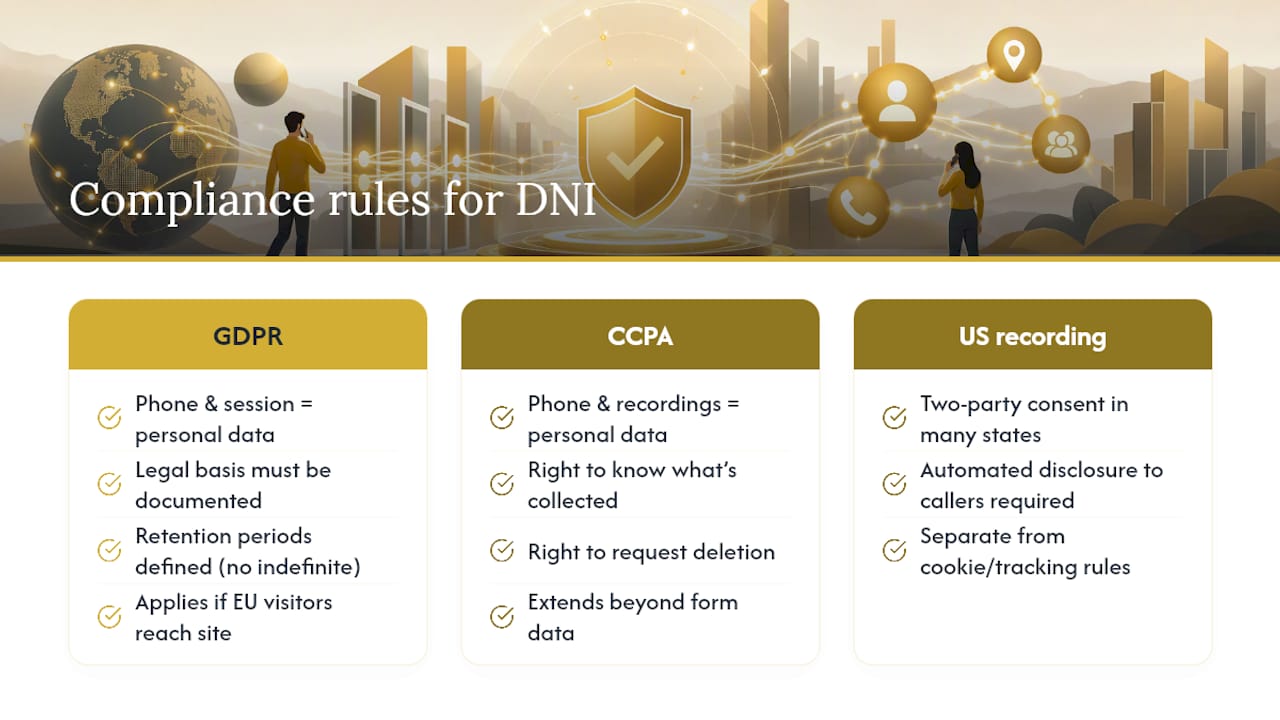
Cookie disclosure is the compliance issue everyone mentions first, but it's not the only one. Regulations like the EU's GDPR and California's CCPA treat a phone number, call recording, and browsing behavior tied to an individual as personal data, which triggers obligations well beyond a cookie banner.
If your DNI platform records calls for quality or training purposes, that's a distinct legal question from tracking which number was dialed. Many US states require two-party consent before recording a phone call, meaning callers need to be notified, typically through an automated disclosure, before the conversation is recorded. That requirement exists independent of anything related to cookies or website tracking.
Under CCPA, California residents have rights to know what personal data is collected and to request its deletion, which extends to call metadata and recordings tied to their phone number, not just data collected through forms. Under GDPR, if any EU visitors reach your site, the legal basis for processing call and session data needs to be documented, and data retention periods need a defined limit rather than indefinite storage.
None of this means DNI is legally risky to use. It means treating a phone number as sensitive data deserves the same discipline you'd apply to an email list, and it's worth confirming with your call tracking provider exactly how long call recordings and session data are retained, and under what legal basis, before you scale usage across your Google Ads and Meta Ads programs. When in doubt on jurisdiction-specific requirements, that's a conversation for legal counsel familiar with your state and any international traffic you receive.
How Does DNI Connect to Call Tracking Platforms and CRMs?
DNI produces the raw attribution data. The value gets locked in or unlocked depending on where that data goes next, and for most home service businesses, that destination is a CRM.

A call tracking platform typically sits between the DNI script and your CRM, handling number assignment, call recording, and initial data capture. From there, the integration usually pushes call events into the CRM as a lead record, complete with source, campaign, and often a call transcript or recording link. This is where CRM automation earns its keep: a call from a paid search campaign can automatically trigger a different follow-up sequence than one from an organic referral, without a human manually tagging the lead.
Pairing DNI with IVR (interactive voice response) systems and call transcription adds a layer most attribution setups skip entirely. Instead of just knowing a call happened, you can measure call quality and conversion likelihood, flagging calls where the caller mentioned a competitor's name or asked about a service you don't offer, and routing those differently than a caller ready to book.
The technical integration usually happens through a native connector (most major CRMs support one) or a webhook that fires on each completed call. Whichever method you use, confirm that the integration passes gclid, campaign name, and landing page URL as separate fields, not bundled into a single note. Buried attribution data in a free-text field defeats the purpose of collecting it in the first place, since nobody builds a report against unstructured notes.
How Should You Analyze and Report DNI Data?
Raw call counts tell you almost nothing on their own. The reporting layer is where DNI data either becomes a decision-making tool or turns into a dashboard nobody checks.
Start by segmenting calls the same way you'd segment web conversions: by channel, campaign, ad group, and keyword where session-level data supports it. A campaign generating 50 calls a month looks strong until you compare cost-per-call against a competing campaign generating 20 calls at a third of the cost. Blend call and web conversion data into one view rather than running them as separate reports that nobody cross-references.
Call duration and outcome matter more than raw volume. A campaign generating short, abandoned calls is often producing curiosity clicks rather than qualified leads, and that distinction only shows up if your reporting captures duration and, ideally, an outcome tag like "booked," "not interested," or "wrong number." Feeding that outcome data back into Google Ads as an offline conversion helps the platform's bidding algorithms optimize toward calls that actually turn into jobs, not just calls that happen.
Set a standing cadence rather than reviewing this ad hoc. A weekly pass to catch swap failures or sudden call-volume drops (often a sign of a broken tracking number) and a monthly pass to review cost-per-call by campaign against your CRM's booked-job data gives you both the operational and strategic view. Without that second number, cost-per-call is a vanity metric.
Where Does Dynamic Number Insertion Deliver the Most Value?
DNI's value shows up differently depending on how phone-dependent a business is and how many concurrent campaigns it runs.
Home service companies (HVAC, plumbing, roofing, restoration) tend to see the clearest lift, since phone calls are often the primary or sole booking path, and jobs can run into the thousands of dollars. Attributing a single high-value call to the right keyword changes bidding decisions immediately. Restoration companies running emergency-response campaigns benefit even more directly, since a mistracked call during a storm surge can mean missing an entire market's worth of leads generated in a 48-hour window.
Legal services and medical practices use DNI similarly, though with heavier compliance overhead given call recording rules that vary by state and the sensitivity of the information discussed. Auto dealerships and real estate use it to tie calls back to specific vehicle listings or property pages, often combining DNI with dynamic content swaps so the number and the featured listing update together.
Multi-location businesses face a specific wrinkle: tracking numbers need to work alongside geographic-specific service pages without confusing the local number a customer expects to see with the tracked number driving attribution. The fix is usually a local tracking number per region rather than one national pool, which preserves the local feel while keeping attribution intact. E-commerce sees less benefit here simply because purchases rarely route through a phone call, which makes DNI far more valuable to service-based, high-ticket, phone-first industries than to transactional retail.
What Actually Matters Once You Look Past the Setup Checklist
Most DNI content treats installation as the finish line. It isn't. The technical setup, the snippet, the pool, the CRM connection, is genuinely the easy part once you follow the sequence correctly. The part that separates businesses that get real value from DNI and businesses that just have a fancier phone number is what happens to the data afterward.
The conventional advice stops at "connect DNI to your analytics." That's necessary but insufficient. A gclid captured on a call means nothing if it never makes it back into Google Ads as an offline conversion, and a lead score sitting in a report nobody checks doesn't change how fast a dispatcher calls someone back. The businesses that win with DNI treat it as an input into routing and bidding decisions, not a reporting exercise.
If you're prioritizing, get the number pool sized correctly before you obsess over reporting dashboards. A pool that's too small silently breaks attribution during your highest-traffic weeks, which is exactly when accurate data matters most. Fix capacity first. Build the sophisticated reporting second.
— Everson Gorski
Get Dynamic Number Insertion Built Into Your Revenue Infrastructure
Most agencies bolt DNI onto your site as a standalone tracking script and hand you a dashboard. Leapify Media builds it as one piece of a larger system, where every tracked call feeds directly into AI-powered lead scoring and dispatch, so a high-intent call from a paid campaign gets routed and prioritized differently than a low-intent one, automatically.

That distinction is what separates attribution data you look at from attribution data that changes how fast your team responds. For home service businesses running Google Ads and Meta Ads at real volume, that speed difference often determines whether a lead books with you or with whoever calls them back first. Leapify Media runs this on in-house, on-premise infrastructure rather than third-party AI tools, which means your call data and customer information stay proprietary to your business.
If your current setup tracks calls but doesn't act on them, see how Leapify Media's growth infrastructure connects DNI, CRM automation, and AI dispatch into one system built specifically for home service operators.
Sources
- Dynamic number insertion overview – CallRail Help Center
- Dynamic Number Insertion (DNI) Guide: Setup, Sizing, and Troubleshooting | VeloCalls Blog
- Dynamic Number Insertion (DNI) Explained: How It Works and Why You Need It | CallScaler