

Run segmented intent campaigns alongside Google Local Services Ads (LSAs), track only booked jobs as your primary conversion, and feed that booked-job revenue back into Google's Smart Bidding. That sequence is the whole game. Everything else, including keyword lists, ad copy, and landing pages, exists to support those three moves.
Quick-action checklist you can start today:
- Create separate campaigns for branded, emergency repair, replacement/installation, maintenance, and remarketing
- Enable LSA and begin the verification process (budget 2–4 weeks)
- Set call-tracking threshold to calls of over 60 seconds before counting any call as a conversion
- Build a dedicated emergency landing page with a click-to-call button above the fold
- Map your CRM fields for offline conversion import so booked-job revenue flows back to Google Ads
- Pull your search terms report and add 20–50 negative keywords before your first week ends
The reason this sequence produces booked jobs rather than cheap clicks: Google's algorithm optimizes toward whatever you tell it a conversion is. Feed it form fills from tire-kickers and it will find more tire-kickers. Feed it booked jobs with revenue values and it will find more booked jobs.
Pro Tip: Set up offline conversion import before you switch to any automated bidding strategy. Smart Bidding without real job-value data is just expensive guessing.
Table of Contents
- How should you structure HVAC Google Ads campaigns?
- Which keywords actually drive booked HVAC jobs?
- How do geo-targeting and ad scheduling affect your results?
- What ad copy and extensions actually get HVAC calls?
- How do you set bids and budgets without wasting money?
- What does a converting HVAC landing page look like?
- How do you set up conversion tracking that actually measures booked jobs?
- How do you test and optimize HVAC campaigns over time?
- How do Local Services Ads and Search Ads work together?
- What KPIs and cost benchmarks should you expect from HVAC Google Ads?
- What does a 30/60/90-day HVAC Google Ads plan look like?
- How does CRM data and AI infrastructure improve your ROAS?
- Key Takeaways
- The mistake most HVAC operators don't catch until it's too late
- Leapify Media builds this infrastructure for home service businesses
- Useful sources and tools to implement this guide
How should you structure HVAC Google Ads campaigns?
The single biggest structural mistake HVAC owners make is running one catch-all campaign. When emergency repair, system replacement, and annual maintenance keywords compete for the same budget, the cheapest clicks win, and those are rarely the highest-value jobs.
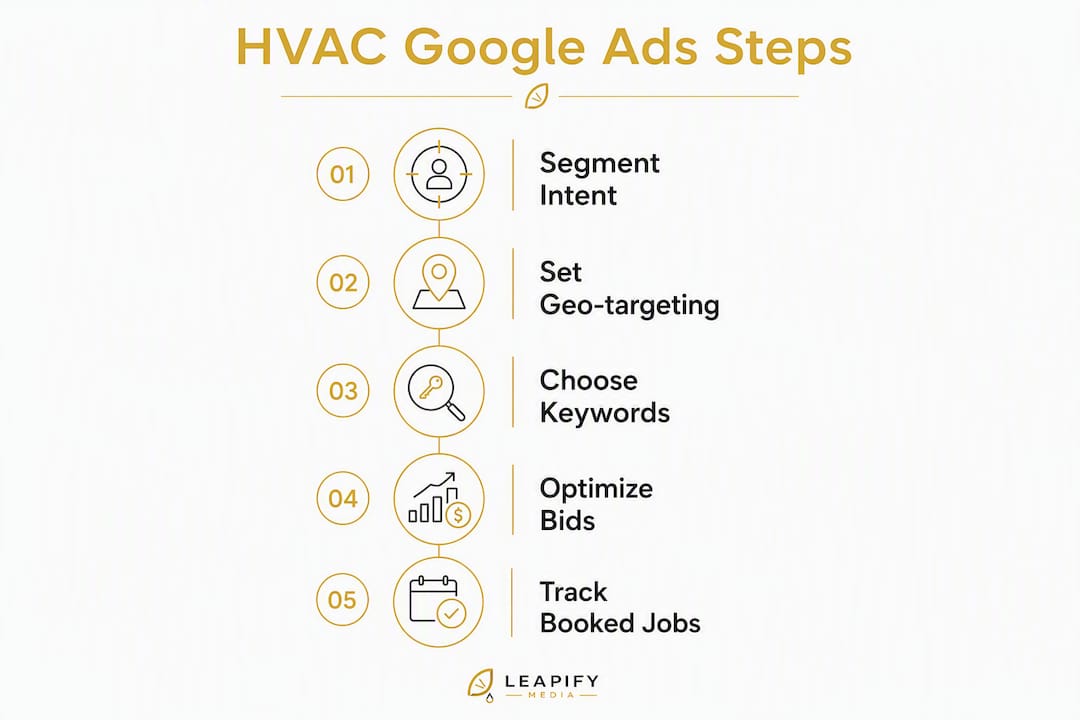
Intent-based segmentation solves this. Build separate campaigns for each job type and assign different KPIs, bids, and budgets to each.
The five-campaign architecture
- Branded — your company name, protect it cheaply, own the click
- Emergency repair — "AC not cooling," "furnace won't start," "no heat tonight"
- Replacement/installation — "new AC unit cost," "HVAC system replacement," "install heat pump"
- Maintenance — "AC tune-up," "HVAC maintenance plan," "furnace checkup"
- Remarketing — past site visitors, past customers, seasonal re-engagement
Naming conventions
Use a consistent naming system so anyone on your team can read the account at a glance. A workable format: Market_Service_Intent_BidStrategy_Date. For example:
Dallas_AC_Emergency_tCPA_Jan2026Dallas_HVAC_Replacement_MaxConv_Jan2026Dallas_Brand_Branded_ManualCPC_Jan2026
Each ad group inside a campaign covers one tightly themed service variation. "AC repair — compressor failure" and "AC repair — no cool air" are two different ad groups, not one. That granularity lets you write ad copy that matches the exact search, which raises Quality Score and lowers your cost per click.
Launch order matters. Start with branded (cheapest, fastest learning), then emergency (highest conversion rate), then replacement, then maintenance, then remarketing once you have enough site traffic.
Pro Tip: Keep Performance Max campaigns completely separate from your intent-based search campaigns. When they share a budget or audience pool, Performance Max tends to absorb spend from your highest-converting emergency keywords, and you lose the clean performance signal you need for Smart Bidding to work.
- Branded campaigns: manual CPC or Target Impression Share until you have 30+ conversions/month
- Emergency campaigns: Target CPA once you have conversion data; manual CPC to start
- Replacement campaigns: Max Conversions with a CPA target after 60 days of data
- Maintenance campaigns: lower bids, longer consideration window, can tolerate higher CPL
Which keywords actually drive booked HVAC jobs?
Keyword strategy for HVAC PPC comes down to one principle: buy intent, not volume. A keyword with 50 monthly searches that signals "I need someone here today" is worth more than a keyword with 5,000 searches that signals "I'm curious about HVAC."
Intent-based keyword groups
Emergency repair (highest urgency, highest conversion rate):
- "AC not working," "air conditioner stopped working," "furnace not turning on," "no heat emergency," "AC repair near me tonight"
Replacement/installation (high job value, longer consideration):
- "HVAC system replacement cost," "new air conditioner installation," "heat pump installation near me," "replace furnace and AC"
Maintenance (lower urgency, good for recurring revenue):
- "AC tune-up near me," "HVAC maintenance plan," "furnace inspection," "annual AC service"
Branded (protect your name, lowest CPL):
- Your company name, common misspellings, "[your name] HVAC," "[your name] reviews"
Match type guidance
Use exact match for emergency and branded keywords. You cannot afford to show up for "HVAC jobs hiring" when you're bidding on "HVAC repair." Phrase match works well for replacement and installation terms where slight variations still signal buying intent. Broad match is useful only for discovery in maintenance campaigns with a tight negative list already in place.
Negative keywords: your budget's first line of defense
Accounts with 50+ starter negatives and weekly audits consistently reduce wasted spend and eliminate non-service clicks. Start with these categories:
| Category | Example negatives |
|---|---|
| DIY / parts | "how to fix," "DIY," "parts," "filter replacement," "YouTube," "manual" |
| Jobs / training | "jobs," "hiring," "career," "apprenticeship," "certification," "HVAC school" |
| Wholesale / supply | "wholesale," "distributor," "supply house," "contractor pricing" |
| Coupon hunting | "free," "coupon," "discount code," "rebate form" |
| Unrelated equipment | "car AC," "refrigerator," "freezer repair," "window unit" |
| Research intent | "what is HVAC," "how does AC work," "HVAC history" |
Pull your search terms report every Monday. Add anything that triggered your ads but has zero chance of becoming a booked job. After 90 days, your negative list should have 100+ terms and your irrelevant click rate should drop noticeably.
How do geo-targeting and ad scheduling affect your results?
Geography and timing are where a lot of HVAC ad budgets quietly bleed out. Showing ads to someone 45 miles outside your service area, or running emergency campaigns at 2 AM when nobody answers the phone, burns money with nothing to show for it.
Geo-targeting setup
For immediate-response services like emergency repair, use radius targeting centered on your dispatch location. A 20–30 mile radius typically matches a realistic service window. For replacement and installation campaigns, where homeowners research for days or weeks, zip-code or DMA targeting lets you cover a broader metro area without wasting bids on rural fringe.

If you serve multiple cities, create location-specific ad groups or campaigns rather than one giant radius. That way you can write "AC repair in Plano" for Plano searchers and "AC repair in Frisco" for Frisco searchers, which raises relevance and click-through rate.
Exclude zip codes where your close rate is historically low. Pull your CRM data, map where booked jobs actually come from, and suppress the rest.
Ad scheduling
Emergency campaigns can run 24/7 only if you have after-hours call routing or an answering service that can book appointments. If calls go to voicemail after 9 PM, you're paying for leads you'll lose. Either set up real after-hours coverage or pause emergency ads outside staffed hours.
For maintenance and replacement campaigns, concentrate spend during business hours when your CSRs are available to answer and book. Weekday mornings (8 AM–11 AM) and early evenings (5 PM–7 PM) tend to produce the highest booking rates for non-emergency HVAC calls.
Pro Tip: Match your ad schedule exactly to your CSR staffing calendar, not just your general business hours. If your best closer works Tuesday through Saturday, weight bids higher on those days. LSA ranking also responds to answer rate, so misaligned schedules hurt both channels simultaneously.
- Use bid adjustments (+20–30%) during peak booking hours
- Reduce bids or pause during hours with zero booking history
- Review scheduling performance monthly and adjust for seasonal shifts
What ad copy and extensions actually get HVAC calls?
The job of an HVAC ad is narrow: get the right person to call right now. Every headline and description line should serve that goal, not showcase your company history.
Ad copy by intent
Emergency repair:
- Headline 1: "AC Broke? We're Available Now"
- Headline 2: "Same-Day HVAC Repair in [City]"
- Headline 3: "Licensed & Insured — Call Now"
- Description: "Don't sweat it out. Our techs are dispatched fast. Call for same-day service — no overtime fees."
Replacement with financing:
- Headline 1: "New AC System — $0 Down Financing"
- Headline 2: "HVAC Replacement in [City]"
- Headline 3: "Free In-Home Estimate Today"
- Description: "Replace your old system before it fails. 0% financing available. Trusted by 500+ homeowners in [City]."
Maintenance:
- Headline 1: "AC Tune-Up — Book Online Now"
- Headline 2: "$79 HVAC Maintenance Special"
- Headline 3: "Certified Techs, Same-Week Appointments"
- Description: "Keep your system running all season. Schedule your annual tune-up today — spots fill fast in spring."
Branded rescue (competitor comparison):
- Headline 1: "[Your Company] HVAC — Official Site"
- Headline 2: "Trusted Since [Year] in [City]"
- Headline 3: "Read Our 500+ Google Reviews"
Extensions to configure first
- Call extensions — your primary phone number, set to show during staffed hours only
- Location extensions — linked to your Google Business Profile
- Callout extensions — "Licensed & Insured," "Same-Day Service," "No Overtime Fees," "Free Estimates"
- Structured snippets — list services: AC Repair, Furnace Repair, Heat Pump Installation, Maintenance Plans
- Sitelinks — Emergency Service, Financing Options, About Us, Reviews
Pro Tip: For mobile users, the call extension is your most important asset. On a phone, a tap-to-call button beats a landing page visit every time. Make sure your call extension shows on mobile and that someone answers during every hour it's active.
A/B test ideas worth running in the first 60 days:
- Urgency headline ("Available Now") vs. price headline ("From $89 Repair Calls")
- Call extension only vs. call extension plus lead form
- Generic CTA ("Learn More") vs. specific CTA ("Call for Same-Day Service")
How do you set bids and budgets without wasting money?
Start with a number that matters: your average job value. Everything else in your bidding strategy flows from that.

Calculating your target CPA
A simple formula: if your average AC repair job is worth $350, your close rate from phone leads is 40%, and you want to keep ad costs under 20% of revenue, your allowable cost per booked job is $70. That means your target CPA for the emergency campaign is $70. If your CPL is $40 and you book 60% of qualified leads, your actual cost per booked job is about $67. You're inside the target.
Run this calculation for each campaign type. Replacement jobs worth $8,000–$12,000 can tolerate a much higher CPL than a $150 tune-up.
Budget guidance by market size
| Market size | Recommended monthly search budget | LSA monthly budget |
|---|---|---|
| Small market | Modest budgets recommended | Moderate LSA budget recommended |
| Mid-size market | Mid-range budgets suggested | Balanced LSA budget suggested |
| Large metro | Higher budgets possible | Larger LSA budget possible |
These are starting ranges. Scale up when your cost per booked job stays inside your target CPA.
Warning: Never switch to automated bidding (Target CPA, Max Conversions) until you have at least 30 booked-job conversions in the past 30 days. Without that data, Smart Bidding without correct conversion inputs will optimize toward whatever it can find — usually cheap, low-intent clicks. Feed it booked-job data from your CRM first, then let it run.
Bid adjustments to set from day one:
- Mobile: +15–25% (most emergency searches happen on phones)
- Top-performing zip codes: +10–20% based on CRM booking history
- Scheduled peak hours: +15–20% during your highest-booking windows
- Tablet: often -20% for HVAC (lower intent, lower booking rate)
What does a converting HVAC landing page look like?
Sending paid traffic to your homepage is one of the most common ways HVAC owners waste their ad budget. A homepage answers every question for every visitor. A landing page answers one question for one visitor: "Can you fix my problem today?"
Dedicated landing pages with a single CTA and mobile load times under two seconds consistently outperform homepages for paid traffic. Build one per campaign intent.
Landing page checklist
Above the fold (visible without scrolling on mobile):
- Large phone number with tap-to-call button
- Headline that matches the ad (e.g., "Same-Day AC Repair in Dallas")
- One clear CTA: "Call Now" or "Book Online"
- Trust signal: Google Guaranteed badge, years in business, or review count
Below the fold:
- Short service description (3–5 bullet points)
- 3–5 Google review snippets with star ratings
- License and insurance badges
- Short qualifying form (5 fields maximum)
Form fields that protect lead quality
Only ask what you need to qualify the lead:
- Name
- Phone number
- Service address (zip code minimum)
- Service type (dropdown: AC repair, furnace, installation, maintenance)
- Urgency (dropdown: emergency/today, this week, just researching)
That last field is your lead-quality filter. Anyone who selects "just researching" goes into a nurture sequence, not your emergency dispatch queue.
For replacement campaigns, add a financing-interest field and a "current system age" field. That data helps your CSR open the right conversation before they even say hello.
Remarketing landing pages can be softer: a financing offer, a seasonal promotion, or a "get a second opinion" angle for homeowners who visited but didn't convert.
How do you set up conversion tracking that actually measures booked jobs?
Most HVAC Google Ads accounts are optimizing for the wrong thing. They count every form submission and every 10-second call as a conversion, which tells Google to find more of those, which produces more junk leads.
Count only phone calls over 60 seconds or form submissions with a qualifying service address as primary conversions used for bidding. Everything else is a secondary, observation-only conversion.
Implementation checklist
- Install Google Ads conversion tag on your site via Google Tag Manager
- Set up call tracking — use Google forwarding numbers or a third-party tool like CallRail; set the call duration threshold to 60 seconds minimum
- Configure form submission tracking — fire a conversion event only when the form includes a valid zip code in your service area
- Mark booked-job conversions as "Primary" in Google Ads; mark all others as "Secondary (observation only)"
- Map CRM fields for offline conversion upload: lead ID, click ID (GCLID), booking timestamp, job type, and revenue value
- Upload offline conversions weekly (or daily if volume allows) via the Google Ads offline conversion import tool
The offline conversion import flow
Lead clicks your ad → calls or fills out form → CSR qualifies the lead → job gets booked in CRM → CRM exports GCLID + booking timestamp + revenue value → you upload that file to Google Ads → Smart Bidding now knows which clicks produced real revenue.
Pro Tip: The GCLID (Google Click ID) is the link between the ad click and the booked job. Make sure your CRM captures it automatically from the URL parameter when a lead lands on your page. Without it, you can't close the loop between ad spend and revenue.
Avoid double-counting LSA calls. LSA calls are tracked separately in the LSA dashboard and should not be imported as offline conversions for your search campaigns. Keep the two data streams clean.
- Review your conversion actions monthly to confirm thresholds are still correct
- Check for conversion lag (time between click and booking) and adjust your attribution window accordingly
- Use lead conversion software that integrates natively with Google Ads for cleaner data flow
How do you test and optimize HVAC campaigns over time?
Optimization without a cadence is just reacting. Build a weekly and monthly rhythm so nothing important gets missed.
First three A/B tests to run
- Emergency headline urgency vs. price — "Available Now" vs. "Repairs From $89" — measure call rate and booking rate, not just CTR
- Call extension only vs. call extension plus lead form — some markets book better via form; most book better via phone
- Landing page CTA prominence — phone number in hero vs. "Book Online" button as primary CTA
Watch call-to-book rate, not just conversion volume. A test that doubles clicks but halves bookings is a loss.
Weekly cadence
- Pull search terms report; add new negatives
- Check budget pacing (are you spending your full budget or hitting limits early in the day?)
- Review lead quality from the prior week with your CSR team
- Flag any campaigns with zero conversions in 7 days
Monthly cadence
- Rotate creative: pause lowest-CTR headlines, test two new ones
- Review audience and remarketing lists; adjust bids for high-value segments
- Run offline conversion import check: confirm GCLID capture rate and upload completeness
- Attribution review: are conversions attributed to the right campaigns?
Seasonal rotation
Pre-season (March–April for cooling, September–October for heating): shift budget toward replacement and installation campaigns. Homeowners replace systems before the season peaks, not during it. In-season (June–August, December–February): emergency repair campaigns get the majority of budget. Maintenance campaigns work best in shoulder months when urgency is low and homeowners have time to schedule.
Adjust budgets 3–4 weeks before each seasonal shift, not after you notice the change in search volume.
How do Local Services Ads and Search Ads work together?
Run both. LSAs and search ads are not competitors for your budget; they serve different parts of the same funnel.
LSAs sit above search ads and the map pack, capturing 30–45% of total clicks on the results page. They charge per lead, not per click, and the Google Guaranteed badge builds trust that a standard text ad can't replicate. Search ads give you messaging control, keyword targeting, and the ability to reach homeowners who are researching rather than ready to call.
LSA vs. search ads: key dimensions
| Dimension | Local Services Ads | Search Ads |
|---|---|---|
| Lead quality | High (phone calls, verified intent) | Variable (depends on keyword match and landing page) |
| Cost model | Pay per lead | Pay per click |
| Conversion rate | Higher (direct call, Google Guaranteed) | Lower (requires landing page conversion) |
| Time to book | Fast (direct call) | Slower (form fill or call after page visit) |
| Messaging control | Limited (profile-based) | Full (headlines, descriptions, extensions) |
| Attribution | Separate LSA dashboard | Google Ads + offline conversion import |
| Seasonality | Responds to review velocity and answer rate | Responds to bid and budget adjustments |
LSA operational checklist
- Complete verification: business name, license, insurance, and background checks (expect 2–4 weeks total)
- Set up a review collection process before launch; aim for 10+ reviews before going live
- Answer every lead within 1 hour during listed business hours; unanswered leads directly lower your LSA ranking
- Dispute irrelevant leads within 30 days to recover cost
- Review your LSA profile weekly for new reviews and respond to all of them
For more on configuring LSAs end-to-end, see Google Local Service Ads management, which offers a step-by-step operational guide.
Budget allocation by business size
Small operators (under $3M revenue): put 60–70% of paid budget into LSAs until you have 20+ reviews and a strong answer rate. The lower CPL and higher trust signal make LSAs the better starting point.
Mid-size operators: split roughly 50/50 between LSAs and search, with search budget concentrated in emergency and replacement campaigns.
Large contractors: LSAs as a floor, search ads for volume and geographic expansion, remarketing for repeat business and upsells.
What KPIs and cost benchmarks should you expect from HVAC Google Ads?
Track five numbers. Everything else is noise until these are healthy.
- Cost per lead (CPL) — what you pay per inbound call or form submission
- Lead-to-book rate — what percentage of leads become booked appointments
- Cost per booked job (CPA) — CPL divided by lead-to-book rate
- ROAS — revenue from booked jobs divided by total ad spend
- Time to book — how quickly a lead converts to a scheduled appointment
Benchmark ranges by campaign type
| Campaign type | Avg. CPC | Avg. CPL | Lead-to-book rate |
|---|---|---|---|
| Branded search | ~$34 (lowest) | $34 | Highest conversion rate |
| Non-branded search | $149 | $149 | Lower conversion rate |
| Performance Max | $72 | $72 | Moderate conversion rate |
| Emergency repair | Blended in non-branded, typically higher CPC | Typically higher CPL | 15–25% conversion rate |
| LSA | N/A (pay per lead) | Lower CPL than search | High conversion rate |
Emergency repair keywords convert at 15–25% compared to a standard campaign average of around 6.5%. That gap is exactly why they deserve their own campaign with higher bids.
How CPL and booking rate combine into cost per booked job
If your non-branded CPL is higher and your lead-to-book rate is around 30%, your cost per booked job could be hundreds of dollars. For a $350 repair call, that's upside down. For a $6,000 system replacement, it's very profitable. This is why you need separate campaigns with separate CPA targets, not a blended average.
In smaller markets, CPCs and CPLs tend to run lower, but so does search volume. In large metros, competition drives CPCs up, but job values are often higher too. Benchmark against your own historical data after 60 days before drawing conclusions from industry averages.
What does a 30/60/90-day HVAC Google Ads plan look like?
The first 90 days are about building the infrastructure that makes everything else work. Don't try to scale before the tracking is right.
Days 1–30: foundation and quick wins
- Build your campaign structure (branded, emergency, one ad group per service theme)
- Install conversion tracking with 60-second call threshold
- Launch branded and emergency campaigns with manual CPC bidding
- Build dedicated emergency landing page (click-to-call, mobile-first, under 2 seconds load)
- Add 50+ negative keywords before launch
- Begin LSA verification process immediately (it takes 2–4 weeks)
KPIs to watch: impression share on branded terms, call volume, call duration distribution (how many calls exceed 60 seconds), cost per call.
Days 31–60: expand and connect data
- Launch LSA once verified; set review collection process in motion
- Set up offline conversion import: map CRM fields, test GCLID capture, run first upload
- Launch replacement and maintenance campaigns
- Run first A/B test on emergency landing page CTA
- Review search terms weekly; expand negative list to 100+ terms
KPIs to watch: CPL by campaign, lead-to-book rate from CSR team, LSA answer rate, first offline conversion upload completeness.
Days 61–90: optimize and scale
- Switch emergency and replacement campaigns to Target CPA once you have 30+ booked-job conversions
- Scale budgets on campaigns where cost per booked job is inside your target
- Launch remarketing campaign targeting past site visitors and past customers
- Run seasonal budget shift if applicable (pre-season replacement push)
- Set up monthly reporting dashboard: CPL, CPA, ROAS, lead-to-book rate
KPIs to watch: cost per booked job vs. target CPA, ROAS by campaign, Smart Bidding performance vs. manual CPC baseline.
Quick wins available in the first week: negative keyword list, branded campaign, call tracking threshold, and emergency landing page. These four moves alone typically reduce wasted spend and raise lead quality before you've spent a significant budget.
How does CRM data and AI infrastructure improve your ROAS?
Feeding booked-job outcomes and revenue back into Google Ads via offline conversion import is the single biggest lever available to shift performance from raw clicks to profitable booked jobs. Everything else, including keyword lists and ad copy, is secondary to getting this data loop right.
The flow looks like this: a homeowner clicks your ad, calls or fills out a form, your CSR qualifies the lead, the job gets booked in your CRM, your CRM exports the GCLID and revenue value, and that data gets uploaded to Google Ads. Smart Bidding then knows which keywords, audiences, and times of day produce real revenue, not just calls.
When accounts move from optimizing toward form fills to optimizing toward booked jobs with revenue values, ROAS improvements are substantial. The mechanism is straightforward: Google stops chasing cheap, high-volume interactions and starts finding the searchers who actually book and pay.
Required data points for offline conversion import: GCLID (captured automatically via URL parameter), conversion timestamp (use the CRM booking timestamp, not the call timestamp), job type, and revenue value. Common CRM integrations that support this flow include ServiceTitan, Jobber, and HubSpot, all of which can export GCLID-matched records.
Upload frequency matters. Weekly uploads are the minimum; daily uploads give Smart Bidding fresher signals, especially during high-volume seasons.
Pro Tip: Use your CRM's booking timestamp, not the call timestamp, as the conversion time. That aligns the conversion with when the job was actually sold, which gives Smart Bidding a more accurate picture of which ad interactions drive revenue.
For HVAC businesses that want this infrastructure built without assembling it piece by piece, Leapify Media's AI-powered approach uses on-premise servers and in-house engineered systems so your CRM data never passes through third-party tools.
Key Takeaways
Running HVAC Google Ads profitably requires segmenting campaigns by job intent, tracking only booked jobs as primary conversions, and feeding CRM revenue back into Smart Bidding so Google optimizes for the jobs that actually pay.
| Point | Details |
|---|---|
| Segment by intent | Run separate campaigns for emergency, replacement, maintenance, and branded to prevent budget cannibalization. |
| Track booked jobs only | Set call threshold to 60+ seconds and filter forms by service address before counting any conversion. |
| Feed CRM data back | Upload booked-job revenue via offline conversion import before switching to any automated bidding strategy. |
| Run LSAs alongside search | LSAs capture 30–45% of top-of-page clicks and charge per lead; run them in parallel, not instead of search ads. |
| HVAC paid search CPL benchmarks | Branded search campaigns average $34 per lead, non-branded search $149, Performance Max campaigns $72, and blended Google Ads CPL for HVAC is $104. |
| Leapify Media | Leapify Media builds the full CRM-to-Google-Ads data loop for home service businesses, including offline conversion import and on-premise AI dispatch. |
The mistake most HVAC operators don't catch until it's too late
The most expensive error in HVAC PPC isn't a bad keyword or a weak headline. It's treating all clicks as equal and letting Google optimize toward volume instead of value.
Here's what that looks like in practice: an account runs one campaign, counts every form fill as a conversion, and watches the cost per conversion drop over time. The numbers look good on paper. But the CSR team is fielding calls from renters who can't authorize repairs, homeowners three counties outside the service area, and people who want a quote for a $79 tune-up. The "conversions" are cheap because Google found the cheapest people to convert, not the most valuable.
Dos and don'ts from operators who've fixed this:
- Do segment by intent from day one; don't wait until you've burned $5,000 on a catch-all campaign
- Do set your call threshold to 60 seconds before any campaign goes live
- Do review lead quality with your CSR team weekly, not just in Google Ads
- Don't run Performance Max and intent-based search campaigns on the same budget
- Don't switch to Target CPA before you have 30 booked-job conversions in the account
- Don't count LSA calls and search ad calls in the same conversion action
Organizational readiness matters as much as account structure. If your CSRs aren't trained to ask qualifying questions and log outcomes in the CRM, the offline conversion import loop breaks. If your techs don't update job status in real time, your booking data is stale. The ad account is only as good as the operations behind it.
The contractors who get the best results from Google Ads aren't always the ones with the biggest budgets. They're the ones who've aligned their dispatch, CSR, and CRM workflows to support the data loop that makes Smart Bidding work.
Leapify Media builds this infrastructure for home service businesses
Most HVAC owners who come to Leapify Media have already spent money on Google Ads. The problem isn't that the ads don't work. The problem is that the tracking, CRM integration, and bidding strategy were never set up to optimize for booked jobs. Leapify Media's reported 20x return on ad spend comes from closing that loop: intent-based campaign architecture, offline conversion import with real revenue values, and on-premise AI dispatch that qualifies leads before they reach your CSR team.

Before an audit, pull together your Google Ads access, CRM login, last 90 days of booking data, and your Google Business Profile. Leapify Media's audit delivers a gap analysis of your current tracking setup, a 30/60/90-day implementation plan, and an estimated CPL by campaign type based on your market and job mix.
Ready to see where your current setup is leaking revenue? Request an audit with Leapify Media or review the full Google Ads management services to see exactly what gets built.
Useful sources and tools to implement this guide
The resources below cover the official documentation and tool categories you'll need to execute the plan above.
Official documentation
- Google Local Services Ads — Getting Started (US) — verification requirements, background check process, and lead dispute instructions
- Google Local Services Ads — Google Ads — LSA setup, Google Guaranteed badge, and pay-per-lead billing overview
- Google Ads Offline Conversion Import — step-by-step guide to uploading CRM-matched conversion data
Tool categories to prioritize
| Tool category | Purpose | Integration priority |
|---|---|---|
| Call tracking | Capture GCLID, record calls, set duration thresholds | High — set up before launch |
| CRM (ServiceTitan, Jobber, HubSpot) | Log booked jobs, export GCLID for offline conversion import | High — required for Smart Bidding |
| Landing page builder | Build fast, mobile-first, single-CTA pages per campaign | High — before first ad goes live |
| Google Tag Manager | Deploy conversion tags without developer help | High — install first |
| Google Analytics 4 | Session data, audience building for remarketing | Medium — connect within 30 days |
The highest-priority integration is CRM to Google Ads offline conversions. Get that working before you worry about anything else. Call tracking connects to your CRM and feeds call outcomes into the same export. Once both are live, your bidding strategy has the data it needs to work.
For lead capture form design and qualifying field best practices, that guide covers form structure and field selection in detail. For a broader look at which agencies specialize in HVAC lead generation, the best HVAC lead generation agencies comparison covers evaluation criteria and what to look for in a managed service partner.