

Manage Google Local Service Ads by prioritizing lead inbox responsiveness, enabling messaging and booking leads, and running Maximize Leads bidding while tracking conversion to booked jobs. That's the core of profitable LSA management. Everything else is refinement.
Three priorities to act on this week:
- Inbox SLAs: Answer calls immediately and respond to message leads quickly. Response time directly affects your ad ranking.
- Bidding setting: Switch to Maximize Leads unless you have strong cost-per-lead data to justify manual bidding.
- Booking opt-in: Enable message and booking leads in your profile to capture every lead type that Google can send.
If you'd rather hand this off than build it yourself, Leapify Media's services cover the full managed stack: inbox ops, bidding, booking integration, and conversion reporting.
Table of Contents
- How do Google Local Services Ads actually deliver leads?
- What does the setup checklist look like before you go live?
- How do lead billing and the inbox actually work day to day?
- Which optimization levers actually move the needle?
- What KPIs should you track, and how do you calculate ROI?
- Are your operations ready to convert LSA volume into booked jobs?
- When does it make sense to hire a managed LSA specialist?
- Key Takeaways
- The part most LSA guides won't tell you
- Leapify Media turns your LSA spend into booked jobs
- Useful sources
How do Google Local Services Ads actually deliver leads?
Local Services Ads are a pay-per-valid-lead product. You don't bid on keywords or write ad copy. Instead, you build a profile, set a weekly budget, and Google shows your listing at the top of search results when someone nearby searches for your service category. You only pay when a customer contacts you through the ad.

Leads arrive in three forms: phone calls through a Google forwarding number, messages through an anonymized alias, or booking requests through a connected booking partner. All three land in your LSA lead inbox, where you manage, respond to, and mark them as booked or archived.
The Google Verified badge (Google Guarantee for most home service trades) sits on your listing and tells the customer that Google has screened your business. That badge is not cosmetic. It signals to the algorithm that you've cleared background checks, insurance verification, and licensing requirements, and it gives the customer a money-back guarantee on work booked through the ad.
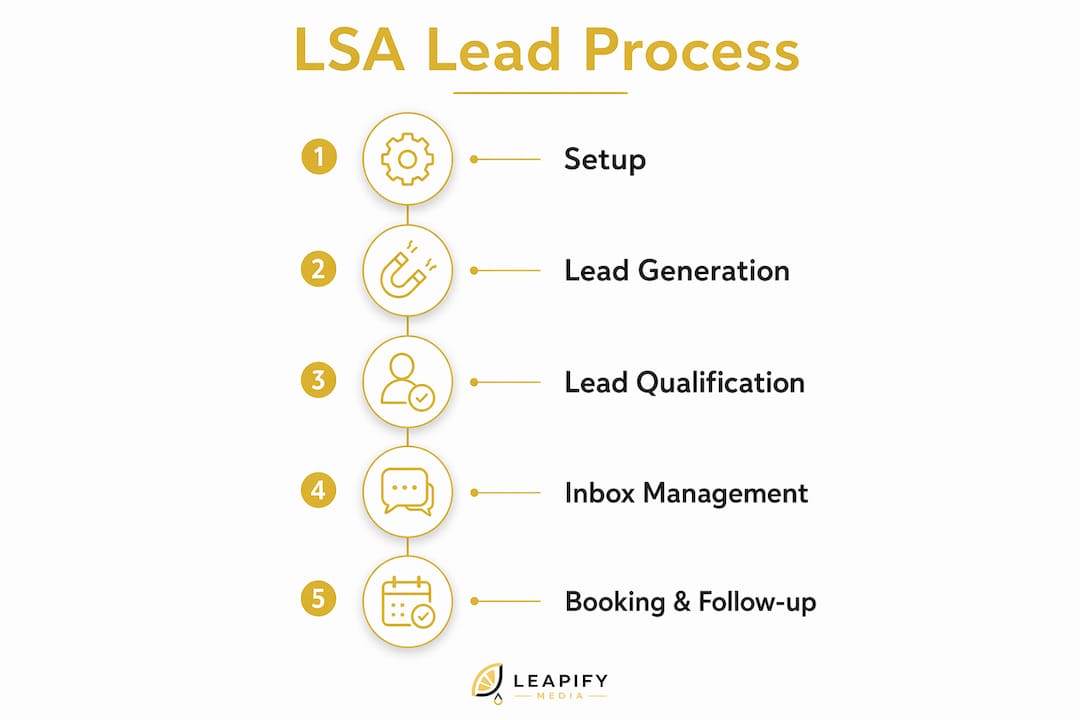
What makes LSA management different from running Google Search campaigns is where the leverage lives. There's no keyword list to sculpt, no ad copy to A/B test. The ranking signals are operational: how fast you respond, how many reviews you have, how often you're available, and whether your profile is complete. Booking leads require a booking partner account, and those appointments flow directly into your scheduling system when set up correctly.
What does the setup checklist look like before you go live?
Getting your LSA account live involves more paperwork than a typical Google Ads campaign. Work through this in order to avoid delays.
- Confirm category eligibility. Not every trade is available in every U.S. market. Check that your service category is supported before investing time in the rest of the setup.
- Create your profile. Add your business name, phone number, service area (set it broadly at first), business hours, and the specific job types you perform. Select every job type you actually do.
- Submit verification documents. This is where most businesses stall. You'll need proof of general liability insurance, any required state or local licenses, and consent for background checks on owners and employees. Upload clear, current documents in accepted formats (PDF or image files).
- Pass background checks. Google uses a third-party provider. Processing typically takes a few days to a few weeks depending on volume. If it's taking longer than expected, check your verification dashboard for missing items rather than waiting passively.
- Add high-quality photos. Google recommends photos of your team, vehicles, and completed work to enhance your profile; consider specialized web design services tailored to home service businesses to optimize these visuals. Profiles with strong photos convert better.
- Connect billing. Link a payment method and set your weekly budget. Your monthly spend cap equals your weekly budget multiplied by the average number of weeks in a month (roughly 4.3). You will never exceed that monthly maximum.
- Link your Google Ads account if you're running Search campaigns alongside LSAs. This isn't required but simplifies reporting.
- Enable message and booking leads. Both are off by default in some categories. Turn them on.
Common blockers: Insurance certificates that list the wrong entity name, licenses that have expired, and background check consent forms that weren't signed by all required individuals. Fix these before submitting rather than after.
Pro Tip: Google offers a pre-badge listing option that lets your ad run while verification is still processing. Use it. You can start receiving leads and building review history before the Google Guarantee badge is officially attached.
How do lead billing and the inbox actually work day to day?
Your lead inbox is the operational center of LSA management. Every incoming call, message, and booking request appears there, and how you handle each one affects both your billing and your ranking.

Understanding valid leads and charges
Google assesses whether a lead is valid at the moment of first contact. A valid lead is one where the customer's inquiry matches your advertised service category and location. Lead prices vary by job type, location, lead type, and bidding mode. Message leads typically cost less than phone leads, which is one reason enabling messaging is worth doing.
Invalid leads are not charged. If you receive a lead that doesn't match your service (wrong category, outside your area, spam), you can dispute it. Google may issue a credit automatically, or you can submit feedback through the lead's dispute option. Credits are applied to future charges, not refunded as cash. Expect a few days to a few weeks for credit decisions on disputed leads.
Inbox workflow
Mark every lead as either booked, archived, or disputed. This isn't just bookkeeping. Marking leads as booked feeds your conversion data, which improves reporting accuracy and helps you calculate actual cost per booked job. Leads that sit unmarked distort your numbers.
You can pause your LSA at any time through Profile & Budget. When paused or outside your scheduled hours, Google may show a free organic listing in place of your paid ad. That fallback is useful but shouldn't be treated as equivalent coverage. The paid listing gets priority placement; the free version does not.
Which optimization levers actually move the needle?
Most of the high-impact LSA optimizations take less than an hour to implement. The harder work is operational.
High impact, low effort:
- Switch bidding to Maximize Leads if you haven't already. Manual Max per Lead bidding makes sense only once you have enough lead history to know your target cost per lead with confidence.
- Enable message leads and booking leads. Both expand the surface area for incoming contacts without increasing your budget.
- Expand job types to include every service you actually perform. Narrow job type lists are one of the most common reasons LSA accounts underperform.
- Broaden your service area. If you'll drive 30 miles for a job, set your radius to 30 miles.
High impact, higher effort:
- Build a review solicitation process. Certain profiles need five or more reviews to show consistently. Ask every completed customer by text or email within 24 hours of job completion. Make it a standard step in your close-out process, not an afterthought.
- Add photos of your team, vehicles, and finished work. Profiles with real, specific photos outperform stock-image profiles.
- Write profile copy that mentions your license, insurance, and any guarantees. Customers read this before calling.
Operational optimizations (the ones most businesses skip):
- Set a hard internal SLA: answer calls on the first or second ring, respond to messages within 5 minutes. Your estimated response time may appear directly in your ad if you have enough message volume, which affects click-through rate.
- Script a short qualification call. The goal is to confirm the job type, location, and timeline in under two minutes, then offer a booking slot. Don't improvise this.
- Staff for coverage during your advertised hours. An unanswered call is a charged lead that didn't convert.
| Optimization | Impact | Effort | Priority |
|---|---|---|---|
| Maximize Leads bidding | High | Low | Do first |
| Enable message + booking leads | High | Low | Do first |
| Expand job types and service area | High | Low | Do first |
| Add quality photos | Medium | Low | Do this week |
| Build review solicitation process | High | Medium | Build this month |
| Set response SLAs + call scripts | High | Medium | Build this month |
| Profile copy with credentials | Medium | Low | Do this week |
What KPIs should you track, and how do you calculate ROI?
Raw lead count is the wrong metric. The number that tells you whether LSAs are working is cost per booked job.
LSA reports show charged leads, a breakdown by lead type (call, message, booking), total charged amount, and a list of all received leads. Export this weekly. Mark leads as booked in the inbox as jobs are completed so the report reflects actual conversion, not just contact volume.
| Metric | Formula | Where to find it |
|---|---|---|
| Cost per charged lead | Total spend ÷ charged leads | Reports tab |
| Lead type breakdown | Calls / messages / bookings as % of total | Reports tab |
| Lead-to-booked conversion rate | Booked jobs ÷ charged leads | Reports tab + inbox marks |
| Cost per booked job | Total spend ÷ booked jobs | Calculated from above |
| Lead credit rate | Credits received ÷ total charged leads | Billing tab |
As an example: if you spend $1,000 in a month, receive 20 charged leads, and convert 8 of them to booked jobs, your cost per booked job is $125. Whether that's profitable depends on your average job value. A $400 HVAC tune-up at $125 cost per booked job is a strong return. A $150 drain clearing at the same cost is not.
For businesses managing multiple locations or high lead volumes, the Local Services Ads reporting API gives programmatic access to lead objects including charge flags and credit states. Manual UI exports don't scale past a handful of accounts.
Are your operations ready to convert LSA volume into booked jobs?
Bidding and profile optimizations bring leads to your door. What happens next is entirely on your operations. This is where most LSA spend gets wasted.
Recommended SLAs:
- Phone answer rate: 90%+ during advertised hours
- Message lead response: under 5 minutes
- Callback for missed calls: within 15 minutes
Coverage models vary. An in-house dispatcher works well for businesses with predictable call volume. A shared call center or answering service can cover gaps during peak hours or after-hours windows, but whoever answers needs to be trained on your job types, service area, and booking process. A generic answering service that takes a message and promises a callback loses the lead.
Suggested lead flow:
Lead arrives → triage (does it match your service and area?) → offer booking slot → confirm appointment → mark booked in inbox and CRM.
That flow needs to happen in under 10 minutes for message leads and in real time for calls. Integrate your booking leads with your CRM or booking partner so that confirmed appointments sync automatically. Mark every booked job in the LSA inbox. Without that step, your cost-per-booked-job calculation is guesswork.
Pro Tip: Treat message coverage as an account management lever, not just a customer service task. Your average response time may appear in your ad. A fast response time is both a ranking signal and a visible trust indicator that affects whether a customer calls you or the next listing.
When does it make sense to hire a managed LSA specialist?
Managing LSAs in-house works well when you have one location, moderate lead volume, and someone who can dedicate time to inbox operations and reporting. Past that threshold, the math usually favors outsourcing.
Signs you should consider a managed service:
- You're running LSAs across multiple locations or service categories
- Your inbox response SLAs are slipping because no one owns the process
- You're not tracking cost per booked job or can't explain your lead credit rate
- You need API-level reporting to manage lead objects at scale
- You're spending on leads that aren't converting and don't know why
A managed LSA service handles continuous inbox operations, bidding strategy adjustments, booking partner integration, lead credit disputes, and reporting. The difference between a good managed service and a generic agency is whether they treat LSAs as an inbox-and-operations discipline or as a campaign-and-keyword problem. They're not the same product.
Questions to ask before hiring:
- What's your SLA for responding to my lead inbox on my behalf?
- How do you handle lead credit disputes?
- Do you use the Local Services API for reporting, or manual exports?
- What's the onboarding timeline to first qualified leads?
- How do you define success, and what does your reporting show?
Timeline and budget expectations: Most businesses see their first qualified leads within one to two weeks of going live, assuming verification is complete. Budget shapes vary by market and trade, but plan for lead charges plus a management retainer. The retainer covers the operational work that determines whether those lead charges turn into booked jobs.
Leapify Media works specifically with home service companies, using in-house AI systems to score lead intent, route contacts, and track conversion to booked jobs. Their reported 20x return on ad spend comes from treating the inbox as a revenue system, not an inbox. For home service operators evaluating whether to manage LSAs in-house or outsource, Leapify Media is the option built specifically for this category.
Key Takeaways
Profitable Google Local Service Ads management comes down to three things: operational readiness, inbox discipline, and measuring cost per booked job rather than raw lead volume.
| Point | Details |
|---|---|
| Inbox responsiveness is a ranking signal | Answer calls immediately and respond to messages within 5 minutes to protect ad placement. |
| Maximize Leads bidding is the default starting point | Switch to manual Max per Lead only after you have enough lead history to set a confident target. |
| Cost per booked job is the real metric | Divide total spend by booked jobs marked in the inbox, not by raw charged leads. |
| Operational readiness determines ROI | Staffing, call scripts, and CRM integration convert lead volume into revenue; without them, more leads mean more waste. |
| Leapify Media manages the full LSA stack | For home service businesses ready to outsource, Leapify Media covers inbox ops, bidding, booking integration, and conversion reporting. |
The part most LSA guides won't tell you
Most articles about LSA management treat it like a campaign optimization problem. Adjust the bid, add some photos, get more reviews. That framing misses what actually determines profitability.
LSAs are fundamentally an operations product. The ad itself is almost passive. Google handles placement, targeting, and most of the creative. What you control is what happens after the lead arrives. And that's where the money is made or lost.
The businesses that get the worst results from LSAs are usually the ones with the best-looking profiles and the slowest phones. They've done the setup work, they've got the Google Guarantee badge, they've got reviews. But no one answers before the second or third ring, message leads sit for 20 minutes, and the inbox is a mess of unmarked contacts. The algorithm sees that responsiveness data and deprioritizes the listing. The business sees a rising cost per lead and assumes LSAs don't work for their market.
The businesses that get the best results treat the inbox like a revenue queue. Every lead gets a response in under five minutes. Every booked job gets marked. Every disputed lead gets flagged. The reporting is clean, so they can see exactly which job types are converting and which are burning budget. That operational discipline is what separates a 3x return from a 10x return on the same ad spend.
Leapify Media turns your LSA spend into booked jobs
Home service companies that hand off LSA management to a generalist agency usually get campaign reports, not booked jobs. Leapify Media is built differently: the entire infrastructure, from lead scoring to inbox operations to CRM sync, is engineered specifically for home service operators.

The difference is in-house AI running on on-premise servers, which means your lead data stays yours and the intent scoring is trained on home service patterns, not generic conversion signals. Leapify Media manages your bidding strategy, handles lead credit disputes, integrates booking leads with your scheduling system, and delivers reporting that shows cost per booked job, not just cost per lead.
If you're spending on LSAs and not seeing the booked jobs to match, the problem is almost always operational, and that's exactly what Leapify Media fixes. Request an audit or review the full service catalog to see what a managed LSA setup looks like for your trade and market.
Useful sources
Google documentation used in this article:
- Getting started with Local Services Ads (U.S.) — lead mechanics and product overview
- Manage leads and jobs — inbox operations, response time, pause/schedule behavior
- How leads work — billing rules, valid lead definition, credits
- Improve your Local Services Ads performance — bidding, photos, job types, reviews
- About direct booking leads — booking lead setup and partner requirements
- View reports on Local Services Ads — report fields, marking leads as booked
- Local Services Ads reporting API — programmatic reporting for scale
Leapify Media:
- Leapify Media — home page — managed LSA services and audit requests
- Services — full service catalog for home service operators