
A service area page is a dedicated landing page targeting one city or region your business serves without a storefront there, built to rank for "[service] + [city]" searches and convert visitors into calls or bookings. If you run a plumbing, HVAC, electrical, or restoration business, here's what to do this week: pick your next target city, build a unique URL for it, and get one local testimonial or job photo onto that page before you publish.
Two guardrails matter from day one. First, Google Business Profile lets service-area businesses list up to 20 service areas, but recommends staying within roughly two hours' drive of your base. Second, Google's spam policies treat template-swapped city pages with no unique content as doorway pages, which can get demoted or pulled from results entirely.
- Pick one target city and confirm it falls inside your realistic drive time.
- Create a unique URL and title for that city (not a duplicate template).
- Add one piece of local proof: a testimonial, a job photo, or a specific project detail.
Key Takeaways
Service area pages succeed when each one delivers genuine local proof and unique content instead of a swapped city name on a shared template.
| Point | Details |
|---|---|
| Start with one city | Build a unique URL, title, and H1 for your highest-demand market before expanding further. |
| Avoid doorway classification | Add real testimonials, job photos, and neighborhood details per Google's spam policies. |
| Aim for substantial, unique pages | Target 600 to 1,000 words of local content per city rather than thin templates. |
| Link GBP directly to each SAP | Point your Google Business Profile listing at the matching city page, not your homepage. |
| Scale with an experienced partner | Leapify Media builds SAP infrastructure, schema, and measurement together for home-service companies managing multiple cities. |
Table of Contents
- What Are Service Area Pages (and How Do They Differ From Location Pages)?
- Why Do Service Area Pages Matter for Local SEO?
- What Is Google's Doorway-Page Policy and How Do You Avoid It?
- How Do You Structure a High-Converting Service Area Page?
- How Should You Handle Schema, Indexing, and Internal Links?
- How Do You Decide Which Cities Get a Page First?
- What Does a Real Agency Rollout Look Like?
- Primary Sources and Further Reading
- Frequently Asked Questions
- Sources
What Are Service Area Pages (and How Do They Differ From Location Pages)?
A service area page (SAP) is a landing page built for a city or region you serve on-site, at the customer's location, rather than a place customers visit you. Plumbers, electricians, landscapers, and restoration companies rely on these because their real "storefront" is a van, not a lobby. The page's job is to rank for local intent like "water heater repair Aurora" and get that searcher to call or book, not to show off an address.
Location pages solve a different problem. They exist for businesses with a physical, visitable presence, and they include a real street address, embedded map, hours, and directions. A hybrid business, say, an HVAC company with a retail showroom plus a fleet that services three surrounding counties, needs both: one location page for the showroom, and separate SAPs for each county or city where trucks roll out but no customer ever walks in.
| Feature | Service area page | Location page |
|---|---|---|
| Physical presence | None at that address | Real, visitable storefront |
| Address display | Hidden or omitted per Google Business Profile rules | Full address shown prominently |
| GBP behavior | Listed as a service area, not a pin | Pinned location with map |
| Best use case | Plumbers, HVAC, electricians, mobile services | Retail, showrooms, dine-in, walk-in clinics |
| Primary CTA | Call, book, request quote | Get directions, visit hours |
A plumber working out of a garage with no public office should never build a location page for every city they cover. That's the doorway-page trap. The right move is a clean SAP for each city, with the storefront concept dropped entirely.
Why Do Service Area Pages Matter for Local SEO?
Without a storefront in every city you serve, you're invisible to Google's local pack in most of those markets. Search Engine Land's guide to SAPs notes that businesses without a physical address in a given city typically can't compete for map-pack placement there, no matter how good the page is. That's the tradeoff you're working around, not solving outright.
What SAPs do solve is organic visibility for "[service] near me" and "[service] in [city]" searches, which route to regular search results, not just the map pack. A well-built SAP captures that traffic and converts it directly.
- SAPs concentrate ranking signals for one city instead of splitting them across a vague "areas we serve" page.
- A tight call-to-action (click-to-call, booking widget) converts local intent faster than a generic contact form.
- Local testimonials and job photos on the page build the trust an address normally would.
- Expect more manual work per city than location-page templates, since each SAP needs genuinely unique content to avoid doorway classification.
What Is Google's Doorway-Page Policy and How Do You Avoid It?
Here's the compliance test that actually matters: if you deleted the city name from the page, would it still be a useful, standalone piece of content, or would it collapse into a generic template? Google's spam policies exist specifically to catch pages built only to rank, with the city name swapped in and nothing else changed.
Do this:
- Write unique service descriptions, local project examples, and neighborhood references for each city.
- Include at least one city-specific testimonial or dated project photo.
- Mention real local details: a subdivision name, a common local issue (hard water in one region, older wiring in another), or a nearby landmark.
Avoid this:
- Copying one city page and swapping only the city name.
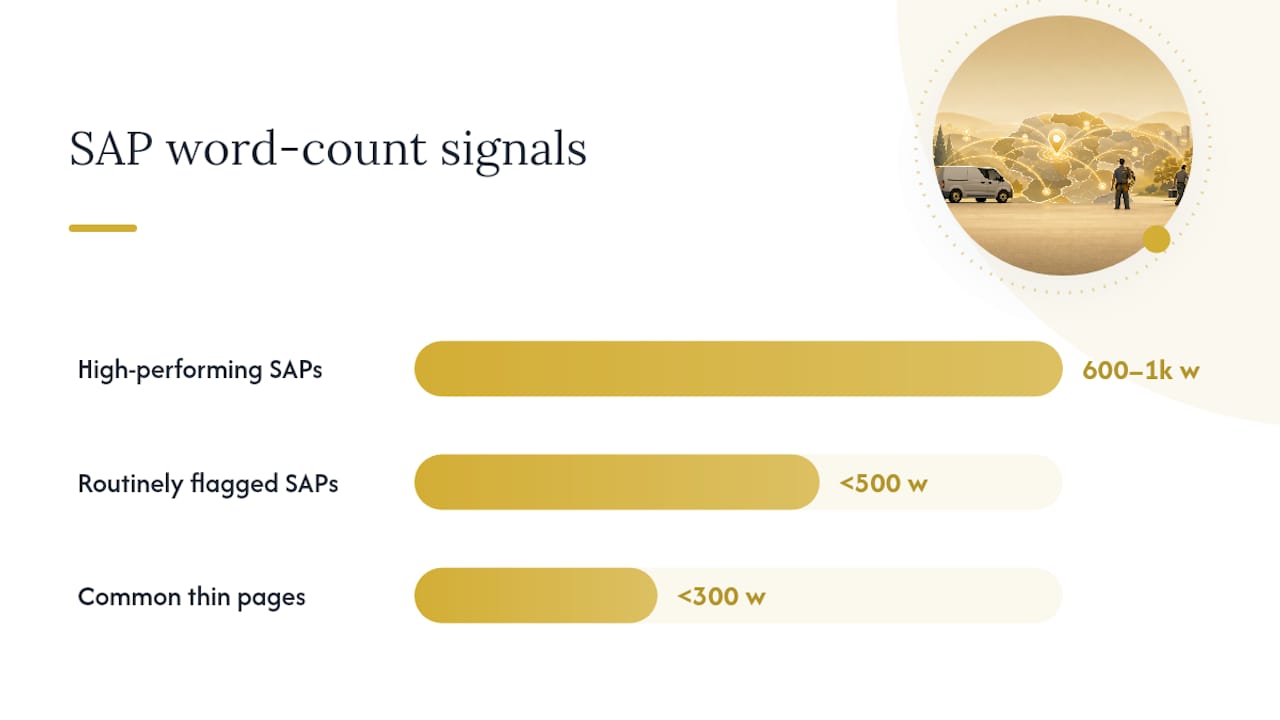
- Publishing pages under 300 words with no distinguishing local content.
- Building dozens of pages in a single week with zero local proof behind any of them.
Search Engine Land's data puts high-performing SAPs in the 600 to 1,000 word range, with pages under 500 words routinely flagged as thin. That's not a hard cutoff. It's a signal that thin pages rarely carry enough unique substance to survive scrutiny. Google's own helpful content guidance backs this up: content should be written primarily for people demonstrating real, first-hand expertise, not stitched together to rank.
Pro Tip: If you genuinely can't produce unique content for every city on your list yet, build fewer pages, not thinner ones. A dozen strong SAPs with real local proof will outrank fifty hollow ones every time, and they won't put your whole domain at risk.
How Do You Structure a High-Converting Service Area Page?
Getting the skeleton right matters as much as the content sitting on it. Here's the build order that keeps a page both crawlable and conversion-ready.
- URL structure: use a predictable, hub-and-spoke pattern like
/service-areas/plumbing/auroraor/plumbing/aurora-co, nested under a central hub page that links to every city you serve. - Title tag: keep it under 60 characters, formatted as "[Service] in [City], [State] | [Business Name]".
- H1: match the title closely but make it read naturally: "Emergency Plumbing Repair in Aurora, Colorado."
- Meta description: 150 to 160 characters, naming the city, the core service, and a reason to click, like same-day availability.
- Local proof block: one testimonial with the customer's neighborhood or city named, plus one dated project photo if you have it.
Beyond structure, a handful of on-page elements separate a page that converts from one that just exists:
- Click-to-call button placed above the fold, not buried in a footer.
- A short booking form or scheduling widget, ideally the same one used sitewide for consistency.
- A localized service description mentioning specific problems common to that area (older housing stock, well water, coastal humidity).
- Neighborhood or subdivision references that prove you actually work there, not just that you'd be willing to.
- Transparent pricing context, even a range, since local searchers comparison-shop hard for home services.
A page that reads like it was written for one specific city, with one specific customer's story on it, does more conversion work than five paragraphs of generic service copy ever will.
On schema, add LocalBusiness or a more specific subtype like Plumber or Electrician from Schema, including name, telephone, openingHours, url, and areaServed set to the specific city. A simple JSON-LD block naming the city in areaServed gives search engines an explicit, structured signal that this page maps to that location, on top of whatever your visible copy already says.
Photo and testimonial placement matters more than most builders assume. Put the testimonial near the CTA, not at the bottom of the page where most visitors never scroll. If you have a dated job photo, caption it with the city and a one-line description of the work. That combination, real photo plus real place name plus real date, is exactly the kind of local proof Search Engine Land's SAP research flags as the difference between a legitimate destination page and a thin template.

Pro Tip: Reuse the same testimonial format across every city page (name, neighborhood, one-line quote, service performed) so the pattern feels intentional rather than copy-pasted filler.
How Should You Handle Schema, Indexing, and Internal Links?
Technical setup is where a lot of otherwise solid SAP campaigns quietly fail. Getting three things right, schema, indexation rules, and internal linking, keeps your pages both crawlable and correctly interpreted.
Start with schema. Beyond the basic LocalBusiness fields covered above, include areaServed specifically when the page targets a service radius rather than a fixed address, per schema.org's LocalBusiness documentation. This tells search engines explicitly that the business serves that area without claiming a physical location there.
On indexation, don't canonicalize every city page back to a single hub page, that erases the individual page's chance to rank for its own city query. Canonical tags belong on genuine duplicates only. Every unique SAP should be self-canonical and included in your XML sitemap.
- Build a hub page linking out to every city SAP, and link back from each SAP to the hub.
- Add an HTML sitemap or footer navigation listing every service area, since pages hidden behind a JavaScript-only store locator can go undiscovered by crawlers.
- Link relevant blog posts and core service pages into their matching SAPs to pass internal authority.
- Link your Google Business Profile directly to the matching city's SAP, not to your homepage, so local searchers land exactly where they should.
Skipping the HTML sitemap is the single most common technical mistake in SAP rollouts: the pages exist, they're well written, and Google simply never finds half of them.
How Do You Decide Which Cities Get a Page First?
Not every city in your drive radius deserves a page on day one. Prioritize by demand and payoff, not by how far you're willing to drive.
- Rank cities by current job volume and revenue per job, using whatever data your CRM already tracks.
- Check keyword demand for "[service] + [city]" in each market; low-demand towns rarely justify the build time.
- Weigh competitive density: a city with three entrenched competitors and thin demand is a poor first bet.
- Confirm the city sits within Google's recommended roughly two-hour drive time of your base.
Start with your top 5 to 10 cities where you already have local proof on hand: real testimonials, real job photos, real completed work. That's the phased approach Search Engine Land recommends for avoiding the thin-content trap entirely.
- Stop expanding once new cities generate under a handful of monthly searches for your core service.
- Consolidate rather than build separately if two neighboring towns share nearly identical demand and demographics.
- Watch for pages sitting flat with zero organic traffic after several months. That's your signal to improve or merge them, not to add ten more.
What Does a Real Agency Rollout Look Like?
A typical SAP rollout follows five stages: discovery, local proof gathering, page build, schema and linking, then measurement. Discovery means pulling job history by city to rank priority markets. Local proof gathering means chasing down testimonials, permits, and job photos, city by city, which is usually the slowest step. Page build and schema come next, followed by linking each SAP into the hub and into your Google Business Profile.
- Track calls and form submissions per city page, not just sitewide totals.
- Watch organic rankings and impressions for "[service] + [city]" queries specifically.
- Expect early months to show impression growth before ranking or conversion gains catch up.
Most SAP campaigns need three to six months before rankings stabilize, since Google's helpful content systems take time to reassess a domain's overall quality signals as new pages accumulate real engagement. Early wins tend to show up as more Google Business Profile views and calls before organic rankings fully mature.
What we've learned building SAPs for home-service clients
Real local proof beats polished copy every time. A crooked photo from an actual job outperforms a stock image with better lighting. Repurpose testimonials across a booking confirmation email and the SAP itself instead of writing new copy for each channel. And don't let scale outrun quality: the moment you're mass-producing city pages faster than you can gather real local proof for them, stop and slow down. Fix the ratio before you add another city.
When Should You Bring in an Agency for Service Area Pages?
Once you're managing more than a handful of cities, juggling schema markup, testimonial collection, and indexation checks in-house starts eating time you don't have. That's usually the tipping point: multiple markets, limited internal bandwidth, and schema requirements that go beyond what a generic template can handle.

Leapify Media builds this infrastructure specifically for home-service companies, handling discovery, local proof sourcing, schema implementation, and Google Business Profile linking as one connected process rather than a checklist handed off in pieces. The firm's local SEO work for contractors is built around the same compliance-first approach covered here: real local content per city, correct technical signals, and measurement tied to actual calls and bookings, not vanity rankings. If you're weighing whether to build your next ten city pages internally or hand the process to a team that's already run this rollout for other home-service businesses, see how Leapify Media's services are structured and request a discovery call to map out your priority cities.
Primary Sources and Further Reading
- Google's helpful content documentation outlines the people-first standard your city pages need to meet.
- Search Engine Land's guide to service area pages offers page-length benchmarks and local proof examples.
- BrightLocal's service area page SEO guide breaks down keyword targeting and CTA structure for mobile-first businesses.
- Leapify Media's contractor local SEO guide applies these principles specifically to home-service rollouts.
Frequently Asked Questions
What are service area pages? A service area page is a landing page built for a specific city or region a business serves on-location, without a storefront there. It targets local search intent for that city while directing visitors to call or book rather than visit an address.
What should a service area page include?
At minimum: a unique title and URL, a localized service description, at least one local testimonial or job photo, a clear call-to-action, and LocalBusiness schema with areaServed set to that city.
What are examples of service areas? For a plumbing company based in one metro area, service areas might include five or six surrounding suburbs and towns within roughly a two-hour drive, each with its own dedicated page rather than one combined "areas we serve" list.
What's the 80/20 rule for service area pages? It's a practical prioritization habit: focus the bulk of your content effort on the roughly 20% of cities generating 80% of your job volume, rather than spreading thin, low-quality effort across every city in your radius.
Sources
- Service Area Pages: Boost Local SEO Across Locations
- Creating helpful, people-first content - Google Search Central
- How to Do Service Area Page SEO for Local Search Visibility - BrightLocal