

For most home service operators, the single best move right now is adopting a purpose-built CRM automation platform that consolidates lead capture, scheduling, dispatch, invoicing, and review requests into one system, then rolling it out in a crawl→walk→run sequence. Generic CRMs were not built for the field, and the revenue leaks they create are real and measurable.
The short version:
- Enable missed-call text-back and two-way SMS on day one.
- Set job-complete triggers for automated review requests and invoice delivery.
- Route new leads instantly to the right technician or pipeline stage.
- Follow a phased rollout: confirmations first, then quote follow-ups and dispatch, then AI nurturing.
- Contact Leapify Media for a turnkey implementation built specifically for home service workflows.
McKinsey's research on AI adoption consistently shows the highest ROI goes to businesses that automate high-volume, repetitive tasks first. For a plumbing or HVAC shop, that means missed calls and follow-ups, not complex analytics.
Table of Contents
- Why purpose-built CRM automation software beats generic tools
- What AI-driven CRM automation actually does for your business
- How to roll out CRM automation: crawl, walk, run
- Must-have features for home service CRM automation
- Costs, licensing, and what ROI to expect
- How to evaluate vendors: questions to ask and red flags
- Key takeaways
- The gap between CRM promises and what actually moves the needle
- Leapify Media builds this infrastructure for home service operators
- Useful sources and further reading
Why purpose-built CRM automation software beats generic tools
Purpose-built CRMs for home service businesses consolidate sales, scheduling, and operations in one dashboard, eliminating the need to stitch together separate subscriptions for texting, invoicing, and lead capture. Generic platforms create five specific workflow mismatches that cost real money:
- Missed-call handling: Generic CRMs have no native text-back. A missed call from a homeowner who needs a plumber today goes cold in minutes.
- Field-first mobile UX: Office-designed interfaces slow down technicians who need job details, photos, and signatures from a truck.
- Quoting and invoicing tied to jobs: Disconnected billing tools mean manual re-entry, delayed invoices, and slower cash flow.
- Automated review requests: Without a job-complete trigger, review collection depends entirely on someone remembering to ask.
- Scheduling and dispatch integration: A CRM that cannot see technician availability creates double-booking and dispatch errors.
A missed call is the single most common revenue leak for contractors. An instant text-back reply converts a high share of otherwise lost jobs — jobs that would have gone to whoever answered first.
A single dashboard also reduces duplicate records, cuts subscription overhead, and lets owners see their full pipeline without toggling between five apps.

What AI-driven CRM automation actually does for your business
AI in a home service CRM is not magic. It handles the repetitive, time-sensitive tasks that cost booked jobs when you or your staff are in the field. Practical AI capabilities that deliver ROI for contractors fall into four categories:
- AI conversation bots: Answer inquiries 24/7, qualify leads, and book appointments without a human in the loop.
- Predictive lead scoring: Flag which leads are most likely to convert so your team calls the right ones first.
- Intelligent follow-up timing: Send quote reminders and re-engagement messages at the moment a prospect is most likely to respond.
- AI content assistance: Draft SMS replies, review responses, and follow-up emails faster.
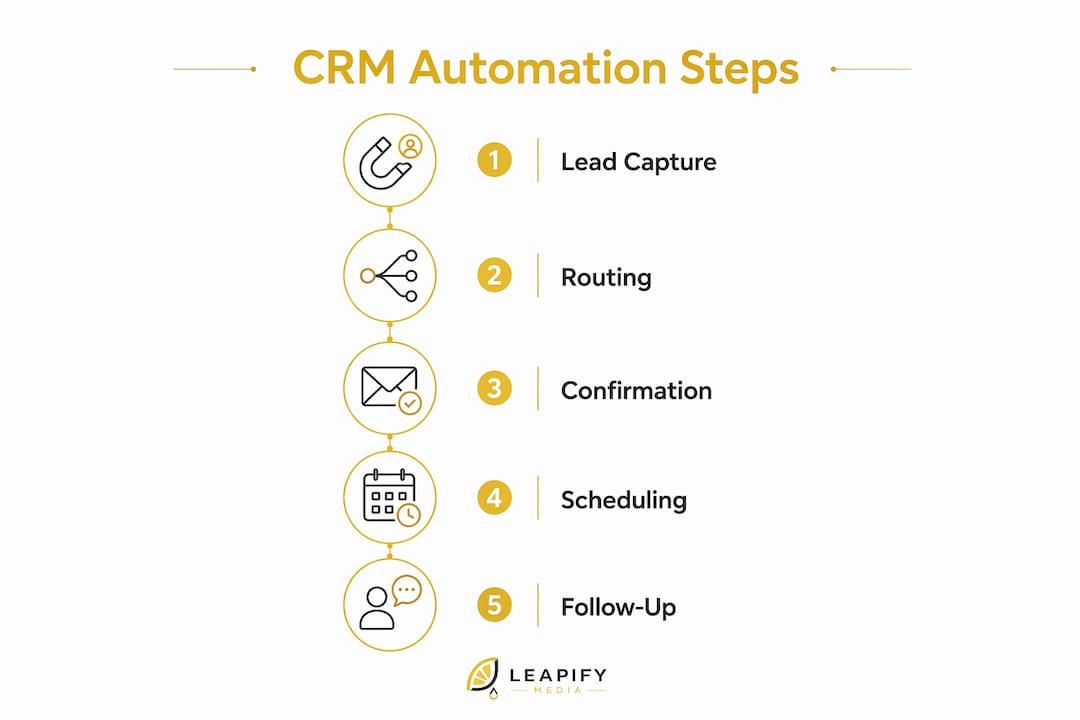
Starting automation with lead capture, routing, and confirmations generates the fastest wins without removing human judgment from the process. AI should not handle pricing negotiations, complex complaints, or any conversation where a wrong answer damages the relationship.
Pro Tip: Before turning on any AI personalization, confirm your CRM consistently captures lead source, service type, and interaction history. Personalization built on dirty data sends the wrong message to the wrong person at the wrong time.
How to roll out CRM automation: crawl, walk, run
A phased rollout is the lowest-risk path. Trying to automate everything at once leads to broken workflows and staff who distrust the system.
Phase 1: Crawl (weeks 1–4)
- Enable missed-call text-back and instant lead routing.
- Set up basic pipeline stages: Inquiry → Contacted → Estimate Sent → Booked → Completed → Reviewed.
- Automate appointment confirmations via SMS.
- Assign ownership rules so every lead has a named follow-up owner.
Phase 2: Walk (weeks 5–10)
- Activate quote follow-up sequences (24-hour and 72-hour reminders).
- Connect field technician mobile app with offline access.
- Tie invoicing to job-complete status.
- Add basic lead scoring to prioritize inbound volume.
- Launch automated review requests triggered at job completion.
Phase 3: Run (months 3–6)
- Deploy AI-driven nurturing for unconverted leads and seasonal rebook campaigns.
- Activate predictive scoring for repeat-service opportunities.
- Run domain and email warming for deliverability. Without it, automated nurture emails land in spam and the entire campaign fails silently.
- Build advanced reporting dashboards tied to booked jobs and revenue per lead source.
Minimum CRM fields to capture from day one:
| Field | Why it matters |
|---|---|
| Lead source | Tells you which ad channel or referral is producing jobs |
| Service type | Enables routing, scoring, and seasonal campaign targeting |
| Property details | Supports accurate quoting and repeat-service triggers |
| Last contact date | Prevents leads from going cold without a follow-up |
| Job status | Drives invoice, review, and rebook automation triggers |
Pro Tip: Assign one person to own data hygiene in Phase 1. If lead source is blank on 40% of records, your AI scoring and attribution reporting will be wrong from the start.
Change management matters as much as the software. Train technicians on the mobile app before go-live, not during. Run parallel operations for the first two weeks so no job falls through a gap. Track adoption by checking how many jobs have complete status updates at end of day.
Must-have features for home service CRM automation
Use this checklist when evaluating any platform or talking to a vendor:
Core features:
- Instant lead capture with missed-call text-back
- Two-way SMS with conversation history
- Mobile-first field app with offline access, photo upload, and signature capture
- Scheduling with technician availability sync and route optimization
- Job-tied quoting and invoicing with on-site payment collection
- Automated review requests triggered at job completion
- Reporting dashboard showing pipeline, revenue, and response time
Integration essentials:
- API and webhooks for custom connections
- Ad platform connectors (Google, Meta) for lead conversion tracking
- Accounting sync (QuickBooks Online or Xero)
Security and data control:
- Data ownership and full export capability
- On-premise or hybrid AI options
- Role-based access for owners, dispatchers, and technicians
- Automated backup
Field technicians need offline access to job history, photos, and invoicing from the field. A platform that drops functionality without cell service is a liability on any job site.
Costs, licensing, and what ROI to expect
CRM pricing for home service businesses typically follows one of three models: per-user monthly fees, per-technician tiers, or flat-rate bundles. Entry-level options run roughly $29–$60 per month for basic scheduling and CRM. Mid-tier platforms with real automation and dispatch typically run $100–$300 per month. Enterprise tools are quote-only and often land in four figures monthly.
One-time costs to budget for include data migration, pipeline template setup, and any custom integrations. Messaging fees (SMS credits) are often billed separately and add up quickly for high-volume operators.
ROI signals to track in the first 90 days:
- Average response time to new leads (target: under 5 minutes)
- Lead-to-booked-job conversion rate
- Review velocity (new Google Reviews per week)
- Booked jobs per week versus the pre-automation baseline
- Admin hours saved per week
Missed-call text-back and quote follow-up automation are the two highest-ROI starting points. Contractors who automate these two workflows recover leads that would otherwise go to the first competitor who answered.
Email deliverability is a hidden cost many operators miss. Domain warming takes 4–6 weeks and must be completed before any nurture campaign goes live, or open rates crater and sender reputation suffers.
How to evaluate vendors: questions to ask and red flags
Questions to ask every vendor:
- Who owns the data, and can I export everything in a standard format?
- Does the mobile app work offline with full job functionality?
- Are there prebuilt workflows for trades (HVAC, plumbing, roofing)?
- What is your SLA for support, and is it phone or ticket-only?
- Do you offer on-premise or hybrid AI options for data control?
- What does migration look like, and how long does it take?
Red flags:
- No full data export or vague answers about data ownership
- No offline field app capability
- Core features require three or more third-party subscriptions
- SLAs measured in days, not hours
- No measurable case studies from home service clients
Pro Tip: Run a 30–60 day pilot with clear success criteria before full commitment. Define what "working" looks like: response time under 5 minutes, review requests sent on 90% of completed jobs, zero missed-call gaps. Run the new system in parallel with your current process for the first two weeks to catch anything that breaks.
Key takeaways
Purpose-built CRM automation software, rolled out in a crawl→walk→run sequence, is the most reliable path to faster lead response, higher booking rates, and consistent review growth for home service businesses.
| Point | Details |
|---|---|
| Start with missed-call text-back | It is the highest-ROI automation for contractors and recovers leads lost to competitors. |
| Clean data before AI | Capture lead source, service type, and interaction history consistently before scaling personalization. |
| Phase the rollout | Confirmations first, then dispatch and invoicing, then AI nurturing — each phase proves value before adding complexity. |
| Track 90-day KPIs | Watch response time, conversion rate, review velocity, and booked jobs weekly to confirm ROI. |
| Leapify Media | Offers turnkey CRM automation setup with on-premise AI options and a reported 20x ROAS for home service clients. |
The gap between CRM promises and what actually moves the needle
Most CRM vendors sell the dream of full automation from day one. What actually happens is that businesses skip data hygiene, enable every feature at once, and end up with a system nobody trusts. The crawl→walk→run approach is not a compromise. It is the only way to build staff confidence and prove ROI before complexity grows.
The other thing most guides miss: AI in a home service CRM is most valuable for the tasks that happen when the owner is on a roof or under a sink. A bot that books a visit at 9 PM on a Saturday is not replacing anyone. It is capturing a job that would have been gone by Monday morning. That is the real case for automation, and it is a lot more concrete than any vendor's pitch deck.
Client outcomes from implementations that follow this methodology consistently show improved booking rates, faster review growth, and measurable reductions in admin time. The businesses that struggle are the ones that automate before their pipeline data is clean or skip technician training entirely.
Leapify Media builds this infrastructure for home service operators
Home service owners who want a turnkey path to CRM automation without piecing together tools themselves have a direct option. Leapify Media builds AI-powered marketing infrastructure specifically for trades, covering CRM setup and automation, on-premise AI lead dispatch with data ownership, Google Ads and Meta Ads management, local SEO, and custom content production.

The reported outcome across client engagements is a very high return on ad spend, with measurable gains in lead conversion and booked jobs. On-premise AI options mean client data stays proprietary, not shared with third-party platforms. Typical engagements start with a scoped pilot covering Phase 1 automations, then expand based on results.
If you are ready to stop losing leads to missed calls and cold quotes, see what Leapify Media builds for home service operators.
Useful sources and further reading
- Home Service CRM vs. Generic AI CRM Software — explains the revenue gap between purpose-built and generic platforms, including missed-call and email warming issues.
- CRM Automation for Home Service Businesses — practical guide on what to automate first without losing the human touch.
- AI CRM for Home Service Businesses — defines the four AI capability categories and expected contractor outcomes.
- 5 CRM Features Home Service Businesses Ignore — covers missed-call text-back, email warming, and pipeline visibility as underused features.
- CRM for Home Services: Beyond Contact Management — frames AI-driven CRM as a revenue growth tool tied to marketing orchestration.
- Leapify Media Services — full breakdown of CRM automation, on-premise AI, and implementation packages for home service operators.
- Marketing Automation Tools for Agencies — survey of automation tools that integrate with CRM for campaign orchestration.
- AI for Plumbers: Win More Jobs With Smarter Tech — trade-specific workflow automation examples with ROI context for single-trade operators.