

HVAC call scripts are structured phone frameworks that guide dispatchers and CSRs through greetings, diagnostic questions, expectation-setting, and booking closes, and standardized scripts can lift booking rates by roughly 15 to 25 percent when paired with trained staff. That gap between a script-less call and a scripted one usually comes down to consistency: the same problem gets solved the same way, every time, no matter who picks up the phone.
Here are four scripts you can copy, paste, and put in front of your team today.
Inbound booking opener: "Thanks for calling [Company Name], this is [Name]. Is everything running okay, or is your system giving you trouble right now?" Use this the moment the phone rings; it opens with empathy instead of a script-sounding pitch.
Quote-range reply: "Most calls like this run between $X and $Y depending on what our technician finds, and there's no charge for the diagnostic visit if you book today." Use this when a caller asks "how much" before you've gathered any details.
Missed-call callback: "Hi, this is [Name] from [Company]. I saw we missed your call. What's going on with your system?" Use this within five minutes of a missed call, since fast callback windows recover a meaningfully higher share of bookings.
Maintenance pitch close: "Since you're already on the schedule, want me to add you to our maintenance plan? It covers your spring and fall tune-ups and gets you priority booking." Use this at the tail end of any booked call.
Watch your call-to-booking rate for the first two weeks after rollout. It's the single clearest signal these scripts are working.
Key Takeaways
Consistent, well-structured HVAC call scripts combined with fast callback follow-up and CRM automation are what actually turn phone calls into a predictable stream of booked jobs.
| Point | Details |
|---|---|
| Standardize before scaling | Roll out core scripts (inbound, dispatcher, emergency, upsell) before adding more script variants. |
| Diagnostic questions come first | Ask safety and symptom questions before quoting any price to reduce objections later. |
| Speed matters on callbacks | Respond to missed calls within five minutes to recover a meaningfully higher share of bookings. |
| Measure weekly, not quarterly | Track call-to-booking rate and handle time every week during rollout to catch problems fast. |
| Automation closes the loop | Leapify Media's CRM and AI dispatch tools handle the confirmation and follow-up work scripts alone can't cover. |
Table of Contents
- Why Call Scripting Matters for HVAC Booking Rates
- What Types of HVAC Call Scripts Do You Need?
- Ready-to-Use HVAC Phone Scripts You Can Deploy Today
- How Do You Customize Scripts for Your Team?
- What Diagnostic Questions Actually Build Value?
- How Do You Handle Price Objections and Skepticism?
- What Happens After the Call Ends?
- How Do You Train Staff and Measure Script Success?
- Quick Reference: Openers, Closers, and Urgency Phrases
- 7 Steps to Roll Out New Scripts This Week
- How Should Emergency HVAC Calls Be Scripted?
- Legal and Compliance Points Every Script Should Cover
- How Do You De-escalate an Angry Caller?
- Sample Language for Warranty and Dispute Calls
- Why Scripts Are Only Half the Revenue Equation
- Want Automation to Back Up Your Scripts?
- Frequently Asked Questions
- Sources
Why Call Scripting Matters for HVAC Booking Rates
A missed HVAC call rarely comes back on its own. The homeowner calls the next number on the list, and that's a booked job walking out the door. Call scripting HVAC teams use isn't about sounding robotic. It's about making sure the CSR who's been there three weeks handles a no-heat emergency as well as your most experienced dispatcher.
Without a script, you get three different problems on the same call type depending on who answers: one CSR quotes a price range confidently, another gets flustered and loses the caller, a third forgets to ask about system age and sends a tech in blind. Standardizing the script structure closes that gap and tends to shorten handle times too, since nobody is improvising mid-call.
- Consistent scripts reduce abandoned calls caused by dead air or CSR hesitation.
- They shorten average handle time by cutting out improvised, rambling explanations.
- They make appointment value more predictable because upsell prompts get delivered every time, not just when a rep remembers.
What Types of HVAC Call Scripts Do You Need?
Different calls need different scripts. An emergency no-cooling call in July has nothing in common with a routine maintenance reminder, and treating them the same way is how businesses lose both.
- Inbound service scripts handle new callers with a problem. They must identify urgency, capture basic system info, and set a realistic appointment window.
- Dispatcher/dispatching scripts route the call internally. They must confirm the issue category, flag safety risks, and assign priority level.
- Confirmation/arrival scripts lock in the appointment. They must restate the time window, confirm contact details, and set technician-arrival expectations.
- Sales and maintenance-plan scripts pitch add-on value. They must connect the pitch to the caller's actual system, state the price plainly, and offer an easy yes.
- Emergency scripts handle life-safety or major-damage situations. They must triage urgency first, gather safety details second, and dispatch fast third.
A caller reporting a gas smell needs the emergency script within the first ten seconds, not a polite maintenance-plan pitch three minutes in.
Ready-to-Use HVAC Phone Scripts You Can Deploy Today
These four scripts cover the calls that make up most of a residential HVAC call volume. Each one breaks into four parts: opener, diagnostic probe, expectation-setting, and close.
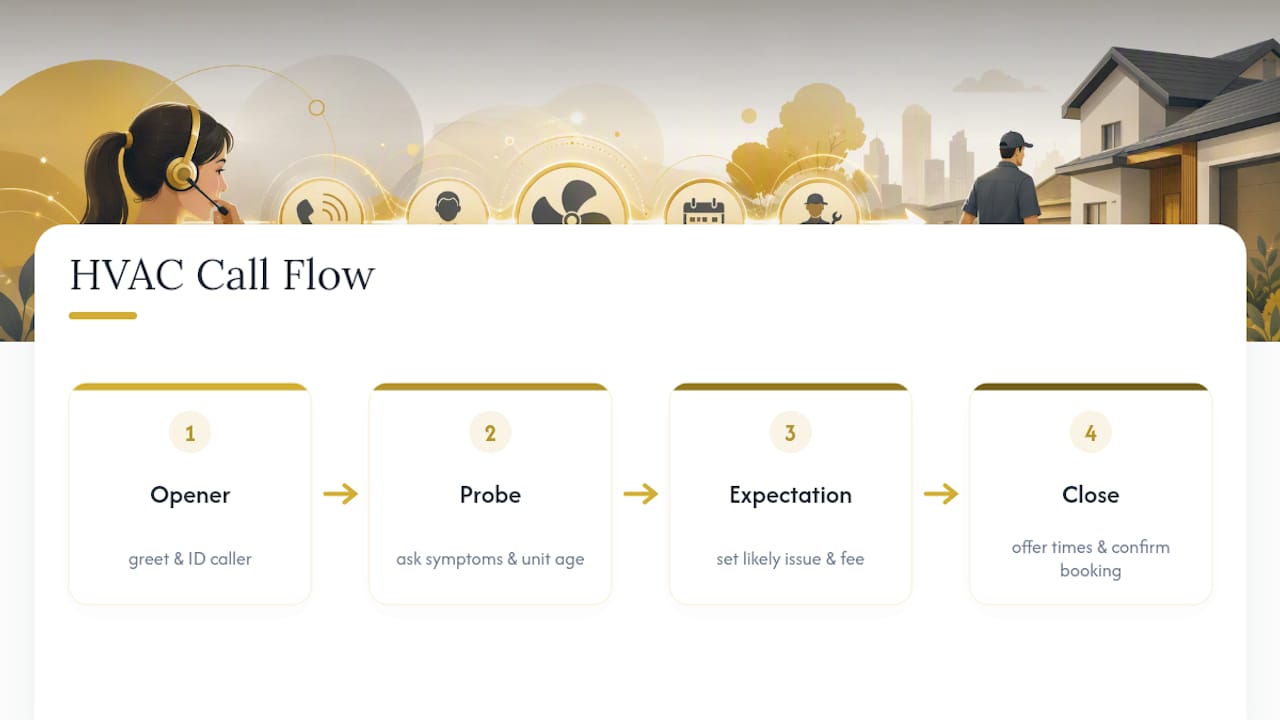
1. Inbound dispatcher/booking script
Opener: "Thanks for calling [Company], this is [Name]. What's going on with your system today?"
Diagnostic probe: "Is it blowing warm air, cold air, or not turning on at all? And how old is the unit, if you know?"
Expectation-setting: "Okay, that sounds like it could be [likely issue]. Our technician will do a full diagnostic when they arrive, which runs $[X], and that gets applied toward any repair."
Close: "I have an opening tomorrow between 10 and noon, or Thursday morning. Which works better?"
2. Inbound quote-range reply
Opener: "Happy to give you a ballpark. Can I ask a couple quick questions first so it's actually accurate for your situation?"
Diagnostic probe: "What's the system doing exactly, and when did you first notice it?"
Expectation-setting: "Based on what you're describing, most repairs like this run between $[X] and $[Y], but our technician will give you an exact number before doing any work. Nothing happens without your approval."
Close: "Let's get you on the schedule so we can nail down the real number. Morning or afternoon this week?"
3. After-hours/missed-call callback recovery
Opener: "Hi, this is [Name] from [Company], returning your call from [time]. Sorry we missed you. What's happening with your system?"
Diagnostic probe: "Has this been going on a while, or did it just start?"
Expectation-setting: "I can get a technician out [timeframe]. We'll text you a confirmation as soon as we hang up."
Close: "Does [time] work, or would [alternate time] be better?"
4. Maintenance upsell / membership pitch
Opener: "Before I let you go, I noticed you're not currently on our maintenance plan."
Diagnostic probe: "Has your system had a tune-up in the last year?"
Expectation-setting: "The plan covers two visits a year, priority scheduling, and a discount on repairs. It's $[X] a year, which usually pays for itself in the discount alone."
Close: "Want me to add that while I have you on the schedule?"
Pro Tip: Pace yourself slower than feels natural on the diagnostic questions. Rushing this part is the number one reason CSRs sound like they're reading a script instead of solving a problem.

If a caller pushes for a fixed price before a technician sees the unit, don't invent one. Say: "I want to give you a number you can trust, and the only way to do that accurately is with eyes on the system. That's exactly what the diagnostic visit is for." If a caller says a competitor quoted a flat rate over the phone, don't disparage them. Just explain your process protects the customer from surprise charges later.
How Do You Customize Scripts for Your Team?
A script that reads great on paper can sound stiff coming out of a nervous CSR's mouth. Customization fixes that in three moves: map your brand's tone (formal versus conversational), adjust length for your average caller's patience, and add branch prompts for the detours that come up in your specific market.
A conservative brand swaps "What's going on with your system today?" for "How can I help you with your HVAC system?" A conversational brand keeps the casual version and might even add "That's frustrating, I get it" before moving into diagnostics.
Channel matters too. Phone scripts can carry warmth and pacing; SMS confirmation templates need to be short and scannable, something like: "Confirmed: [Tech Name] arrives [date] between [window]. Reply STOP to opt out." Junior CSRs generally need the full word-for-word script with less room to improvise, while senior sales reps can work from a bullet outline and personalize more freely.
- Map tone first, before touching a single word of the script itself.
- Keep sentence length shorter for phone; keep SMS under two sentences.
- Give junior reps the full script; give experienced reps talking points.
Pro Tip: Keep one canonical script document, not five versions floating in group chats. Every approved branch line lives in that single file, so when you update the maintenance-plan pitch, everyone updates it at once.
What Diagnostic Questions Actually Build Value?
The questions you ask before quoting anything determine whether the caller sees you as a vendor or a problem-solver. Ask about safety first, system details second, scheduling last.
- "Is anyone smelling gas or seeing smoke?" (immediate safety triage)
- "What exactly is the system doing, and when did it start?" (symptom capture)
- "How old is the unit, and has it been serviced recently?" (equipment history)
- "Is this affecting the whole house or just one room?" (scope assessment)
- "How soon do you need someone out?" (urgency and scheduling)
Safety questions come first because a gas smell or carbon monoxide concern changes everything about how fast you dispatch. System details come next because they help the technician show up prepared with the right parts. Scheduling comes last because by then the caller trusts you're actually listening, not just trying to get them off the phone.
Listen for tone shifts, not just answers. A caller who sighs when describing "three days of no AC in July" needs urgency in your response, not a scripted recitation of available windows.
How Do You Handle Price Objections and Skepticism?
Most callers asking about price aren't haggling. They're anxious about an unknown cost, and treating every price question as a negotiation tactic is the fastest way to lose a booking you could have kept.
Price pushback: "I totally understand wanting a number up front. The reason we do a diagnostic first is so you don't get a lowball estimate that turns into a surprise bill later. Every dollar of that diagnostic fee applies toward your repair."
Scheduling conflict: "I don't have that exact time, but I can do [alternate window], or I can put you on our cancellation list in case something opens up sooner."
Technician doubt: "I hear you, and I want you to feel good about who's coming into your home. [Tech Name] has been with us [X years] and specializes in exactly this type of system."
Pro Tip: The diagnostic questions from the previous section double as objection prevention. A caller who's already explained their symptoms in detail is far less likely to fixate on price, because they're now thinking about the fix, not just the bill.
What Happens After the Call Ends?
The call isn't done when you hang up. What happens in the next ten minutes decides whether that booking shows up on the schedule or turns into a no-show.
- Send the confirmation text or email immediately: date, time window, technician name if known, and a cancellation link.
- Enter the call notes into your CRM: urgency level, equipment type and age, caller's stated concern, and any upsell opportunity flagged.
- Attach technician handoff info to the job record so the tech arrives already knowing the symptoms, not starting from zero.
- Schedule a reminder text for the day before the appointment.
- Confirmation script line: "You're all set for [date] between [window]. We'll text a reminder the day before, and you'll get a text when the technician is on the way."
Using call-booking software to auto-populate these fields cuts the risk of a CSR forgetting a step during a busy call volume day.
How Do You Train Staff and Measure Script Success?
A script only works if people actually use it, and the only way to know that is measurement. Track these:
- Call-to-booking rate: percentage of inbound calls that convert to a scheduled job.
- Booking close rate on callbacks: how many missed-call recoveries turn into appointments.
- Average handle time: watch for calls that are either too rushed or dragging with dead air.
- Abandoned call rate: callers who hang up before reaching a CSR.
- Appointment-value lift: whether maintenance-plan and upsell pitches are moving the needle.
Run weekly call-recording reviews with scorecards graded against the actual script, not vague impressions. Roleplay new hires through every script category before they take a live call, and keep coaching sessions short and frequent rather than one long monthly review. Recorded calls make for genuinely useful coaching material because reps can hear exactly where they drifted off-script.
Tag calls by script type in your CRM so you can A/B test variants. If a new price-objection line outperforms the old one by even a few points on close rate, that's a signal worth acting on. Aim for a callback within five minutes on missed leads. It's one of the highest-leverage habits a call center can build.
Quick Reference: Openers, Closers, and Urgency Phrases
Pin these near the phone or load them into your call software as quick prompts.
Openers: "Is everything running okay?" / "What's going on with your system today?" / "Thanks for holding, how can I help?"
Diagnostic probes: "How old is the unit?" / "When did you first notice the issue?" / "Is it affecting the whole house?"
Closers: "Morning or afternoon work better?" / "I can lock that in right now." / "Let's get you on the schedule before that window fills up."
Urgency phrases: "That's something we want to get eyes on today." / "Given what you're describing, I'd like to prioritize you."
De-escalation lines: "I hear you, and I want to make this right." / "Let's slow down and figure out exactly what happened."
Swap in the caller's name and a specific detail they mentioned to keep any line from sounding canned.
7 Steps to Roll Out New Scripts This Week
- Day 1: Pick a pilot team of two or three CSRs. Owner: call center manager.
- Day 1: Localize scripts with your brand tone and local pricing ranges. Owner: operations lead.
- Day 2: Roleplay every script category with the pilot team. Owner: senior CSR or trainer.
- Day 3-5: Run scripts live and A/B test one variant against the old approach. Owner: pilot team.
- Day 3: Enable CRM prompts so scripts appear on-screen during calls. Owner: CRM administrator.
- Day 5: Start QA scoring on a sample of recorded calls. Owner: call center manager.
- Day 14: Review booking rate, handle time, and callback close rate against baseline. Owner: owner or general manager.
Two weeks is enough to see whether call-to-booking rate moved. If it didn't, the script needs a rewrite, not more time.
How Should Emergency HVAC Calls Be Scripted?
Emergency calls need a different rhythm than routine bookings: faster triage, fewer pleasantries, and a decision tree that gets a CSR to a dispatch decision in seconds, not minutes.

Open with safety, not sympathy: "Is anyone in immediate danger, or do you smell gas?" That question comes before name, address, or anything else. Building explicit if/then decision points into the script means a CSR doesn't have to guess whether a situation warrants immediate dispatch versus a scheduled visit.
A no-heat call during a winter cold snap with elderly occupants or infants in the home should escalate differently than the same no-heat call in mild weather with no vulnerable occupants. Build that distinction into the script itself: "Is anyone in the home elderly, very young, or dealing with a medical condition that heat or cooling affects?"
Once safety is confirmed, move fast through system basics and get a technician moving. Don't spend three minutes on upsell language during an emergency call. The urgency phrase does the work: "Given what you're describing, we're going to prioritize getting someone out to you today." Confirm the emergency dispatch fee upfront if one applies, so there's no surprise when the invoice arrives.
Legal and Compliance Points Every Script Should Cover
Scripts that skip disclosure requirements create liability, not just customer friction. If a call is recorded for quality or training purposes, most states require disclosure at the start of the call: "This call may be recorded for quality assurance." Skipping this line isn't just a compliance gap, it's a legal exposure depending on your state's consent laws.
Pricing disclosures matter just as much. If your script quotes a range, make clear it's an estimate pending in-person diagnosis, not a binding quote. Overpromising a number on the phone that a technician later has to walk back damages trust and can trigger disputes.
Get explicit consent before adding a caller to any marketing list, text campaign, or maintenance-plan auto-renewal. A line like "Would it be okay to text you appointment reminders and occasional maintenance tips?" covers this cleanly without burying consent in fine print nobody hears.
If your business operates across multiple states, check local consumer-protection rules on estimate language, cancellation policies, and any required cooling-off period disclosures for larger jobs. These vary enough that a script written for one market can create real problems in another. When in doubt on a specific compliance question, that's a conversation for legal counsel, not a guess baked into a phone script.
How Do You De-escalate an Angry Caller?
An irate caller on the phone is rarely angry about the HVAC system itself. They're angry about being hot, cold, or inconvenienced, and the script has to acknowledge that before it tries to solve anything.
Start with acknowledgment, not defense: "I completely understand why you're frustrated, and I want to get this resolved for you." Resist the urge to explain policy first. Explaining before acknowledging reads as dismissive even when the explanation is accurate.
Lower your own pace and volume deliberately. A CSR who speaks slowly and calmly tends to bring the caller's energy down with them; matching an angry tone with an equally clipped one escalates the call instead. If the caller is venting, let them finish before responding. Interrupting mid-vent almost always makes things worse.
Once the venting slows, pivot to specifics: "Tell me exactly what happened so I can make sure it doesn't happen again." This moves the conversation from emotion to problem-solving. If the issue requires a manager, say so plainly instead of stalling: "I want to make sure this gets handled right, so let me get my manager on the line." Never promise a resolution you can't guarantee, like a specific discount or same-day fix, if that's not actually within your authority to offer.
Sample Language for Warranty and Dispute Calls
Warranty and dispute calls carry more tension than a standard booking call, and the script needs to slow down instead of rushing to a close.
Warranty claim opener: "I'm sorry to hear you're having trouble again. Let's pull up your service history and figure out if this falls under your warranty coverage." This buys time to actually check the record instead of guessing on the spot.
Dispute de-escalation: "I want to understand exactly what happened and make this right. Can you walk me through the timeline?" Getting the full story before responding prevents a CSR from committing to something that contradicts what a technician later finds.
Warranty confirmation: "Good news, this is covered under your parts warranty. There's a service fee for the visit, but no charge for the part itself." Be explicit about what is and isn't covered; vague language here is exactly what turns a warranty call into a dispute.
Unresolved dispute escalation: "I don't have the authority to resolve this on this call, but I'm going to get you to someone who does, and I'll make sure they have all these details so you don't have to repeat yourself." That last part matters. Nothing frustrates a caller more than re-explaining a problem to a second person from scratch.
Why Scripts Are Only Half the Revenue Equation
Great scripts fix what happens during the call. They don't fix what happens before it or after it, and that gap is where a lot of booking rate quietly leaks away. A CSR can run a flawless diagnostic conversation and still lose the booking if the confirmation text goes out ten minutes late or the CRM never flags the upsell opportunity for a follow-up call.
Scripts and automation aren't competing priorities. They're the same system operating at different points in the customer journey. Marketing brings the call in, the script converts it, and the after-call automation locks it into a paid job. Weakness anywhere in that chain shows up as a lower booking rate, even if the script itself was perfect.
Pro Tip: Build your CRM to surface the right script section automatically based on call type. A dispatcher seeing "emergency, no heat, elderly occupant" flagged on-screen moves through triage faster than one hunting for the right script in a binder.
The businesses seeing the best results treat scripts as one layer of a larger revenue stack, not a standalone fix.
Want Automation to Back Up Your Scripts?
Great scripts get callers to say yes. What happens in the ninety seconds after that yes, the confirmation text, the CRM entry, the callback if they don't pick up, decides whether that yes turns into a job on the schedule. Leapify Media builds that layer specifically for home service businesses: on-premise AI dispatch and intent scoring that flags urgent calls automatically, CRM automation that populates job records without a CSR typing everything manually, and confirmation workflows that fire the moment a booking closes.

This isn't a replacement for the scripts in this guide. It's the infrastructure that makes sure a well-run call doesn't lose its momentum in the handoff. If your team is booking calls well but losing ground on follow-through, from missed callbacks to CRM fields nobody fills in, that's the exact gap Leapify Media's growth infrastructure is built to close. Reach out through their services page to see what automating your confirmation and dispatch workflow would look like for your call volume.
Frequently Asked Questions
What is the fastest way to start using HVAC call scripts? Pick one script category, usually inbound booking, roleplay it with a small pilot team, and run it live for a week before rolling out the rest. Trying to launch every script type at once tends to overwhelm CSRs and slows adoption.
Do HVAC call scripts sound robotic to customers? Only if reps read them word-for-word without adjusting tone. A well-customized script gives CSRs a framework and approved phrasing, but the delivery should still sound conversational, especially in the diagnostic-question section.
How often should scripts be updated? Review scripts monthly based on call recordings and booking-rate data. If a specific objection line or opener consistently underperforms in your A/B tests, update it rather than waiting for a scheduled quarterly review.
What's the single most important KPI for measuring script effectiveness? Call-to-booking rate is the clearest signal, since it directly reflects whether the script is converting calls into scheduled jobs rather than just improving how a call feels.
Do scripts work the same for phone and text communications? No. Phone scripts can carry more warmth and detail, while SMS confirmation templates need to be short and scannable, usually under two sentences with a clear date, time, and action item.
Sources
- Stop Losing Calls Over Price: How HVAC CSRs Can Turn Curiosity into Conversions | Contracting Business
- Call Center Metrics for Home Services | Profitability Partners
- Call Scripting for HVAC Professionals: Your Blueprint for Better Customer Service | HRAI
- How HVAC Call Scripts Help Boost Booking Rates (With Examples) | ServiceTitan