

Start with a paired Google Search campaign and Local Services Ads (LSA). That combination reaches homeowners at the exact moment they need a roofer, and it gives you two distinct lead streams: high-intent clicks from Search and phone-qualified calls from LSA. If you only have time to do one thing today, get both live before the next storm rolls through your market.
Here are three actions you can take in the next 24–72 hours:
- Add emergency and replacement keywords in exact and phrase match (e.g., [roof leak repair near me], "roof replacement estimate").
- Check your LSA status or start the verification process if you haven't already.
- Build one focused landing page for either storm damage or roof replacement, and attach call tracking to every inbound number.
Immediate wins to lock in from day one:
- Enable call conversion tracking in Google Ads before spending a dollar.
- Add a negative keyword list covering jobs, DIY, cheap, how to, and careers.
- Geo-lock your campaign to your actual service zip codes, not a broad radius.
- Set your ad schedule to match your staffed hours so calls don't go to voicemail.
Key Takeaways
Running roofing Google Ads profitably requires pairing Search with LSA, segmenting by intent, and connecting ad spend directly to closed-job revenue through offline conversion import.
| Point | Details |
|---|---|
| Start with Search + LSA | Launch both simultaneously for high-intent clicks and phone-qualified leads from day one. |
| Segment by intent | Keep repair, replacement, and storm in separate ad groups or campaigns with dedicated copy and landing pages. |
| Track closed revenue, not just leads | Import booked-job revenue from your CRM as offline conversions so Smart Bidding optimizes for job value. |
| Budget for the learning phase | Commit at least $1,500/month to generate enough data; scale after CPL stabilizes and close rate is tracked. |
| Leapify Media | Builds intent-segmented roofing campaigns with CRM integration, storm automation, and AI-powered lead dispatch for measurable ROAS. |
Table of Contents
- Why Google Ads work for roofing businesses
- Which Google ad types should roofers run?
- How to build a roofing Search campaign that converts
- Local Services Ads for roofers: setup, verification, and when to prioritize them
- What should your roofing ad budget be?
- Measure what matters: tracking, CRM integration, and attribution
- Tactical optimizations that cut wasted spend fast
- Common mistakes that drain roofing ad budgets
- How Leapify Media approaches roofing Google Ads
- What actually wins in roofing Google Ads
- Leapify Media helps roofers turn ad spend into booked jobs
- Sources
Why Google Ads work for roofing businesses
Google holds the dominant share of U.S. search traffic by a wide margin, according to StatCounter's search engine market share data. For a roofing business, that matters because your customers aren't browsing social media when a shingle blows off in a storm. They open Google and type something like "roof leak repair near me" or "emergency roofer Austin." Search captures that intent the moment it exists.
Roofing demand doesn't follow a steady curve. It spikes hard after hail, wind events, and heavy rain, and it rises predictably in spring and fall for replacement cycles. A business that has live campaigns during those windows captures the highest-value traffic of the year. One that's still building ads after the storm has already missed it.
Three intent buckets drive most roofing search volume:
- Emergency repair: "roof leak," "storm damage roof," "emergency roofer near me" — these callers need someone today.
- Replacement: "roof replacement cost," "new roof estimate," "best roofing company" — longer sales cycle, higher ticket, and more comparison shopping.
- Storm/insurance: "hail damage roof claim," "insurance roof replacement" — high value, but requires a roofer with insurance claim experience.
Trust signals close the gap between a click and a booked job. BrightLocal's Local Consumer Review Survey shows that reviews and star ratings are among the primary factors homeowners use when choosing a local service provider. For a $12,000 roof replacement, a homeowner will read your reviews before they call. That means your Google Business Profile rating, your review count, and any trust indicators on your landing page all directly affect your conversion rate from paid traffic.
Organic SEO is a parallel strategy worth running, but it typically takes months to show meaningful results. Google Ads gives you qualified traffic on day one. That's the practical reason most roofing businesses run paid search first and build organic alongside it.
Pro Tip: Set up a Google Alert for your city plus "hail storm" or "wind damage." When an alert fires, you have a narrow window to increase bids and activate storm-specific ad copy before competitors react.
Which Google ad types should roofers run?
Not every Google ad format earns its place in a roofing account. Here's how the main options stack up:
Search Ads are the foundation. They show when someone types a high-intent query, and they let you control keywords, match types, ad copy, and landing pages. CPC in roofing runs higher than most home services, but the intent behind those clicks is hard to match anywhere else.
Local Services Ads (LSA) sit above Search results and operate on a pay-per-lead model rather than pay-per-click. You pay only when a homeowner calls or messages through the ad. LSA leads often convert at higher close rates than shared-lead marketplaces because the caller contacts your business directly. Pair LSA with Search for both volume and quality, per industry benchmarks for roofing PPC campaigns.
Performance Max runs across Search, Display, YouTube, Gmail, and Maps from a single campaign. It's worth testing once you have 30–50 conversions per month and consistent conversion data. Before that, it has too little signal to optimize well and can burn budget on low-intent placements.
Call-only ads and lead form extensions serve different moments. Call-only ads are best during business hours when your team can answer. Lead form extensions work well for replacement flows where the homeowner wants to schedule an estimate rather than call immediately. Both require separate conversion actions to track properly.
YouTube/video ads are a brand and trust play, not a direct-lead driver. For replacement audiences who are still in the research phase, a short video showing your crew, your certifications, and a few completed jobs builds the credibility that closes the sale later. Direct lead volume from YouTube is low, but it supports remarketing and shortens the consideration cycle.
| Ad Type | Best For | Lead Quality | Setup Complexity | Typical Role |
|---|---|---|---|---|
| Search Ads | Emergency repair, replacement | High intent, phone + form | Moderate | Primary lead driver |
| Local Services Ads | Urgent phone leads | Highest close rate | Requires verification | Volume + quality layer |
| Performance Max | Cross-channel capture | Mixed | Low setup, less control | Scale after data exists |
| Call-only / Lead Form | Calls during hours, form leads | Good with filtering | Low | Supplement Search |
| YouTube / Video | Brand trust, remarketing | Lower direct volume | Moderate | Awareness + retargeting |
How to build a roofing Search campaign that converts
A well-structured campaign takes about two hours to set up correctly. Rushing the structure costs you weeks of wasted spend.
Step-by-step campaign setup
- Set your conversion goals first. Define primary conversions (phone calls over 60 seconds, form submissions) and secondary conversions (page views, video plays). Never let Google optimize toward secondary goals by default.
- Choose your campaign structure. For a new account, start with one Search campaign and three tightly themed ad groups: Repair, Replacement, and Storm. If your monthly budget exceeds $3,000, consider separate campaigns so you can control budgets independently.
- Build your keyword list. Start with exact and phrase match for high-intent queries. Seed keywords to include:
- [roof repair near me], [emergency roofer], [roof leak fix]
- "roof replacement cost," "new roof estimate," "roofing contractor [city]"
- [hail damage roof], "storm damage roof repair," "insurance roof claim"
- Add negatives on day one. Before your campaign goes live, add a negative keyword list covering: jobs, hiring, careers, DIY, how to, cheap, free, materials, supply, shingles for sale, metal roofing cost. These block job seekers and DIY researchers who will never call you.
- Write ad copy that matches intent. Each ad group needs headlines that mirror the search query. Three short examples:
- Repair: "Roof Leak? We Fix It Today | Licensed & Insured | Free Inspection"
- Replacement: "Roof Replacement Estimates | Financing Available | 5-Star Rated"
- Storm: "Storm Damage Roof Repair | Insurance Claims Accepted | Same-Day Response"
- Build a focused landing page. One page per intent theme. Required elements: a headline that matches the ad, a short form (name, phone, address, service type), a click-to-call button above the fold, a trust bar showing your Google rating and review count, and your license/insurance credentials. BrightLocal's review research confirms that review counts and ratings are what homeowners check before they commit to a call.
- Set up call and form tracking separately. In Google Ads, create two distinct conversion actions: one for calls (minimum 60-second duration) and one for form submissions. Never lump them together. Calls from roofing ads close at a much higher rate than form fills, and mixing them distorts your bidding data.
Pro Tip: Use Google's call reporting to pull call recordings weekly during your first 60 days. You'll catch missed calls, wrong-number traffic, and low-quality queries that your negative keyword list hasn't blocked yet.
For a practical look at how local roofing contractors in competitive U.S. markets structure their service pages and messaging, this Austin roofing contractor example shows how trust signals and service clarity translate from ads to landing pages.
Local Services Ads for roofers: setup, verification, and when to prioritize them
LSA is a separate product from Google Ads. It lives above the standard Search results, shows your business name, rating, review count, and a "Google Guaranteed" or "Google Screened" badge, and charges you per lead rather than per click.
LSA verification checklist
Before your ads go live, Google requires:
- Business license — upload a current state contractor's license.
- General liability insurance — minimum coverage varies by state; upload your certificate of insurance.
- Background checks — Google uses a third-party provider to run checks on the business owner and any employees listed.
- Service area confirmation — define the zip codes or cities you serve.
- Business profile completeness — hours, services offered, and a profile photo.
Verification typically takes 1–3 weeks. Common roadblocks include expired insurance certificates, license numbers that don't match state databases, and incomplete business profiles. If your verification stalls, check the LSA dashboard for a specific rejection reason before resubmitting.
For a detailed walkthrough of the verification process, this LSA management guide covers the steps and common fixes.
Pros of LSA for roofers:
- Pay-per-lead model means no wasted spend on clicks that don't convert.
- Leads are exclusive to your business at the moment of contact.
- The Google Guaranteed badge builds immediate trust with homeowners.
- Lower cost-per-lead in many markets compared to non-branded Search.
Cons to plan around:
- Lead volume depends on your market's LSA competition and your review count.
- You can dispute low-quality leads, but the process takes time.
- LSA availability varies by market — not every roofing category is active in every city.
Prioritize LSA when you have limited staff and need phone leads you can answer immediately, during storm season when call volume spikes, and whenever your LSA cost-per-lead runs below your Search CPL. Run both simultaneously whenever your budget allows.
Pro Tip: Dispute LSA leads that are clearly outside your service area or for services you don't offer. Google credits legitimate disputes, and disputing consistently keeps your average CPL accurate.
What should your roofing ad budget be?
Roofing is one of the higher-cost verticals in home services PPC. CPCs for non-branded roofing keywords in competitive U.S. markets often run $15–$50 per click, with cost-per-lead figures that vary significantly by market, campaign type, and season, according to industry benchmarks for roofing Google Ads campaigns. Branded keywords cost far less, but they only reach people who already know your name.
Here's how three budget levels typically play out for a roofing Search campaign:
Sample ROI calculation:
- Monthly budget: $3,000
- Estimated leads: 15
- Close rate: 25% (conservative for qualified phone leads)
- Booked jobs: ~4
- Average roof replacement value: $12,000
- Revenue generated: ~$48,000
- Return on ad spend: roughly 16x
That math changes with your close rate and average job value.
Minimum viable budget: Plan for at least $1,500/month to gather enough click and conversion data for Google's algorithms to learn. Below that, campaigns often stall in the learning phase and never reach stable performance. Scale once you're seeing consistent CPL and your close rate is tracked.
- Add LSA budget separately from your Search budget; they bill independently.
- Storm season (spring and fall in most U.S. markets) justifies a temporary budget increase of 50–100%.
- Branded campaigns are cheap insurance — run them at a low daily budget to protect your name from competitors bidding on it.
Measure what matters: tracking, CRM integration, and attribution
Most roofing businesses track clicks. The ones that scale track booked jobs. There's a significant gap between those two metrics, and closing it requires a short but specific tracking stack.
Essential tracking setup
- Google Ads conversion tracking — create separate actions for calls (60+ seconds) and form submissions.
- Google Analytics 4 — link to your Google Ads account and import goals as conversions.
- Call tracking provider — use a service like CallRail or a Google forwarding number to record and attribute calls to specific campaigns and keywords.
- CRM with lead status fields — log every lead as New, Contacted, Estimate Sent, Booked, or Lost. This data feeds your offline conversion import.
Offline conversion import
When a lead becomes a booked and paid job, that outcome lives in your CRM, not in Google Ads. Importing closed-job revenue back into Google Ads as offline conversions lets Smart Bidding optimize toward actual business value rather than raw call volume. The process: export closed jobs with their Google click ID (GCLID) from your CRM, format the file to Google's spec, and upload it weekly or via API. Once Google sees which clicks turned into revenue, it starts bidding more aggressively for similar users.
Tracking integration checklist:
- Google Ads and GA4 linked and conversion data flowing.
- Call tracking numbers assigned per campaign (not one shared number).
- CRM capturing GCLID at lead entry.
- Weekly offline conversion upload scheduled.
- Attribution window set to 30 days for calls, 90 days for replacement leads.
A/B test worth running early: Send half your replacement traffic to a long-form landing page with a detailed estimate form, and the other half to a short page with just a click-to-call and a 4-field form. Most roofing markets favor the short page, but your market may differ.
Tactical optimizations that cut wasted spend fast
The biggest ROI improvements in roofing PPC come from what you stop spending on, not just what you add.
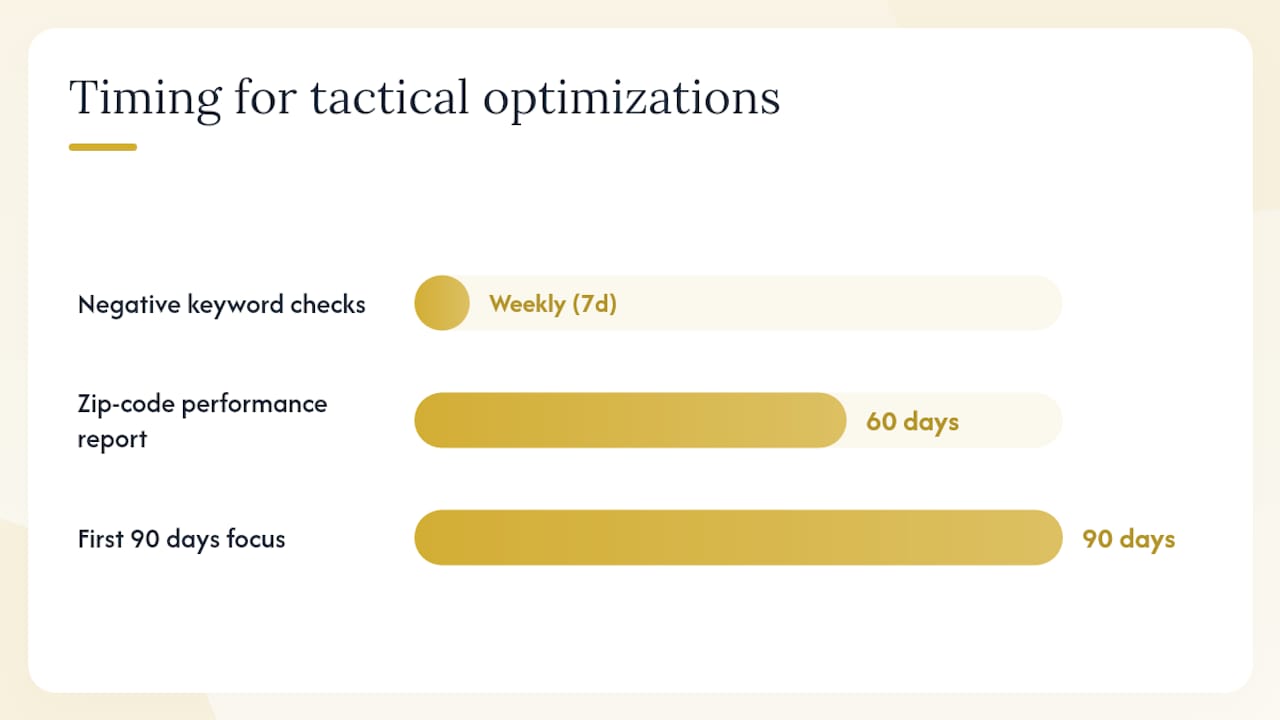
Negative keyword sculpting is the highest-leverage weekly task in your first 90 days. Pull the Search Terms report every week and add irrelevant queries as negatives. Common culprits: "roofing jobs near me," "how to fix a roof leak yourself," "cheap roofing materials," "metal roofing supply." One week of unchecked search terms can drain hundreds of dollars toward zero-intent traffic.
Pull a performance report by zip code after 60 days. Exclude zip codes with high spend and zero conversions. Increase bids on zip codes with strong CPL and close rates.
Ad scheduling should match your staffed hours precisely. If your office answers calls Monday through Saturday, 7 AM to 6 PM, run call-focused ads only during those windows. A call that goes to voicemail at 8 PM on a Sunday is a lost lead, not a conversion. Use call-only ads or call extensions during staffed hours; switch to lead form extensions for after-hours traffic if you have someone monitoring form submissions.
Assets and extensions add real estate and trust signals to your ads without extra cost per click. Use:
- Callout extensions: "Licensed & Insured," "Free Estimates," "Insurance Claims Accepted"
- Structured snippets: list your services (Repair, Replacement, Storm Damage, Gutters)
- Lead form extensions for replacement flows where the homeowner wants to schedule, not call
Pro Tip: Build a storm-response protocol before storm season. Pre-write storm-specific ad copy, create a dedicated storm landing page, and set up a campaign that's paused and ready to activate. When a weather event hits your market, you can be live with targeted ads within hours. Storm-triggered campaigns that scale quickly capture disproportionately more high-value leads because most competitors are still reacting.
Common mistakes that drain roofing ad budgets
These are the errors that show up most often in roofing accounts, and each one has a fast fix.
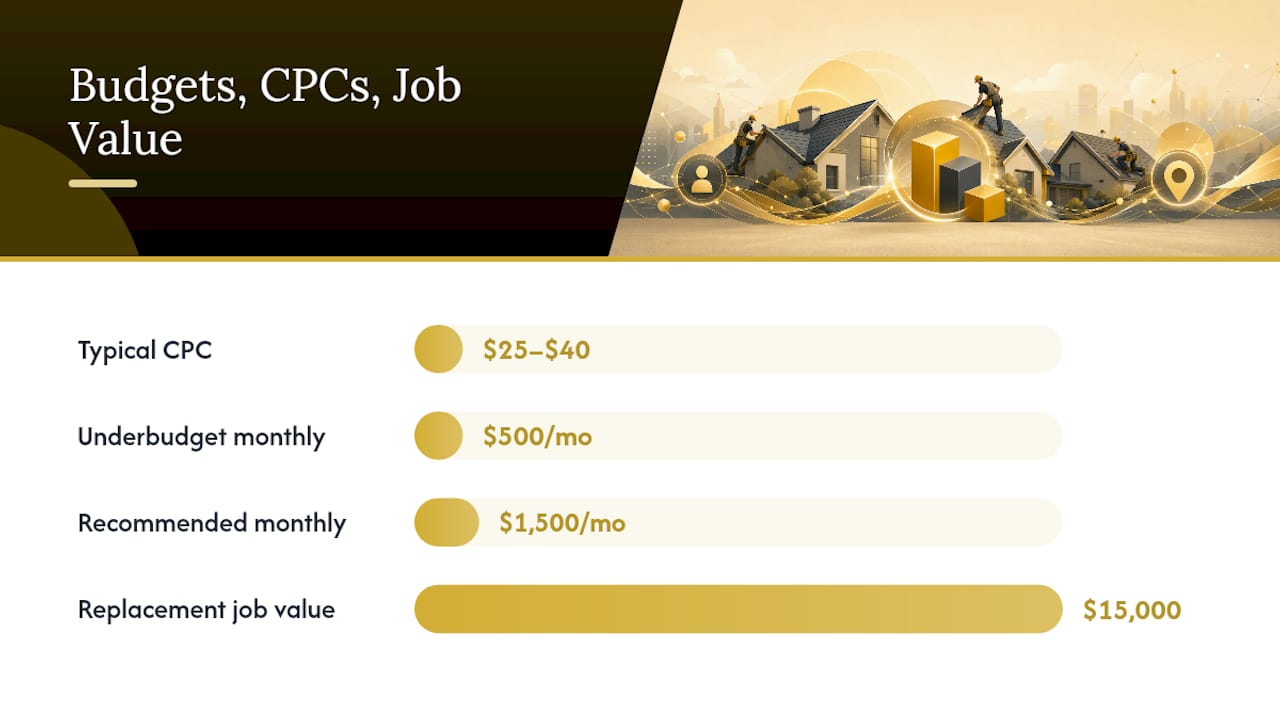
Underbudgeting below the learning threshold. Spending $500/month in a market where roofing CPCs run $25–$40 means you're getting 12–20 clicks and almost no conversion data. Fix: commit to at least $1,500/month or pause until you can.
Mixing repair and replacement keywords in one ad group. A homeowner searching "roof leak repair" and one searching "roof replacement cost" have completely different intent, timelines, and budgets. Mixing them forces Google to show the same ad to both, which tanks relevance scores. Fix: separate ad groups with dedicated copy and landing pages for each intent.
No call tracking. Without call tracking, you can't tell which keywords, ads, or campaigns are generating calls. You're flying blind on your primary conversion. Fix: add a Google forwarding number or a CallRail number before your campaign goes live.
Missing negatives at launch. Without a negative list, your ads will show for job seekers, DIYers, and material suppliers within the first 48 hours. Fix: add a 20–30 term negative list before the campaign activates.
Not importing closed revenue. If Google only sees calls and form fills, it optimizes for contact volume, not job value. A $500 repair call and a $15,000 replacement call look identical without offline conversion data. Fix: set up CRM-to-Google Ads offline conversion import within your first 30 days.
Red flags in your reporting to watch for:
- High click volume, zero calls or forms: landing page problem or wrong keywords.
- High lead volume, zero booked jobs: lead quality issue, wrong service area, or slow follow-up.
- Conversion rate below 3% on a roofing landing page: form is too long, page loads too slowly, or trust signals are missing.
- Average CPC climbing week over week with no budget increase: competitors are raising bids; review your Quality Score and ad relevance.
For a broader look at how managed Google Ads services correct these structural errors, the patterns are consistent across home service verticals.
How Leapify Media approaches roofing Google Ads
Leapify Media's process for roofing accounts follows a consistent sequence: audit the existing account or build from scratch, segment campaigns by intent (repair, replacement, storm), build or optimize landing pages for each segment, integrate CRM and call tracking for offline conversion import, then shift to value-based bidding once conversion data is stable.
The core operating principle is that clicks are not the product. Booked jobs are. Every structural decision, from keyword match types to landing page form length, is evaluated against its effect on cost-per-acquisition based on closed revenue, not cost-per-lead.
What that looks like in practice:
- Separate campaigns for repair, replacement, and storm with independent budgets.
- Landing pages built to match each intent theme, with trust bars pulling live Google review data.
- Call tracking numbers assigned per campaign so attribution is clean.
- CRM integration that captures GCLID at lead entry and exports closed-job revenue weekly.
- Storm-response campaigns pre-built and paused, ready to activate within hours of a weather event.
Leapify Media specializes in converting marketing spend into booked jobs for home service businesses. Clients have reported improvements up to a 20x return on ad spend through the combination of intent-segmented campaigns, AI-powered lead dispatch, and offline conversion optimization.
What actually wins in roofing Google Ads
The conventional wisdom in roofing PPC is to run more keywords, write more ads, and spend more budget. That's not wrong, but it misses the real lever.
The roofing businesses that consistently generate booked jobs from Google Ads share one trait: they treat speed-to-lead and CRM discipline as part of their ad strategy, not as separate operational concerns. A campaign that generates 20 calls a month means nothing if 12 of those calls go to voicemail or sit in a spreadsheet for 48 hours. The close rate on a roofing lead drops sharply after the first hour. That's not a marketing problem. It's a response problem that marketing spend is funding.
The second thing most guides understate is storm season budgeting. Successful roofing businesses don't scramble to increase budgets after a storm. They have a pre-built protocol: a paused campaign with storm-specific copy, a dedicated landing page, and a budget increase rule ready to fire. The window between a weather event and peak search volume is narrow, often 12–24 hours. Businesses that are live within that window capture a disproportionate share of the highest-value leads of the year.
Pair Search with LSA from the start. Keep campaigns segmented by intent. Invest in tracking that connects ad spend to closed revenue. And build your storm response before you need it.
Leapify Media helps roofers turn ad spend into booked jobs
Running roofing Google Ads correctly requires more than a live campaign. It requires intent-segmented structure, landing pages that convert, call tracking that feeds clean data, CRM integration that closes the loop between ad spend and revenue, and a storm-response protocol that activates before competitors react.

Leapify Media builds that entire infrastructure for roofing businesses. The service covers Google Ads and LSA management, AI-powered lead dispatch that routes inbound calls in real time, CRM setup and offline conversion integration, storm automation, and landing page production. Unlike traditional agencies running generic playbooks, Leapify uses in-house AI systems on private servers, so your lead data stays proprietary and your campaigns improve faster.
If your current campaigns are generating clicks but not booked jobs, or if you're starting from scratch and want a structure built for measurable ROI from week one, see what Leapify Media builds for home service operators or get the full picture on the growth infrastructure.
Sources
The benchmarks, platform guidance, and review behavior data in this guide draw from the following sources. Check platform documentation directly for the latest policy and format updates, as Google Ads features and LSA requirements change regularly.
- Google Ads Help — About ad assets and extensions
- StatCounter — Search Engine Market Share
- BrightLocal — Local Consumer Review Survey 2023
- Google Ads for Roofing Companies