

Performance Max can drive real store visits, in-store sales, and local actions, but only when your account meets Google's location and conversion requirements. The move is to select the "Local store visits and promotions" objective, confirm your Business Profile and location data are accurate, and commit to a 30-day learning window before judging results. Skip that setup and you're just burning budget on a campaign type that has no local signal to optimize against.
TL;DR:
- Performance Max local campaigns require at least 10 verified store locations for store visits and sales, or around 5 for local actions, to generate sufficient data.
- Successful setup demands accurate Business Profiles, location assets, relevant inventory feeds, and high-quality creative assets, with a minimum 30-day learning period.
- Campaigns show across Google Maps, Waze, local inventory ads, YouTube, Display, and Gmail, each serving different functions from driving visits to awareness.
- Practitioners advise a daily budget of $30 to $50 and 30 to 50 conversions per month to ensure effective Smart Bidding and learning.
- Operational success depends on fast lead responses, proper lead routing, offline conversion tracking, and in many cases, pairing PMax with additional campaigns or operational infrastructure.
Table of Contents
- What Is Performance Max Local and How Does It Work?
- Where Do Performance Max Local Ads Actually Show Up?
- How Do You Set Up a Performance Max Campaign for Store Goals?
- Is Your Account Eligible for Performance Max Local Campaigns?
- What Optimization Practices Actually Move the Needle?
- How Do You Measure Whether Local Performance Max Is Working?
- What Does Leapify Media Require Operationally to Make This Work?
- When Does Performance Max Local Actually Make Sense?
- Get Your Local Performance Max Campaign Built Right the First Time
- Sources
- FAQ
What Is Performance Max Local and How Does It Work?
Performance Max for store goals runs on a single campaign objective: local store visits and promotions. Instead of juggling separate campaigns for Search, Display, and YouTube, you feed Google one set of inputs, and its AI decides where and to whom to show your ads across every property it controls. Google's own documentation on Performance Max for store goals confirms the campaign promotes physical locations across Search, Maps, Waze, YouTube, Gmail, and Display, and recommends running it for at least 30 days before drawing conclusions.
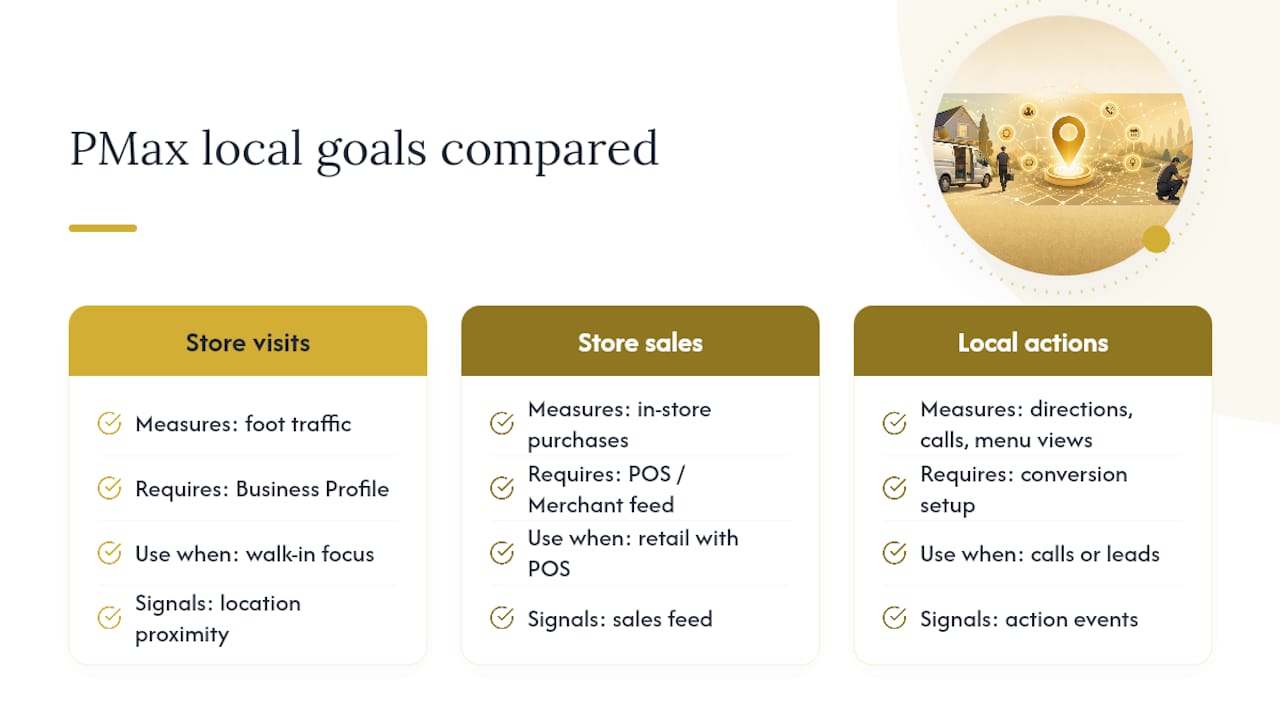
The three outcomes PMax can chase locally aren't interchangeable. Store visits count foot traffic near your locations. Store sales estimate actual in-store purchases, usually for retailers with point-of-sale data. Local actions cover things like direction requests, calls, and menu views. Each requires different backend setup, and picking the wrong one for your business model wastes the learning period.
PMax needs specific inputs to work. Your Business Profile and location assets tell Google where your stores or service areas are. If you sell physical inventory, a Merchant Center feed with local inventory data lets PMax show what's actually in stock nearby. Creative assets (images, video, headlines, logos) give the algorithm something to test across formats. And your conversion goals, weighted by value, tell Smart Bidding what a "win" actually looks like.
Here's the part most advertisers underestimate: PMax doesn't invent quality inputs. It optimizes ruthlessly against whatever signals you hand it, but a thin Business Profile or generic creative gives the AI nothing distinctive to work with. Smart Bidding then cross-references your conversion history, audience signals, and location data to find users near your stores who are statistically likely to visit, call, or buy. That matching happens in real time, across every channel PMax touches, which is exactly why the setup quality upfront matters more here than in a standard Search campaign.
Where Do Performance Max Local Ads Actually Show Up?
PMax local campaigns don't live in one place. They stretch across Google's entire local footprint, and each surface plays a different role in getting someone from "saw an ad" to "walked in the door."
- Google Maps: Your business appears with promoted pins and directions prompts when someone searches nearby, often the single strongest driver of measurable visits.
- Waze: Promoted pins surface along a driver's actual route, turning a commute into a spontaneous stop, particularly effective for quick-service and convenience-driven categories.
- Local inventory ads (via Merchant Center): These show real-time product availability at nearby stores and support in-store pickup signals, which matters if you're competing on "buy it today, not in three days."
- YouTube, Display, and Gmail: These handle awareness and consideration, the mid-funnel touches that get someone thinking about your brand before they're anywhere near your store.
- Business Profile: Enhanced visibility here ties directly back to the same data that fuels your Maps and Search presence.
The mistake advertisers make is judging a Display impression by the same yardstick as a Maps click. They're doing different jobs in the same campaign, and PMax's reporting doesn't always make that distinction obvious.
How Do You Set Up a Performance Max Campaign for Store Goals?
Setting up a local PMax campaign follows a specific sequence in Google Ads, and skipping steps here is where most local advertisers lose weeks of learning time. Google's own campaign creation guidance lays out the core flow.
- Select the campaign objective. Choose "Local store visits and promotions" as your goal, then set the campaign type to Performance Max.
- Link your Business Profile. Connect location groups or affiliate locations so Google can pull accurate address, hours, and category data.
- Skip redundant radius targeting. Once location assets are linked, PMax infers geography from them. Layering a manual radius on top just confuses the signal.
- Confirm and prioritize your conversion actions. Decide whether store visits, store sales, or local actions matter most, then assign each a conversion value that reflects its real worth to your business.
- Link Merchant Center if relevant. If you're promoting in-store products, enable local inventory ads so PMax can show what's actually on the shelf.
- Build campaign feeds and upload assets. This means images sized for every placement, short videos, logos, and headline and description variations for each asset group.
- Set your budget and commit to a duration. Plan for a minimum 30-day run, since that's the window Google needs for the learning phase to stabilize.
On budget, don't start too thin. Practitioner guidance for local service businesses points to daily minimums in the range of $30 to $50 per day, or $900 to $1,500 monthly, alongside 30 to 50 conversions a month to give Smart Bidding enough data to work with. Below that, you're feeding the algorithm scraps and wondering why it can't learn.
Is Your Account Eligible for Performance Max Local Campaigns?
Not every account qualifies for every store goal out of the gate, and location count is the biggest gatekeeper most advertisers overlook. Google's optimization guidance for store goals lays out the practical minimums.
- Store visits and store sales typically need around 10 verified business locations to generate enough data volume for Smart Bidding to work with.
- Local actions (calls, direction requests, bookings) have a lower bar, generally around 5 locations.
- Store sales reporting often requires allowlisting from Google, since it estimates offline purchases rather than counting a visit or a click.
- Conversion volume matters as much as location count. Smart Bidding needs a steady stream of conversion events, not a handful scattered across a month, to find reliable patterns.
If you're running two or three locations, you're not necessarily locked out of PMax, but you'll likely need to lean on local actions (calls, direction clicks) rather than store visits as your primary signal, simply because you won't hit the volume threshold otherwise.
What Optimization Practices Actually Move the Needle?
Most of the underperformance complaints about local PMax trace back to a handful of fixable mistakes, and the fixes are almost always about giving the algorithm sharper local signal, not fighting it.
Build location-specific asset groups, not one generic set. Developer documentation on PMax asset group structure is blunt about this: if every location shares the same images and copy, PMax has no way to tell your downtown location apart from your suburban one, and it starts treating them as interchangeable. Local imagery, neighborhood-specific copy, and a unique final URL per location asset group force the system to respect real differences between markets.
Weight your conversion values honestly. A store visit isn't worth the same as a phone call, and a phone call isn't worth the same as a completed booking. If you're bidding toward "maximize conversion value," feed it real numbers, something like $25 for a store visit and $10 for a call, adjusted to your actual close rates, not round numbers picked out of convenience.
Watch for budget cannibalization across locations. When you're running location-specific asset groups inside one PMax campaign, or separate campaigns for different regions, Smart Bidding will chase whichever market shows the fastest signal, sometimes at the expense of a slower but ultimately more profitable one. Multi-location advertisers often need to split budgets by region rather than trusting a single pooled budget to distribute fairly.
- Keep creative assets fresh. Stale images and copy lose relevance signal over time, even if performance looks stable on the surface.
- Follow Google's creative specs closely, image dimensions, video length, logo formatting, since mismatched assets get deprioritized in rotation.
- Build seasonal or event-specific asset groups with adjusted expectations rather than forcing a holiday promotion into your always-on creative.
- If you run per-location branded Search campaigns, know that PMax can start bidding on that same branded traffic and inflate your overall cost per click.
Pro Tip: If you notice one location's cost per visit creeping up while another drops, check whether they're sharing a budget pool. Splitting them into separate budget allocations often fixes the imbalance faster than any creative change will.
How Do You Measure Whether Local Performance Max Is Working?
Store visits reporting and store sales reporting aren't the same lens, and mixing them up is how advertisers convince themselves a campaign is failing when it isn't. Store visits reporting works at the campaign level and estimates foot traffic based on location history and device signals. Store sales reporting, where available, ties closer to actual transactions but usually needs Google's allowlisting first.
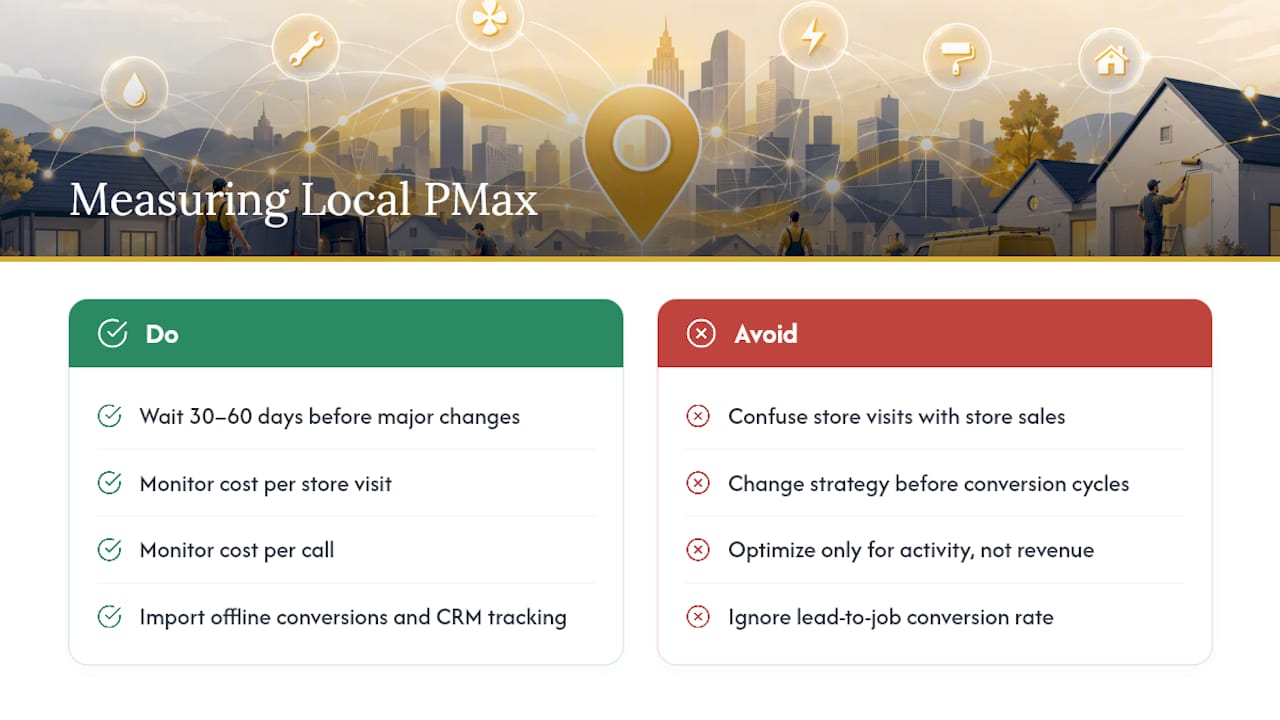
Patience matters more here than in most campaign types. Google's own guidance recommends waiting through one to two full conversion cycles, typically 30 to 60 days, before making major changes, since offline conversions like store visits take time to surface in reporting after the actual visit happens.
The metrics worth watching closely: cost per store visit, cost per call, local conversion rate by geography, and, if you're tracking further downstream, lead-to-job conversion rate. That last one matters enormously for service businesses, since a cheap store visit or call means nothing if it never turns into revenue.
Close the loop with offline conversion imports and CRM call tracking. Without that connection, you're optimizing toward "activity" instead of "business results," and those are not the same thing.
What Does Leapify Media Require Operationally to Make This Work?
A campaign can be technically flawless and still fail if your business can't handle what it generates. Call tracking, CRM lead forwarding, and fast response times matter as much as the ad setup itself, since phone calls and immediate leads convert at meaningfully higher rates when someone actually answers quickly.
A specialized marketing agency builds location-specific asset groups for every service area a client operates in, assigns conversion values based on real historical close rates rather than defaults, and routes incoming leads through on-premise AI dispatch so calls and form fills reach the right technician fast. For home service businesses layering PMax alongside Local Service Ads, that operational backbone is often the difference between wasted spend and booked jobs. When conversion volume is thin, Leapify frequently recommends pairing PMax with a Search campaign for stronger control until data volume catches up.
When Does Performance Max Local Actually Make Sense?
PMax rewards businesses with enough conversion volume and the operational muscle to handle what it generates. It trades granular control for scale, which is a fair trade once your tracking and lead handling are solid. Smaller advertisers without steady conversion history should build that volume and fix tracking gaps before leaning on PMax as a primary channel.
— Everson Gorski
Get Your Local Performance Max Campaign Built Right the First Time
Leapify Media is the alternative to hiring a generalist agency for local Performance Max campaigns: instead of a templated setup, you get location-specific asset groups, conversion values based on your real close rates, and lead routing built for how home service businesses actually operate.

The technical setup is only half the equation. A campaign that drives calls and store visits still needs someone to answer fast, log the lead correctly, and follow up before the customer calls a competitor. The agency handles that whole chain, campaign setup, CRM integration, call tracking, and on-premise AI dispatch that routes leads to the right technician in seconds, so the leads PMax generates actually turn into booked jobs. Equipment and field-efficiency tracking from partners like EquipTrack can round out that operational picture once your crew volume starts climbing. If your current setup is generating clicks without generating revenue, check out Leapify Media's services to see how the full system fits together for your business.
Sources
- About Performance Max for store goals - Google Ads Help
- Performance Max asset group guidance - Google Ads Developer documentation
FAQ
Is Performance Max Worth It for Local Businesses?
It's worth it once your account meets Google's location minimums (around 10 locations for store visits or sales, 5 for local actions) and you can sustain 30 to 50 conversions a month; below that volume, Smart Bidding struggles to learn effectively.
How Do I Turn Off Google Local Service Ads?
Local Service Ads and Performance Max run as separate products, so pausing or removing Local Service Ads requires managing that campaign directly in your Local Services dashboard rather than through PMax settings.
What Does Performance Max Actually Do for Store Goals?
It runs a single campaign objective, local store visits and promotions, across Search, Maps, Waze, YouTube, Display, and Gmail, using your Business Profile, conversion values, and creative assets to find nearby users likely to visit, call, or buy.
Is $20 a Day Good for Google Ads?
For most local Performance Max campaigns, practitioner guidance points to $30 to $50 a day as a realistic floor for Smart Bidding to gather enough conversion data to optimize properly.