

Marketing automation is essential for any contractor who wants consistent lead capture and more booked jobs instead of a mailbox full of unanswered form fills. Done right, it means faster response times, steady follow-up through a long sales cycle, and revenue you can actually trace back to the dollars spent. If you do nothing else this week, connect your lead intake to a speed-to-lead trigger inside your CRM or field service management (FSM) platform. Everything else in this guide builds from there.
TL;DR:
- Response time within five minutes significantly increases the chances of capturing leads, especially when automation triggers instant texts or calls.
- Building sequences around weather events, such as storms, delivers fast ROI by targeting homeowners during peak demand periods.
- Ensuring a two-way sync between your automation tools and FSM or CRM systems is crucial for accurate attribution and ROI measurement.
- Focused, short rollout phases for automation sequences, with regular audits every three months, prevent messaging fatigue and maintain relevance.
- Success depends on tracking booked and invoiced jobs rather than just leads, with a typical ROI of over five dollars in revenue for every dollar spent on automation.
Table of Contents
- What Marketing Automation Actually Means for Contractors
- Core Automation Sequences That Actually Move Booked Jobs
- Software Stack Categories and How to Wire Them Together
- How to Choose and Implement Marketing Automation
- Measuring ROI: Track to Booked and Invoiced Jobs
- Common Mistakes, Governance, and Best Practices
- Leapify Media's Evidence and Author Expertise
- Cost Overview and Pricing Models for Contractor Automation Tools
- The Deployment Timeline From Selection to First Measurable ROI
- Real-World Patterns in Contractor Automation Success
- Legal and Compliance Considerations for Contractor Marketing Data
- When to Build Automation In-House vs. Hire a Managed Provider
- How Leapify Media Helps Contractors Automate and Scale
- Sources
- FAQ
What Marketing Automation Actually Means for Contractors
Marketing automation for contractors is the practice of using software to trigger the right message, to the right person, at the right point in the job pipeline, without a human deciding to hit "send" every time. That's the whole idea. It's not chatbots pretending to be your dispatcher, and it's not a robot voice calling homeowners at dinner. It's a system that watches your pipeline and reacts.
Picture the actual path a lead takes through a contracting business: a homeowner fills out a form or calls after a storm, your team gives a quote, the job gets scheduled, a technician shows up, the invoice gets paid, and eighteen months later that same homeowner needs a filter changed or a gutter cleared. Automation touches every one of those handoffs.
- Intake: A new lead lands in your CRM or FSM the second the form submits or the call ends.
- Speed-to-lead: A text or call attempt fires automatically within minutes, not hours.
- Estimate follow-up: If a quote sits untouched for 48 hours, a reminder goes out on its own.
- Appointment reminders: SMS and email confirmations cut down no-shows before a truck ever rolls.
- Post-job upsell: Once a job closes, a maintenance offer or review request triggers automatically.
Good automation doesn't replace relationship selling. It protects it. Most homeowners hire the contractor who responds first and follows up consistently, not necessarily the cheapest bid. Automation is what keeps that consistency alive when your estimator is on a roof and can't check their phone for three hours.
None of this works in isolation, though. You need your CRM or FSM talking to call tracking, your CRM talking to your SMS provider, your SMS provider talking to email, and all of it feeding your ad accounts so you know which campaigns actually produce paid jobs. Review platforms need to plug in too, since a five-star review triggered right after job completion converts better than one requested a month later. Adobe's own marketing automation guide frames this as an orchestration problem more than a tooling problem: the software matters less than whether the systems actually talk to each other.
Core Automation Sequences That Actually Move Booked Jobs
Not every automated sequence earns its keep. Some genuinely move the needle on booked jobs; others just generate noise. Here's the priority order, based on what actually shows up in the numbers.
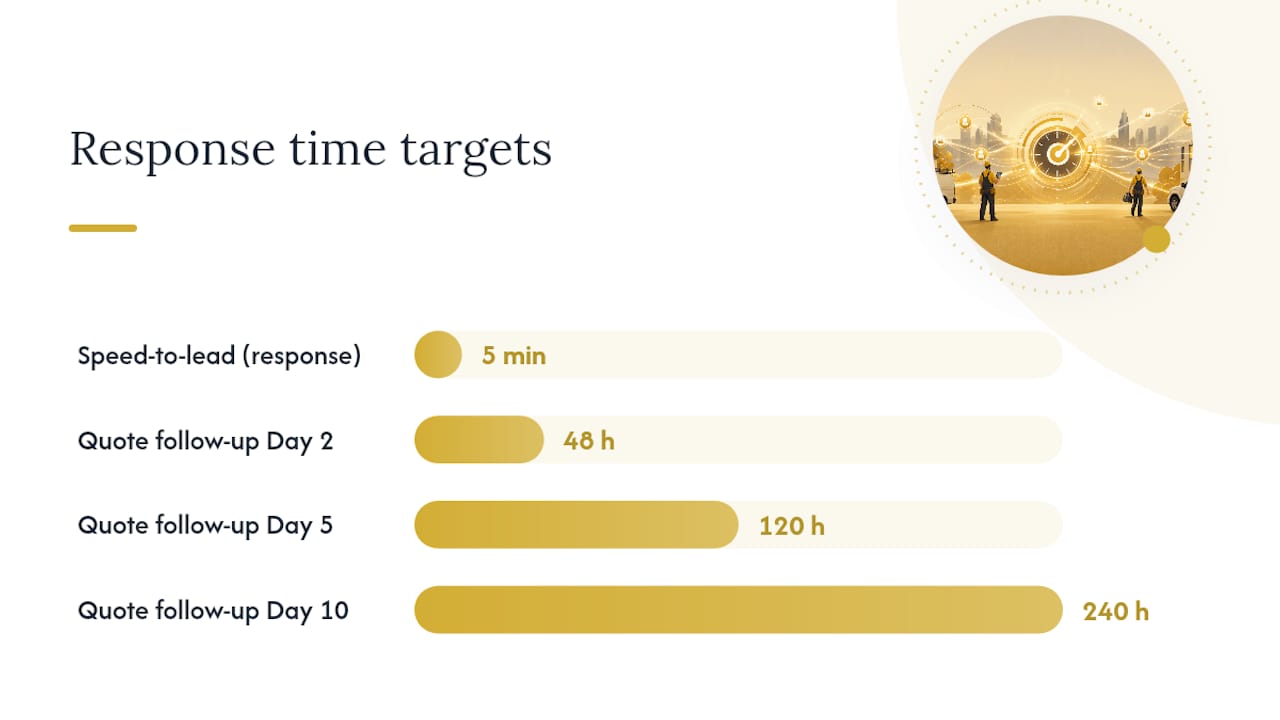
- Speed-to-lead. Response time inside five minutes dramatically outperforms anything slower, and automation is the only reliable way to hit that window every single time, including nights and weekends when your office is closed. A missed call trigger that fires an instant text ("Thanks for reaching out, we'll call you back shortly") buys you time without losing the lead to a competitor who answered first.
- Quote and estimate follow-up. Most unclosed estimates die from silence, not price objections. A cadence of a day-two check-in, a day-five value reminder, and a day-ten final nudge, spaced out and varied in tone, recovers jobs that would otherwise just go cold.
- Weather-triggered campaigns. Roofing, HVAC, and restoration companies see real spikes in demand after storms, and automation that fires SMS and ad campaigns within hours of a weather event captures homeowners while the damage is still fresh in their minds. Practitioner ROI models built around home services automation show this kind of event-driven sequence paying back fast, precisely because the demand spike is short and automation is the only way to move at its speed.
- Post-job upsell and maintenance renewals. A job that closes today is a lead for a maintenance plan, a seasonal tune-up, or a referral request six months from now. Automating that timeline turns a one-time customer into recurring revenue without anyone remembering to follow up manually.
- Multi-channel orchestration. Combining SMS, email, and a scheduled call attempt into one sequence beats any single channel alone, but only when it's throttled. Three touches in the first 48 hours, then tapering off, respects the homeowner's inbox while still staying visible.
Pro Tip: Cap any single sequence at three touches within 48 hours, then space remaining touches out over days, not hours. Homeowners unsubscribe from cadences that feel like a countdown clock, not from cadences that feel like a person checking in.
The Invesp overview of marketing automation makes a point worth repeating here: automation should model how a great salesperson would actually behave, just without the fatigue. If your best estimator would never text a lead four times in one day, your automation shouldn't either.
Software Stack Categories and How to Wire Them Together
Contractors don't need one giant platform. They need a handful of tools that pass information cleanly, in both directions, without anyone manually re-typing a phone number into three systems. Think of the stack in layers.
- Intake and tracking: Call tracking numbers, form capture, and chat widgets that log every inbound contact with its source attached.
- Orchestration and automation: The layer that watches for triggers (new lead, quote stalled, job completed) and fires the right sequence.
- CRM or FSM: Where the job record lives, from first contact through invoice and warranty.
- Ads and retargeting: Google Ads, Meta Ads, and retargeting pixels that need job outcome data fed back to them to optimize spend.
- Reporting: The layer that ties spend to booked jobs, not just to leads or clicks.
Every layer needs specific capabilities to earn a spot in your stack. Two-way sync matters most: a tool that only pushes data in one direction (say, leads into your CRM but no job-status updates back out) leaves your automation blind to what actually happened after the quote. Job-status triggers, webhooks, and solid email and SMS deliverability monitoring round out the checklist. If a vendor can't answer a direct question about webhook support, that's your answer.
There are two broad integration patterns worth knowing. The first is an orchestration layer sitting above your existing FSM or CRM, coordinating messages across systems without replacing anything you already use. Adobe's own architecture guidance treats this as the more pragmatic path for mid-size operations, since it avoids the disruption of ripping out a system your dispatch team already knows. The second is embedded marketing automation built directly inside the FSM itself, which is simpler to manage but can box you in if you outgrow that platform's marketing features later.
The trade-off is straightforward: orchestration above your FSM gives you flexibility and lets you swap pieces later, at the cost of more setup work upfront. Embedded automation inside your FSM is faster to launch but harder to extend. Neither is universally right. A two-truck plumbing outfit and a 40-truck HVAC operation will land on different answers, and that's fine.
Data silos are the real enemy either way. A CRM automation setup built around home service intake and dispatch only works if lead source, job status, and invoice data all flow through the same pipeline. Before you sign anything, ask a vendor to show you a live sync between their tool and your FSM, not a slide deck. If they can't demo it, it doesn't exist yet.
How to Choose and Implement Marketing Automation
Picking a platform is the easy part. Getting it running without breaking your existing workflow is where most contractors stall. A staged rollout beats a big-bang launch every time.
Start with a short evaluation checklist before you sign anything:
- Data ownership. Confirm you can export your full lead and customer history if you ever switch providers.
- Two-way FSM/CRM sync. Job status changes need to flow both directions in near real time, not overnight batches.
- SMS throughput and deliverability. Ask what carrier filtering and opt-out handling looks like at your expected message volume.
- Reporting tied to booked jobs. Confirm the dashboard can show cost-per-booked-job, not just cost-per-lead.
- Realistic implementation timeline. A vendor promising full deployment in 48 hours is either overselling or underscoping the work.
During evaluation, ask vendors direct questions: "Show me a real client dashboard tracking booked jobs, not leads." "What happens to my data if I cancel?" "How do you handle carrier-level SMS filtering for high-volume accounts?" Vague answers to any of these are a warning sign.
Once you've picked a direction, a 90-day rollout keeps the project from collapsing under its own scope.
Phase 1 (Days 1 to 30): Lead intake and speed-to-lead. Connect every intake source (forms, calls, chat) into one system and get the instant response trigger live. This alone often produces the fastest visible lift, since it fixes the leakiest part of most contractors' funnels.
Phase 2 (Days 31 to 60): Nurture and quote follow-up. Build out the estimate follow-up cadence and appointment reminder sequences. This is also when you connect review requests to job completion.
Phase 3 (Days 61 to 90): Event triggers and upsells. Layer in weather-triggered campaigns, maintenance renewal sequences, and retargeting tied to your ad accounts. By day 90 you should have enough data to see which sequences are actually producing booked jobs.
Pro Tip: Don't launch all three phases at once, even if the software lets you. Your team needs time to trust that the automation is doing what you told them it would do, and that trust builds one working sequence at a time.
Watch for these red flags during implementation: no two-way sync between your automation tool and your FSM, attribution reporting that can't trace a lead past the first click, and no deliverability monitoring on your email or SMS sending domains. Any one of these will quietly erode your results for months before you notice.
Measuring ROI: Track to Booked and Invoiced Jobs
Form fills are not revenue. Cost-per-lead is a vanity metric if you can't connect it to a paid invoice, and this is the single biggest reporting mistake contractors make with marketing automation.
Real ROI measurement for a contracting business rests on six inputs:
- Total marketing spend for the period
- Number of leads that convert to a booked appointment
- Lead-to-quote conversion rate
- Quote-to-job conversion rate
- Average ticket size per job
- Gross margin per job type
With those six numbers, a simple spreadsheet formula gets you to the metric that actually matters: cost-per-booked-job equals total spend divided by number of booked jobs, and return on ad spend equals total revenue from those jobs divided by total spend. That's it. No dashboard required, though a good CRM will calculate it for you automatically.
Nucleus Research found that marketing automation returns $5.44 for every dollar spent on average across the businesses it studied. That figure comes from companies that measured through to actual revenue, not from ones counting form fills as conversions. If you're only tracking leads, you're measuring the wrong end of the funnel and any ROI number you report is fiction.
The most common attribution mistake is last-touch bias: crediting whichever channel happened to send the final message before a homeowner booked, even when a different channel started the conversation weeks earlier. A homeowner who first saw a Google ad after a storm, then converted three days later off a retargeting text, didn't convert "because of" the text alone. Multi-touch attribution, even a rough version that tracks first-touch and last-touch separately, gives you a far more honest picture of which campaigns deserve more budget.
Common Mistakes, Governance, and Best Practices
Automation left unattended drifts. Sequences that made sense six months ago start firing at the wrong time, messaging gets stale, and deliverability quietly degrades while nobody's watching. This is the part of automation contractors skip, and it is the part that determines whether the system still works a year from now.
The most common failure mode is treating automation as set-and-forget. A cadence built once and never revisited eventually starts annoying the exact leads it was meant to convert, because customer expectations and message volume both shift over time. Over-messaging is the fastest way to burn a list: cap any sequence at three touches in the first two days, then space remaining messages out over a week or more.
A quarterly audit keeps things honest. Check these four items every three months:
- Messaging relevance: Are the templates still accurate about pricing, availability, and service area?
- Deliverability metrics: Has your email open rate or SMS delivery rate dropped compared to last quarter?
- List hygiene: Are dead numbers, bounced emails, and duplicate contacts getting purged?
- Job-status reconciliation: Does the automation's record of "completed jobs" actually match your invoicing system?
Pro Tip: Assign one person, even part-time, to own the quarterly audit. Automation that nobody owns is automation nobody notices breaking until a customer complains about getting the wrong message three times in a row.
If you're using AI to draft any of your automated content, whether it's SMS copy or follow-up emails, put brand-voice guardrails in place before it goes live. A generic AI-written message that doesn't sound like your business erodes trust fast, and homeowners notice when a message reads like it came from nowhere in particular.
Leapify Media's Evidence and Author Expertise
This guide draws on the practical patterns Leapify Media applies when building automation infrastructure for home service companies, documented in resources like the automated lead follow-up guide covering real sequence design for small and mid-size operators.
Leapify Media works specifically with home service businesses, roofing, HVAC, plumbing, restoration, electrical, and landscaping companies, on the infrastructure side of marketing: ad management, CRM automation, and lead dispatch systems. Two architecture patterns show up repeatedly in that work. On-premise AI dispatch, where lead scoring and routing logic run on infrastructure the client controls rather than a third-party AI vendor, fits companies that want their customer data to stay proprietary. Orchestration layered above an existing FSM fits contractors who already have a system their dispatch team trusts and don't want to rip it out to add marketing automation.
Neither pattern is right for every contractor. The choice depends on how much control a business needs over its own data and how much disruption it can tolerate during a transition.
Cost Overview and Pricing Models for Contractor Automation Tools
Pricing for marketing automation tools generally falls into a few recognizable models, and knowing which one you're being sold matters more than the sticker price alone.
Monthly retainer or subscription pricing is the most common structure, where you pay a flat monthly fee for a tiered set of features, more contacts, more automation workflows, or more advanced reporting unlocked at higher tiers. À la carte or modular pricing lets you pay separately for specific pieces, like ad management or CRM automation, without bundling everything into one package. Some vendors charge one-time setup fees for initial CRM integration or AI dispatch configuration, separate from any ongoing monthly cost. Larger accounts sometimes negotiate performance-based components, where part of the fee ties to results like booked jobs or revenue generated.
The mistake to avoid is comparing sticker prices without comparing what's actually included. A cheap monthly plan that caps your contact list at a few thousand names will cost you more in the long run than a slightly pricier plan built for your actual lead volume, once you factor in the lost jobs from a list that hits its ceiling mid-campaign. Ask any vendor for their tier limits, overage charges, and what happens to your automation if you go over, before you sign anything, not after your first invoice arrives with a surprise.
The Deployment Timeline From Selection to First Measurable ROI
Full deployment, from picking a platform to seeing your first measurable return, typically spans three distinct stages, and rushing any of them tends to backfire.
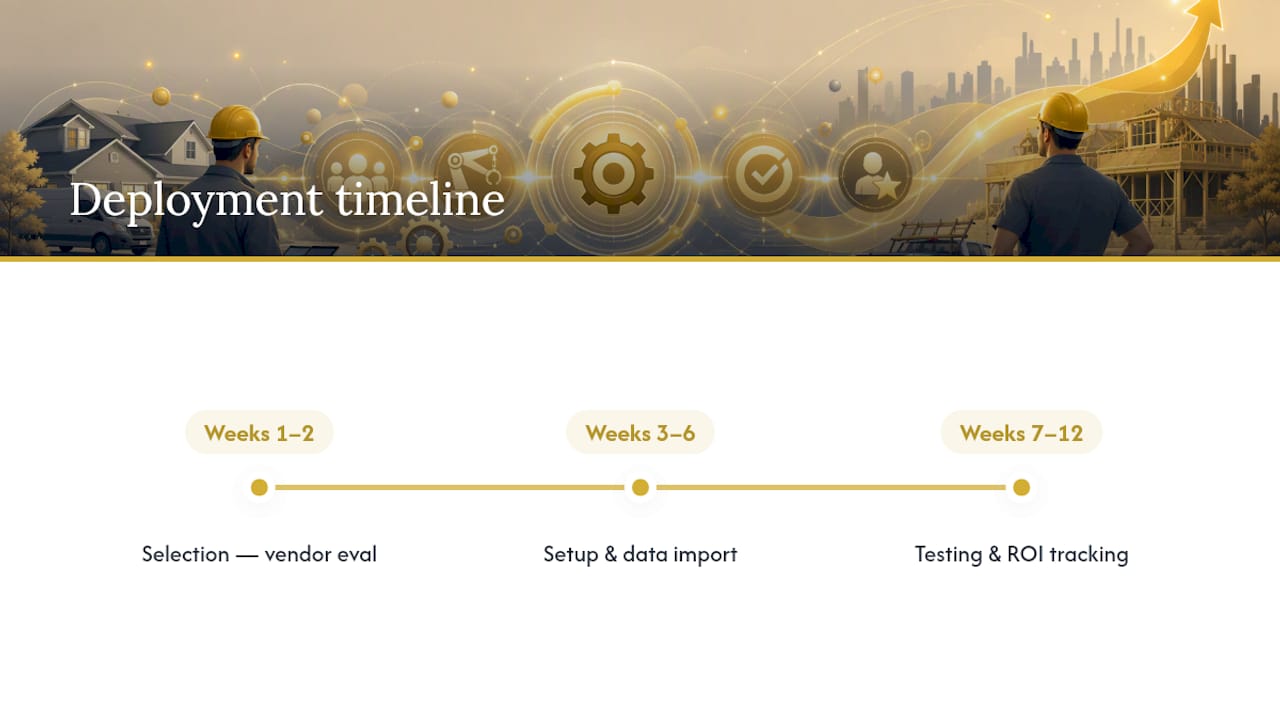
Selection (Weeks 1 to 2): Evaluate vendors against the checklist covered earlier, data ownership, two-way sync, SMS throughput, and reporting tied to booked jobs. Get a live demo of the FSM integration before signing anything.
Setup and configuration (Weeks 3 to 6): Connect intake sources, configure the speed-to-lead trigger, and build out your first two or three sequences. This is also when you clean and import your existing customer data, which usually takes longer than anyone expects.
Testing and first results (Weeks 7 to 12): Run the live sequences against real leads, watch deliverability closely, and start tracking cost-per-booked-job. Most contractors see their first clear ROI signal somewhere between week 8 and week 12, once enough leads have moved all the way through to a booked and invoiced job.
That 12-week window lines up closely with the 90-day rollout plan covered earlier, and that overlap isn't a coincidence. The phases that get your sequences live are the same phases that generate the data you need to prove the investment paid off.
Real-World Patterns in Contractor Automation Success
The contractors who see the strongest results from automation tend to share a few habits, regardless of trade or company size.
They start narrow. Rather than automating every possible touchpoint at once, the businesses that succeed pick one high-leverage sequence, almost always speed-to-lead, and get it working reliably before adding anything else. A roofing company that automates its post-storm response before touching its maintenance renewal sequence sees faster, clearer wins than one trying to launch five sequences simultaneously.
They also track the right number from day one. Companies that set up cost-per-booked-job reporting before launching automation, rather than bolting it on later, catch underperforming sequences within weeks instead of months. This is where the ROI models built around weather-triggered home services campaigns prove useful: event-driven sequences are easy to test in isolation, since you can measure a single storm's response against a clear before-and-after baseline.
And they treat their FSM or CRM as the single source of truth. Contractors who let job status live in one system and lead source live in another consistently struggle to prove ROI, because no single report tells the full story. The ones who succeed insist on that two-way sync from the start, even if it means turning down an otherwise appealing tool that can't deliver it.
Legal and Compliance Considerations for Contractor Marketing Data
Automated texting and email fall under real federal rules, and getting this wrong carries actual financial risk, not just an annoyed customer.
The Telephone Consumer Protection Act governs automated texts and calls, and it requires clear consent before you send marketing messages to a phone number, along with an easy way to opt out of every message. CAN-SPAM sets similar requirements for email: a working unsubscribe link, accurate sender information, and no misleading subject lines. Neither law cares whether a human or a piece of software sent the message. If your automation platform sends it on your behalf, your business is still the one responsible for compliance.
Customer data handling matters just as much. Contractors collect names, addresses, phone numbers, and sometimes payment details through their CRM and FSM systems, and that data needs reasonable security protections regardless of which state you operate in. Several states have their own data privacy laws with specific consumer rights around access and deletion requests, so it's worth confirming with a qualified attorney whether any apply to your business before you scale up your data collection.
Keep opt-out requests processed immediately, not batched weekly, and keep a documented consent trail for every phone number and email address in your system. If a vendor can't show you how they log consent timestamps, that's a compliance gap you're inheriting, not just theirs.
When to Build Automation In-House vs. Hire a Managed Provider
Building automation in-house means owning every integration and every fix, which sounds appealing until a webhook breaks at 2 a.m. and nobody on your team knows why. In-house makes sense once you have someone dedicated to the systems full time, not as a side project for your office manager.
A managed provider makes more sense for most contractors under a certain scale, because the time-to-value is faster and the ongoing engineering burden sits with someone else. The trade-off is less direct control over the day-to-day tooling, though not necessarily less control over your own data, depending on how the provider is structured.
The clearest signal it's time to hire out is when your team is spending more hours fixing broken automation than the automation saves them. If your tracking has gaps, your speed-to-lead numbers are inconsistent, and nobody can produce a clean cost-per-booked-job report, that's not a tooling problem. That's a resourcing problem, and it usually means the DIY phase has run its course.
— Everson Gorski
How Leapify Media Helps Contractors Automate and Scale
Some providers offer alternatives to traditional agencies for contractors who want their lead data to stay in-house instead of being routed through third-party AI vendors. Some providers run infrastructure that they build and control, rather than relying on rented APIs from other companies, which can help keep the intake, scoring, and dispatch logic proprietary to the business.

Available services include Google Ads and Meta Ads management designed for booked-job tracking, CRM setup and automation linked to FSM platforms, AI lead dispatch and intent scoring solutions, and local SEO and content production to maintain pipeline flow between campaigns. These services typically suit home service companies with significant annual revenue in trades like HVAC, plumbing, roofing, landscaping, restoration, and electrical contracting that require scalable infrastructure beyond basic DIY tools.
If your team is buried in leads you can't respond to fast enough, or your reporting still stops at "cost-per-lead" instead of cost-per-booked-job, that's the signal it's time to talk to someone who builds this for a living. Visit Leapify Media's services page to see what a proposal looks like for your trade and revenue range.
Sources
- Marketing automation returns 5.44 for every dollar spent — Nucleus Research
- Marketing automation guide — Adobe (PDF)
- Marketing automation overview and best practices — Invesp
- 5 Steps to Calculate Home Services Automation ROI in 2026 — US Tech Automations
FAQ
How do I market myself as a contractor?
Start with fast response times and consistent follow-up. A speed-to-lead automation combined with active Google Ads, local SEO, and review generation covers the core of what most successful contractors do to stand out.
What are the top marketing automation tools for contractors?
Rather than chasing a specific list, look for tools in each category your stack needs: intake tracking, CRM/FSM, SMS and email orchestration, and reporting tied to booked jobs. A CRM automation setup built for home service dispatch is a good place to start evaluating what "good" looks like in that category.
What are effective marketing ideas for contractors?
Weather-triggered campaigns for storm-driven trades, post-job maintenance renewal sequences, and automated review requests right after job completion consistently produce results because they target moments when homeowners are already thinking about your service.
What are examples of marketing automation in contracting?
Common examples include an instant text triggered by a missed call, an automated quote follow-up cadence over ten days, appointment reminder texts sent before a job, and a maintenance plan offer that fires automatically six months after job completion.
Does marketing automation actually work for small contracting businesses?
Yes, and the return often shows up faster for smaller operations because a single missed lead represents a bigger share of monthly revenue. Businesses that measure through to booked jobs, not just leads, tend to see automation pay back within a few months of proper setup, particularly when event-driven campaigns are involved.