

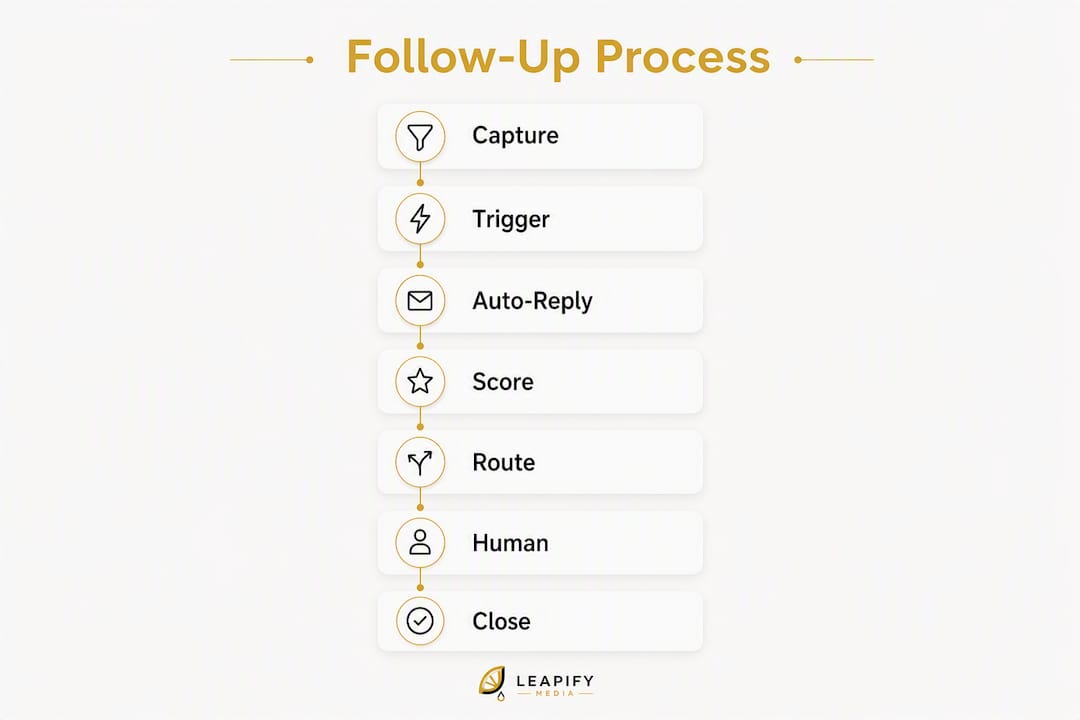
Set a sub-5-minute first response using CRM triggers plus an intelligent routing and scoring layer. That single decision recovers more leads than any other change you can make to your sales process.
Here is the minimum viable action checklist:
- Capture every inbound lead from web forms, paid ads, calls, and chat into one CRM
- Auto-respond within 60 seconds via SMS and email with a booking link or qualification question
- Score the lead by intent signals (source, service type, urgency keywords) before routing
- Route high-intent leads to an available rep or calendar slot immediately
- Trigger a multi-touch cadence (SMS, email, call) over the next 7 days for leads that do not book
Leads contacted quickly are dramatically more likely to qualify than those reached much later. In home services, where a homeowner's burst pipe or dead AC unit demands an answer now, that window is even tighter.
Pro Tip: On the first touch, prioritize speed and a single clear action (phone number, calendar link) over personalized copy. A fast, plain message beats a polished one that arrives 20 minutes later.

Table of Contents
- What is an automated lead follow-up system, and how does it differ from manual follow-up?
- Why does automating lead follow-up matter for your conversion rate?
- What core components does your system need?
- How do you build an automated follow-up system step by step?
- What cadence and templates should you use?
- Which KPIs should you track, and how do you improve them?
- What U.S. compliance rules apply to automated follow-up?
- What does implementation actually cost, and how long does it take?
- Why does intelligent scoring plus fast routing actually work?
- Key Takeaways
- The part most businesses get wrong about speed-to-lead
- How Leapify Media builds this infrastructure for home service companies
- Useful sources and further reading
What is an automated lead follow-up system, and how does it differ from manual follow-up?
Automated lead follow-up ties your lead capture sources to a set of rules and triggers that launch messages, tasks, and rep assignments without anyone pressing "send." The moment a form is submitted or a call comes in, the system acts. No one has to notice, remember, or prioritize.
Manual follow-up depends entirely on a rep checking a queue, deciding who to call first, and finding time between other tasks. The result is predictable: leads go cold, after-hours inquiries sit until morning, and high-intent prospects book with whoever called them back first.
The practical differences come down to four things:
- Speed: Automation responds in seconds; manual processes average far longer than most businesses realize, typically several hours or more.
- Consistency: Every lead gets the same sequence, regardless of which rep is on duty or how busy the day is
- Coverage: Automated systems work at 2 AM on a Sunday; your team does not
- Accountability: SLA rules and alerts make it easy to see when a lead falls through the cracks
The scope of a complete system includes capture sources (web forms, Google Local Service Ads, paid social, inbound calls, live chat), outreach channels (SMS, email, outbound call), a CRM or workflow engine to store and route data, and an AI scoring layer that ranks leads by purchase intent before they reach a rep.
Automation does not replace the human conversation. It makes sure that conversation happens fast, with the right person, on the right lead.

Why does automating lead follow-up matter for your conversion rate?
Speed is the single biggest lever in lead conversion, with a significantly higher likelihood to connect with a lead when responding promptly versus waiting longer, and most deals go to the vendor that responds first. Those numbers hold across industries, but they hit hardest in home services, where a homeowner searching for an HVAC tech or a roofer is often comparing three companies simultaneously.
Speed-to-lead stat: Leads contacted quickly are dramatically more likely to qualify and book than those reached after some time has passed. Contact and qualification odds decline sharply as time passes after initial contact.
The operational benefits compound quickly once the system is running:
- Higher contact rate: Automated first touches catch leads before they move on
- Better qualification: Scoring filters separate high-intent leads from tire-kickers before a rep spends time on them
- Fewer wasted ad dollars: Every lead that enters the pipeline gets a follow-up sequence, not just the ones a rep happened to notice
- 24/7 capture: After-hours leads, weekend inquiries, and holiday requests get an immediate response
- Rep time savings: Reps spend their hours on conversations, not on chasing cold leads or sending routine check-in emails
The business KPIs that move are contact rate, qualification rate, booked calls per lead, cost per booked job, and revenue per lead. Improve speed and consistency, and all five tend to shift in the right direction.
What core components does your system need?
A working lead follow-up automation system has eight components. Missing any one of them creates a gap where leads leak out.
| Component | Primary purpose | Example trigger |
|---|---|---|
| Lead capture | Collect lead data from all sources into one record | Form submission, inbound call, ad click |
| Data enrichment | Fill in missing fields (phone, company, service type) | API call on new CRM record creation |
| CRM ingestion | Store, deduplicate, and timestamp every lead | Webhook from landing page or ad platform |
| Workflow triggers | Launch sequences based on rules and lead status | New lead created, status changed to "contacted" |
| Intent scoring | Rank leads by purchase likelihood before routing | Source + service type + urgency keyword match |
| Routing and assignment | Send lead to the right rep or calendar slot instantly | Score threshold met, rep availability check |
| Channel templates | Pre-built SMS, email, and call scripts for each stage | Trigger fires → template sends with tokens filled |
| Analytics and alerts | Track SLA compliance and flag leads that stall | No contact within 5 minutes → manager alert |
Integration requirements are worth mapping before you build. You need webhooks or API connections between your capture sources and CRM, an SMS provider (such as Twilio or a platform with native SMS), a calendar booking widget (Calendly or a CRM-native scheduler), and optionally a phone enrichment or intent-data service.
Automating lead distribution and routing removes manual assignment delays and ensures leads reach the right rep without anyone manually checking a queue. That is the piece most small businesses skip, and it is usually the biggest bottleneck.
Pro Tip: Build the minimal pipeline first: capture → auto-reply → score → route. Add advanced scoring rules and personalization only after you have two to four weeks of conversion data to calibrate against.
How do you build an automated follow-up system step by step?
A minimum viable system takes 1–3 weeks to stand up if your lead data is reasonably clean. Full scoring and optimization typically takes 6–12 weeks. Here is the ordered checklist.
-
Map your capture points and assign owners. List every source where leads arrive (Google Ads, Meta Ads, organic web forms, inbound calls, Google Local Service Ads). Assign one person responsible for each source feeding correctly into the CRM.
-
Standardize lead data and set up enrichment. Define required fields (name, phone, email, service type, zip code, source). Build an enrichment step that fills gaps automatically so routing rules have clean data to work with. Tooling gaps and enrichment delays are among the most common causes of slow response times.
-
Build auto-response flows. Create an instant SMS reply and a 15-minute email for every capture source. Both should include a booking link or a single qualifying question. Test every form and ad source to confirm the trigger fires.
-
Implement scoring and routing rules. Assign point values to signals: source (paid search scores higher than organic), service type (emergency repair scores higher than general inquiry), and urgency language in the message. Route leads above your threshold to an available rep; route lower-scoring leads to a nurture sequence.
-
Create cadence templates. Write SMS, email, and call-script templates for each stage of the sequence (covered in detail in the next section). Keep them short, specific to the service requested, and with one clear call to action per message.
-
Set SLAs and alerts. Define your response-time targets (e.g., auto-reply within 60 seconds, first human contact within 5 minutes for high-intent leads). Build alerts that notify a manager when a lead breaches the SLA.
-
QA and test. Submit test leads from every capture source. Confirm the CRM record is created, the auto-reply fires, the score is calculated correctly, and the routing sends the lead to the right place. Check opt-out links and consent fields.
-
Roll out and monitor. Launch with one campaign or one lead source first. Track contact rate, time-to-first-human contact, and booked calls daily for the first two weeks before expanding.
For readers evaluating lead conversion software agencies to handle this build, the checklist above doubles as a vendor evaluation framework.
Pro Tip: Run a one-week pilot on a single campaign before full rollout. Measure three numbers only: contact rate, time-to-first-human contact, and booked calls. If all three improve, scale the system.
What cadence and templates should you use?
Start immediately, then space out. That is the core rule. An omnichannel sequence that opens with an instant auto-reply and a human call attempt within 5 minutes will outperform any single-channel approach, regardless of how well-written the messages are.
Recommended cadence timeline:
- 0–60 seconds: Instant SMS auto-reply with booking link
- Within 5 minutes: First outbound call attempt by a rep (or AI dispatch for high-intent leads)
- 15 minutes: Follow-up email with service details and booking link
- 1 hour: Second SMS reminder if no response
- 4 hours: Second call attempt or voicemail drop
- 24 hours: Check-in email with a value-add (FAQ, testimonial, or offer)
- Day 7: Nurture email with educational content and a soft CTA
Template snippets:
Instant SMS (0–60 seconds): "Hi [First Name], thanks for reaching out about [Service Requested]. We have availability in [City] — grab a time here: [Booking Link]. Reply STOP to opt out."
15-minute email subject: "Your [Service] request — here's what happens next" Body: "Hi [First Name], we received your request for [Service] in [Location]. [Rep Name] will be in touch shortly. In the meantime, you can book directly: [Booking Link]."
1-hour SMS reminder: "Hi [First Name], still here when you're ready. [Company Name] — [Phone Number]. Reply STOP to opt out."
Call script opener: "Hi, is this [First Name]? This is [Rep Name] from [Company]. You reached out about [Service] — I wanted to make sure we connect quickly. Do you have two minutes?"
Day 7 nurture email: Subject: "Still thinking about [Service]? Here's what our customers say." Body: A short value paragraph, one customer result (real, attributed), and a single CTA button.
Personalization tokens that matter most: first name, service requested, city or zip, and the rep's name on call attempts. Those four tokens make a message feel specific without requiring complex data.
Pro Tip: Vary the channel and tone across touches. A 4-hour gap with a different channel (call after SMS) avoids the robotic impression that kills response rates on automated sequences.
Which KPIs should you track, and how do you improve them?
Six metrics tell you whether your lead nurturing automation is working. Track all six, and you can pinpoint exactly where leads are dropping out.
- Speed to first contact: Time from lead creation to first auto-reply (system) and first human conversation (rep)
- Contact rate: Percentage of leads that reach a two-way conversation
- Qualification rate: Percentage of contacted leads that meet your criteria for a booked call
- Booked calls per lead: Booked appointments divided by total leads in the period
- Conversion from booked to paid job: Booked calls that become paying customers
- Revenue per lead: Total revenue divided by total leads, by source
| Metric | Why it matters | How to measure |
|---|---|---|
| Speed to first contact | Predicts contact rate; benchmarks show sharp drop-off after 5 minutes | CRM timestamp: lead created vs. first activity logged |
| Contact rate | Reveals if your auto-reply and call attempts are reaching leads | Contacts with ≥1 two-way exchange ÷ total leads |
| Qualification rate | Shows if scoring is filtering correctly | Qualified leads ÷ contacted leads |
| Booked calls per lead | Ties the system to pipeline output | Booked appointments ÷ total leads |
| Revenue per lead | Connects marketing spend to revenue | Total revenue from cohort ÷ leads in cohort |
A/B testing framework: Change one variable at a time. Good candidates: SMS copy on the first touch, subject line on the 15-minute email, call script opener, and send time on the day-7 nurture. Run each test for at least two weeks or until you have enough leads to see a pattern. Do not declare a winner on fewer than 30 leads per variant.
Score tuning works the same way. After four weeks of data, compare the average booked-call rate for leads in each score band. If your top-scoring leads are not booking at a higher rate than mid-tier leads, your scoring weights need recalibration. Adjust the weights on the signals that correlate most strongly with booked jobs, not just with contact.
Pro Tip: Track system timestamps and human timestamps separately. Auto-reply speed and rep response speed are two different problems with two different fixes.
What U.S. compliance rules apply to automated follow-up?
Get consent and provide a clear opt-out on every commercial SMS and email. That is the baseline. TCPA (Telephone Consumer Protection Act) governs automated SMS and calls; CAN-SPAM governs commercial email. Both carry real penalties for non-compliance.
Must-do compliance checklist:
- Written consent before SMS: Capture opt-in at the point of form submission with clear disclosure language (e.g., "By submitting, you agree to receive texts from [Company] at the number provided")
- Simple opt-out on every message: "Reply STOP to opt out" on every SMS; an unsubscribe link in every email
- Message identification: Every commercial email must identify the sender and include a physical mailing address (CAN-SPAM requirement)
- Record retention: Log consent timestamps, IP addresses, and opt-out requests; retain records for at least 4 years
- Time-of-day rules: Avoid automated calls and SMS before 8 AM or after 9 PM local time (TCPA requirement)
- Suppression lists: Remove opted-out contacts from all sequences immediately and maintain a do-not-contact list
Deliverability best practices:
- Authenticate your sending domain with SPF, DKIM, and DMARC records before sending any volume
- Warm new IP addresses and sending domains gradually over 2–4 weeks
- Keep complaint rates below 0.1% (Google's threshold for inbox delivery)
- Avoid spam trigger words in subject lines ("FREE," "ACT NOW," all-caps strings)
- Monitor bounce rates weekly; remove hard bounces immediately
Pro Tip: For complex consent scenarios (e.g., leads from third-party aggregators or shared lead pools), consult a communications attorney before launching automated SMS. One sentence of legal review is cheaper than a TCPA class action.
What does implementation actually cost, and how long does it take?
Most small businesses can stand up a minimum viable system in 1–3 weeks. Full scoring, routing optimization, and cadence testing typically take 6–12 weeks from kickoff to a stable, data-backed system.
| Approach | Setup cost (one-time) | Monthly recurring | Timeline to MVP |
|---|---|---|---|
| DIY (SaaS CRM + SMS platform) | — | — | 2–4 weeks |
| Hybrid (agency setup + your CRM) | — | — | 3–6 weeks |
| Fully managed / on-premise AI | — | — | 4–10 weeks |
Recurring costs to budget for: SMS credits (volume-dependent, typically $0.01–$0.05 per message), CRM subscription tiers, enrichment or intent-scoring API calls, and ongoing template and routing maintenance.
The internal resource requirement is real. Someone needs to own the system: reviewing alerts, updating templates when offers change, and monitoring KPIs weekly. Budget 3–5 hours per week for a non-technical owner during the first 90 days.
AI-powered routing and auto-response can produce an 8x speed improvement when configured correctly. That speed gain is where the ROI shows up fastest, which is why the managed or on-premise approach often pays back its higher setup cost within the first few months.
Pro Tip: Automate SLA alerts and routing before you invest in advanced personalization. Speed returns value faster than polish, every time.
Why does intelligent scoring plus fast routing actually work?
Combining instant automated responses with intent scoring and fast routing materially raises both contact rate and qualification rate. The mechanism is straightforward: speed gets you the conversation; scoring makes sure the conversation is with someone who is actually ready to buy.
AI-powered lead scoring improves conversion rates significantly over static rules, and the gap widens when scoring is paired with automated follow-up. Static rules (e.g., "all paid search leads go to rep A") treat every lead the same. AI scoring weights signals dynamically, so a homeowner who searched "emergency AC repair near me" at 2 PM on a Friday gets routed ahead of a general inquiry that came in from a blog post.
The speed side of the equation is equally well-documented. Benchmarks replicated across multiple studies show contact and qualification odds fall sharply after the first few minutes, and the first-responder advantage is durable across service categories.
Leapify Media builds this infrastructure for home service companies using on-premise AI for lead dispatch and intent scoring, with CRM integration and routing rules configured to each client's service area and team structure. The Leapify Media services page outlines the full stack, including Google Ads and Meta Ads management, local SEO, and custom automation. For readers who want to go deeper on tool selection, the Leapify Media blog on lead generation tool alternatives covers the evaluation criteria in detail.
A practical validation test: run A/B routing for 30 days. Send half your leads through your current routing logic and half through AI-scored routing. Compare contact rate, qualification rate, and booked calls per lead. The delta between the two groups is your scoring ROI.
Pro Tip: Track the time from lead creation to first human conversation, not just to first auto-reply. The auto-reply is table stakes. The human conversation is where deals are made.
Key Takeaways
Automated lead follow-up works because speed, scoring, and consistent multi-touch sequences together recover leads that manual processes lose to delay, inconsistency, and after-hours gaps.
| Point | Details |
|---|---|
| Speed is the primary lever | Leads contacted within 5 minutes are dramatically more likely to convert or qualify, with qualification odds falling sharply as time passes after initial contact. |
| Build the minimal pipeline first | Capture → auto-reply → score → route is the core; add personalization only after you have conversion data. |
| Compliance is non-negotiable | TCPA written consent, CAN-SPAM identification, and suppression lists must be in place before any automated SMS or email sends. |
| Track both timestamps | Measure time to auto-reply and time to first human contact separately; they diagnose different problems. |
| Leapify Media builds this stack | Leapify Media provides on-premise AI dispatch, CRM integration, intent scoring, and routing for home service companies. |
The part most businesses get wrong about speed-to-lead
The 5-minute rule gets cited constantly, and almost every business that hears it nods and then does nothing about it. The problem is not awareness. It is that most teams treat the first auto-reply as the finish line.
An instant SMS confirmation is not a follow-up. It is an acknowledgment. The actual follow-up, the one that determines whether you book the job, is the first human conversation. And that conversation, in most small businesses, still happens whenever a rep gets around to it.
The deeper issue is that speed without qualification is just noise. Calling every lead within 5 minutes sounds like a win until your best rep spends 40 minutes on a price-shopper while a high-intent emergency job goes to voicemail. That is where intent scoring earns its place. It is not a nice feature on top of a working system. It is what makes speed useful.
Home service businesses often face bursts of leads, and their teams are usually in the field. Prompt text-backs with calendar links can recover leads missed by calls, a recovery approach many operators have yet to build but can yield high returns.
The businesses that win on lead conversion are not the ones with the most sophisticated automation. They are the ones that made a fast, simple system work consistently, then improved it with data. Start there.
How Leapify Media builds this infrastructure for home service companies
Home service operators who want faster bookings without rebuilding their tech stack from scratch get a different result with Leapify Media than they do with a generic marketing agency. Leapify builds the entire infrastructure described in this guide, including on-premise AI lead dispatch, CRM integration, intent scoring, and automated routing, and manages the pilot rollout so your team does not have to figure out the configuration.

The practical difference is in the data. Because Leapify runs on-premise AI rather than third-party cloud tools, your lead data stays on your infrastructure. That matters for businesses handling high call volumes and sensitive customer information. The system is built around your service area, your team's availability windows, and your specific lead sources, not a generic template.
Clients working with Leapify Media on this infrastructure have reported significantly improved returns on ad spend. If you want to see whether your current setup has the gaps this guide describes, the right next step is a diagnostic review of your lead pipeline. Visit Leapify Media's services page or request a diagnostic at leapifymedia.com to start the conversation.
Useful sources and further reading
The claims and recommendations in this guide draw on the following sources, each linked directly for readers who want to verify the underlying data or go deeper on a specific topic.
- CRM lead response time impact statistics | Demand Local, Inc. — Primary source for the 5-minute and 100x connection-rate statistics used throughout this guide
- Speed-to-Lead Benchmarks: Every Lead Response Stat Worth Citing | Pipes.ai — Benchmark compilation supporting the cadence recommendations and the sharp drop-off in qualification odds after the first few minutes
- Speed to Lead: Statistics & Strategies for Lead Response Time | LeadAngel — Operational guidance on automated routing and its effect on speed and consistency
- Average Lead Response Time in 2026: Data & Benchmarks | Prospeo — Data on how slow average response times remain and the role of enrichment delays
- Lead Response Time Benchmarks — How Fast Is Fast Enough? | Optifai — Benchmark on the 8x speed improvement from AI routing and recommended implementation steps
- AI lead follow up | SetSmart — Analysis of AI scoring versus static rules and its effect on conversion and qualification rates
- 60+ Lead Generation Statistics Every Agency Should Know | Lead Distro AI — Aggregated statistics including the 78% first-responder advantage and the 100x connection-rate finding
- Services — Leapify Media | What We Build For Home Service Operators — Leapify Media's full service stack, including on-premise AI dispatch, CRM automation, and lead scoring
- Top 5 Lead Generation Tools Alternatives 2026 | Leapify Media blog — Tool evaluation guidance for readers selecting capture or enrichment platforms