
AI dispatch automatically matches the right technician to the right job by weighing skills, location, and workload in real time, and for most multi-crew trade shops it pays for itself in months, not years. BuildOps surveyed 606 commercial contractors and found 30% say outdated technology is limiting growth, while 80% expect AI to be essential within three years. FieldCamp already runs this in production, assigning jobs by skill, zone, and capacity while showing dispatchers exactly why each tech got the call.
Should a typical multi-crew operation adopt it now? Yes, if you have at least a handful of trucks and enough job volume to make manual scheduling a daily headache. The payoff shows up fast in three places:
- Higher technician utilization because idle windows between jobs shrink
- Lower drive time from smarter route sequencing
- Better first-time fix rates because the right skill set gets matched to the right job
The rest of this guide covers how the technology actually works, what a real implementation timeline looks like, and a checklist for vetting vendors before you sign anything.
Key Takeaways
AI dispatch works when clean skills-matrix data meets a phased Assist-to-Auto rollout, converting recovered drive time directly into billable job capacity.
| Point | Details |
|---|---|
| Start with Assist mode | Let dispatchers validate the AI's reasoning before switching complex jobs to Auto. |
| Clean your skills matrix first | Outdated certifications and messy job-type tags cause more bad matches than the algorithm itself. |
| Track five core KPIs | Monitor drive time, jobs per technician, first-time fix rate, utilization, and SLA compliance weekly. |
| Expect a 3-to-6-month ramp | Quick early wins come first, with compounding accuracy gains building over the following months. |
| Pair dispatch with lead quality | Leapify Media runs on-premise AI dispatch alongside ad-to-job conversion systems, structuring pilots by trade and region. |
Table of Contents
- What Is AI Dispatch for Trades and How Does It Work
- Benefits You Can Measure: Utilization, Drive Time, and First-Time Fix
- How AI Dispatch Works Under the Hood
- What a Realistic Rollout Timeline Actually Looks Like
- Evaluation Checklist: What to Test Before You Sign
- Leapify Media's Approach to AI Dispatch for Home Service Operators
- Why the Skills Matrix Matters More Than the AI Label
- Get AI Dispatch Working Alongside Your Marketing, Not Separate From It
- Sources
What Is AI Dispatch for Trades and How Does It Work
AI dispatch is not the same thing as routing software. Routing optimizes the order of stops on a map. Dispatch decides who goes where, factoring in certifications, truck stock, SLA windows, and crew capacity before a route ever gets calculated. The automation boundary is the real question every dispatch coordinator needs to answer first: how much decision-making authority does the system actually get?
Two modes handle that question differently. Auto mode assigns the job the moment it's created, no human touch required, which works well for routine, well-defined jobs like filter swaps or standard maintenance calls. Assist mode surfaces a ranked recommendation and waits for a dispatcher to approve or override it, which is the safer starting point for complex jobs, VIP accounts, or anything with legal or safety exposure.
The systems worth buying pull from a consistent set of inputs:
- Technician skills, licenses, and certifications
- Live GPS location and current traffic conditions
- Historical job duration data by job type and technician
- Parts and equipment currently loaded on each truck
- SLA terms and customer-specified time windows
Pro Tip: Ask any vendor to show you the reasoning behind a specific assignment during the demo, not just the final match. If they can't explain why Tech A beat Tech B for a given job, you're buying a black box, not a dispatch partner.
Benefits You Can Measure: Utilization, Drive Time, and First-Time Fix
The numbers dispatch coordinators actually care about are drive time, jobs completed per technician per day, first-time fix rate, and SLA compliance. Industry writeups and vendor data commonly cite drive-time reductions in the 25% to 35% range after AI-driven route optimization, a range worth treating as a ceiling rather than a promise until you see it in your own data.
Run the math conservatively. If a technician currently spends significant time driving each day, AI-driven reductions recover meaningful daily minutes. Across a 10-tech crew working many days a year, this adds up to substantial recovered hours, enabling many more service calls without adding headcount.
The compounding effect: Recovered drive time doesn't just save fuel. It converts directly into billable job slots, which is where the real revenue impact shows up.
First-time fix rate improves for a simpler reason: when the system matches certifications and job history correctly, fewer wrong-tech dispatches mean fewer callbacks. Track these on a weekly dashboard:
- Average drive time per technician per day
- Completed jobs per technician
- First-time fix percentage
- Technician utilization rate
- SLA compliance percentage
How AI Dispatch Works Under the Hood
Two distinct types of AI do the heavy lifting, and vendors often blur the line between them in sales pitches. Agentic AI refers to autonomous agents that can take action on their own, assigning a job, rerouting a truck, or flagging an SLA risk without waiting for a human prompt. Predictive AI works differently: it forecasts outcomes, like which asset is likely to fail next, without necessarily acting on that forecast itself.
Makula's analysis of technician dispatching in machinery-heavy operations shows predictive maintenance feeding proactive work orders directly into the dispatch queue, catching failures before they become emergency calls. That's a meaningful shift from reactive scheduling to planned scheduling.

The skills matrix is the backbone of the whole system: a structured map of which technicians hold which certifications, how many hours of a given job type they've completed, and their current capacity for the day. Fieldcode's explainer on AI dispatch describes the system weighing skills, availability, location, SLA terms, and parts readiness simultaneously, then freeing the dispatcher to manage exceptions instead of every single assignment.
Real exception handling looks like this in practice:
- A tech's job runs long, and the system automatically reroutes the next three appointments before the customer even calls to ask
- An emergency job comes in mid-shift, and the AI checks which nearby tech has both the right skill tag and enough slack in their schedule to absorb it without blowing an SLA
- Parts inventory syncs with the CRM so a job never gets assigned to a truck that doesn't actually have the part on board
Integration depth matters here. A dispatch engine that can't talk to your CRM, telematics, and parts system in real time is running on stale data by lunchtime.
What a Realistic Rollout Timeline Actually Looks Like
Before a pilot can produce clean results, you need historical job duration data, complete technician skill profiles, parts and equipment lists, and telematics feeds if you're tracking drive time. Most operations underestimate how much of this groundwork is missing or outdated when they start.
The ramp shape follows a fairly consistent pattern. Expect quick wins in the first few weeks, mostly from eliminating obvious manual scheduling errors, followed by three to six months of compounding accuracy improvement as the system ingests real outcomes and refines its job-duration and technician-performance models.
Three pitfalls show up again and again:
- Incomplete or outdated skill tags that cause the AI to match techs incorrectly
- Messy, inconsistent job-type categories that confuse the duration models
- Missing outcome data, meaning nobody logged whether the first visit actually fixed the problem
Pro Tip: Pilot by trade or region before going company-wide. Run Assist mode first so your dispatchers can validate the AI's logic before handing over full control, a sequencing FieldCamp specifically recommends for building trust in the system.
For teams still running dispatch off a whiteboard or a shared spreadsheet, structured guidance on replacing manual dispatch workflows is worth reading before you even start collecting pilot data.
Evaluation Checklist: What to Test Before You Sign
Vendor demos are where inflated claims meet reality. Prioritize these criteria over flashy dashboards:
- Explainability: does the system show its reasoning for each assignment, or just spit out a name?
- Input breadth: does it factor in skills, SLA terms, parts, and live traffic, or just location?
- Integration depth: does it genuinely connect to your CRM, telematics, and inventory system?
- Data ownership: where does your operational data live, and who else can access it?
- Mode flexibility: can you run Assist for complex jobs and Auto for routine ones simultaneously?
Run these tasks live during the demo:
- Simulate an emergency job mid-shift and watch how it reroutes existing appointments
- Ask to see the reasoning trace behind a completed assignment
- Switch a job from Auto to Assist mode and confirm the handoff is clean
- Check whether the system's CRM and telematics integrations actually sync in real time, not on a delay
Red flags worth walking away from: black-box assignments with zero explanation, promises of instant plug-and-play ROI with no ramp period mentioned, and thin telemetry that can't tell you why a technician was late. As for sizing, AI dispatch tends to justify itself once you're running enough daily job volume that a dispatcher can't mentally track every tech's skill set and location, usually somewhere north of five or six trucks with mixed skill requirements.
Leapify Media's Approach to AI Dispatch for Home Service Operators
Leapify Media builds AI dispatch and intent scoring on on-premise servers rather than routing client data through third-party AI platforms, which matters when job details, customer PII, and technician performance data are involved. That architecture keeps proprietary scheduling logic and customer data inside the client's own infrastructure instead of a shared vendor cloud.
The company's broader focus is turning marketing spend into booked jobs, and dispatch sits downstream of that same conversion logic. In practice, this means:
- Pilots run trade-by-trade, mirroring the phased rollout approach that limits disruption
- Outcomes get measured against the same KPIs covered above: utilization, drive time, and first-time fix
- Clients pairing Leapify's ad-to-job systems with dispatch automation have reported returns as high as 20x on ad spend, a figure tied to the full marketing-to-booking pipeline rather than dispatch alone
The pitch isn't that dispatch AI works in isolation. It works best when the leads feeding it are already qualified.
Why the Skills Matrix Matters More Than the AI Label
Every vendor in this space wants to talk about "AI" as if it's the differentiator. It isn't. The differentiator is whether your skills matrix, job-type taxonomy, and outcome data are clean enough for any algorithm to work with. A poorly tagged technician roster will produce bad assignments whether a human or a machine is making the call.
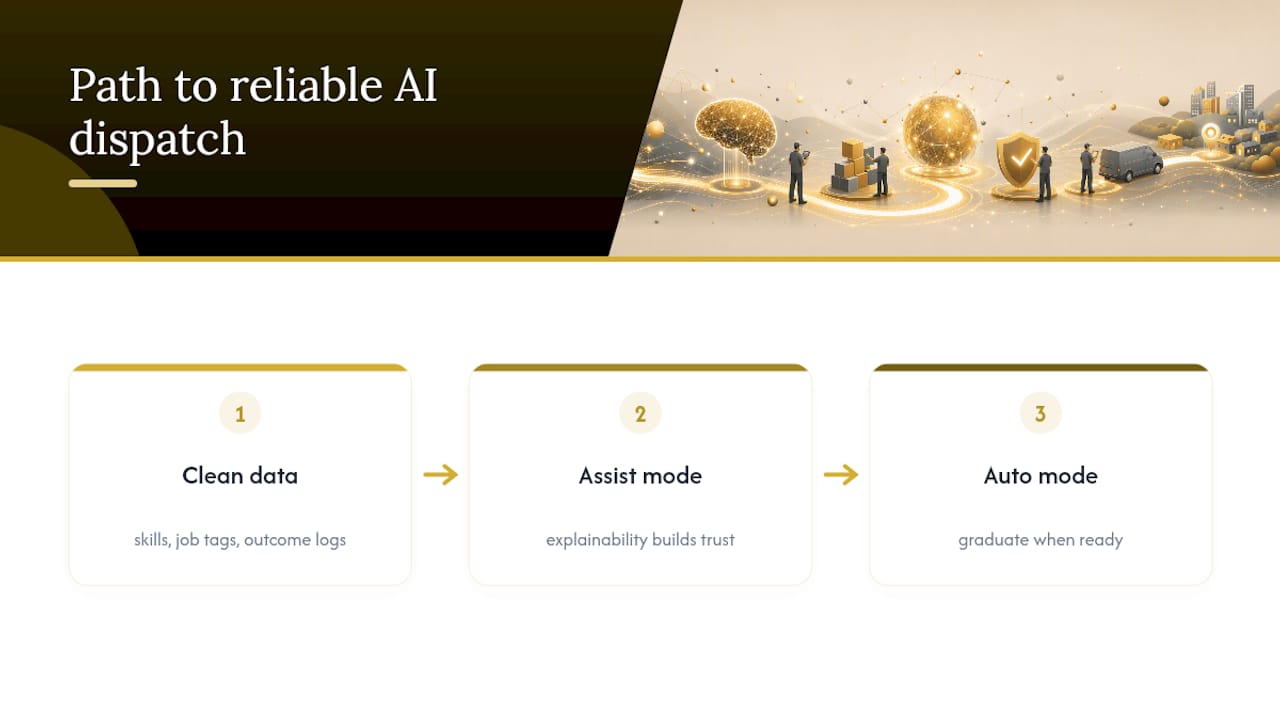
Where conventional advice falls short is in overselling Auto mode as the goal. Plenty of shops rush toward full automation because it sounds more advanced, then get burned when the AI confidently assigns a job to a technician who's two certifications short. Assist mode, treated as a permanent fixture for complex or high-stakes jobs rather than a training-wheels phase you graduate from, is often the smarter long-term architecture. FieldCamp's own framing of explainability as a trust builder backs this up: dispatchers adopt Auto mode faster and more confidently when the system has already proven its reasoning in Assist.
The other overlooked point is that AI dispatch is not primarily a technology purchase. It's a data discipline exercise disguised as software. Shops that treat the pilot phase as an excuse to finally clean up skill tags, job categories, and outcome logging get more value from the AI than shops that expect the algorithm to compensate for messy records. Prioritize the data work first. The dispatch gains follow.
— Everson Gorski
Get AI Dispatch Working Alongside Your Marketing, Not Separate From It
Leapify Media builds AI dispatch as part of a connected system, not a bolt-on tool competing with your existing CRM. Because the dispatch engine runs on-premise rather than through third-party AI platforms, your job history, technician performance data, and customer records stay inside your own infrastructure instead of feeding someone else's model.

For home service businesses generating $500K or more in annual revenue, that combination, on-premise dispatch logic paired with the same infrastructure managing your ad spend and lead conversion, means dispatch decisions get made using data that's actually current, not a weekly export. Leapify's services page outlines how pilots get structured by trade and region, with setup handled as part of the broader marketing infrastructure buildout rather than a standalone integration project. If your dispatch board is still a source of daily friction, reach out to Leapify Media to scope what a pilot would look like for your crew size and trade mix.
Sources
- Guide to AI-Powered Dispatching for Field Service Teams — BuildOps
- Field Service AI Dispatch Scheduling Software — FieldCamp
- AI Dispatch Software: The Complete Guide to Intelligent Technician Routing — Exoserva
- AI dispatching in field service explained — Fieldcode
- How AI supports smart technician dispatching in FSM — Makula