

Choose Jobber if your crew runs five or more stops a day and you need native route optimization with deeper operational reporting. Choose Housecall Pro if you're a solo operator or a two-tech shop that wants the fastest consumer-facing onboarding, polished online booking, and same-day payouts. The one exception worth noting: if you're on QuickBooks Desktop and need a two-way sync, verify that capability directly with each vendor before signing anything, because support for Desktop varies by plan and changes quietly.
According to Field Service Guide's April 2026 comparison, Jobber scores slightly higher overall than Housecall Pro, with Jobber pulling ahead on job tracking and operational depth while Housecall Pro holds its own on consumer-facing workflows. That half-point gap is small, but it reflects a real difference in what each platform is built to do.
| Dimension | Jobber | Housecall Pro |
|---|---|---|
| Starting price | Lower entry-level plan | Higher entry-level plan |
| Best for | 3–20 techs, multi-stop routing | 1–5 techs, fast consumer payments |
| Scheduling style | Native route optimization (added 2025) | Visual dispatch board, real-time assign |
| Payments | Standard card processing, ACH | Same-day/instant payout options |
| Standout feature | Route optimization + job tracking depth | Online booking + consumer checkout polish |
Quick next steps:
- Start both free trials simultaneously and run the same test job through each: create a job, sequence a route, convert an estimate to an invoice, and process a payment.
- Model your true monthly cost before you commit. Take your expected card volume, user count, and any add-ons (GPS tracking, marketing CRM, messaging) and price them out explicitly.
- Ask each sales rep directly: "What does my renewal price look like after year one?" The answer tells you more than the headline rate.
Key Takeaways
Jobber wins on operational depth and routing for multi-tech teams; Housecall Pro wins on consumer-facing payments and fast onboarding for smaller shops, but headline prices understate real cost for both platforms once add-ons and per-user fees are included.
| Point | Details |
|---|---|
| Jobber for routing and reporting | Jobber's native route optimization (added 2025) and stronger job-tracking make it the better fit for 5–20 tech operations. |
| Housecall Pro for fast cash flow | Same-day payout options and polished consumer checkout give Housecall Pro a real edge for solo and small-team operators. |
| Headline prices mislead | Add GPS tracking, marketing CRM, and messaging credits and the all-in monthly cost can double from the advertised starting price. |
| Run your own demo tasks | Auto-sequence a route, convert an estimate, process a payment, and sync to QuickBooks before you decide. |
| Leapify Media for conversion-first setup | Leapify Media helps home-service operators integrate FSM software with Google Ads and Meta Ads tracking so every job record carries its lead source. |
Table of Contents
- How do Jobber and Housecall Pro compare side by side?
- How do scheduling and dispatch actually differ between the two platforms?
- What does Jobber or Housecall Pro actually cost when you add everything up?
- How do estimates, invoicing, and payments affect your cash flow?
- What do techs actually experience in the mobile app?
- How well do Jobber and Housecall Pro connect to QuickBooks and other tools?
- What does support and onboarding look like for each platform?
- Which platform fits your specific business profile?
- How should you evaluate your needs and run a useful vendor demo?
- How does your FSM choice affect lead conversion and marketing ROI?
- What's the final recommendation and what should you do next?
- A note on how we approach FSM selection for clients
- Your FSM should be paying for itself through booked jobs
- Sources and where to read vendor details
How do Jobber and Housecall Pro compare side by side?
Both platforms cover the core field-service management (FSM) stack: scheduling, dispatching, estimates, invoicing, payments, and a mobile app for techs. The split comes down to where each one invests its product depth. G2's feature-by-feature comparison shows Jobber scoring higher on job tracking and support, while both platforms sit close on ease of use.
| Dimension | Jobber | Housecall Pro |
|---|---|---|
| Tier structure | Core → Connect → Grow | Basic → Essentials → Max |
| Best for | Small to mid-size teams, routing-heavy trades | Solo to small teams, consumer-facing workflows |
| Scheduling & dispatch | Native route optimization, job board | Visual dispatch board, drag-and-drop |
| Invoicing & payments | Batch invoicing, card + ACH | Same-day payout, consumer financing |
| Mobile app | High-rated, offline capable | High-rated, polished booking flow |
| Integrations | QuickBooks Online/Desktop, Zapier, API | QuickBooks Online, Zapier, API |
| Ease of use | Slightly steeper learning curve | Faster initial onboarding |
| Add-ons / hidden fees | GPS tracking, chemical tracking (green industry) | Marketing CRM, pipeline, GPS, messaging overages |
The single biggest decision lever here is total cost of ownership versus consumer-facing feature polish. Jobber tends to cost less per seat at scale, and its native route optimization added in 2025 creates a measurable operational advantage for multi-stop trades. Housecall Pro's headline price looks lower at entry, but add GPS tracking, a marketing CRM, and messaging credits for a five-tech shop, and the all-in number climbs fast.
How do scheduling and dispatch actually differ between the two platforms?
This is where the platforms diverge most clearly, and it matters a lot depending on how your crew works.
Jobber's native route optimization sequences multiple stops automatically, calculating the most efficient drive order based on job locations. For a lawn care company running eight stops before noon, or a pest control tech covering a 30-mile radius, that auto-sequencing saves real drive time every day. Jobber added this natively in 2025, which means you're not relying on a third-party integration or a manual workaround.
Housecall Pro's dispatch board is built around real-time assignment and visual management. You see all your techs on a board, drag jobs to reassign them, and push notifications to the field instantly. For an HVAC company handling same-day emergency calls, that visual board is genuinely useful. The platform also sends automated "on my way" texts to customers, which reduces inbound "where is my tech?" calls.
Who wins which use case:
- Many short stops per day (lawn care, pest control, cleaning): Jobber's route optimization wins. The auto-sequencing reduces dead miles without requiring a dispatcher to manually reorder the board.
- Same-day emergency dispatching (HVAC, plumbing): Housecall Pro's drag-and-drop board and real-time push notifications give dispatchers faster control.
- Mixed crews with both scheduled and reactive jobs: test both platforms in a live demo before deciding.
Demo checklist for scheduling:
- Ask the platform to auto-sequence five stops and then manually drag one job to a different time slot. See how it recalculates.
- Test technician availability rules: block a tech for a two-hour window and confirm the system respects that constraint when auto-assigning.
- Edit travel time manually and check whether the change propagates to the tech's mobile view.
- Check how the platform handles a last-minute cancellation mid-route.
Pro Tip: Track average drive minutes per tech per day for your first 30 days on any FSM. If that number doesn't drop after you implement route optimization, your job density or geographic spread may not justify the feature's cost. This single KPI tells you whether routing is actually paying off.
What does Jobber or Housecall Pro actually cost when you add everything up?
Headline prices are marketing. The real number is what you pay after adding the users, add-ons, and payment processing your business actually needs. Housecall Pro's all-in cost analysis makes this point clearly: growth-stage teams frequently see their monthly bill double once GPS tracking, a marketing CRM, and messaging credits are included.
| Team size | Jobber (estimated monthly) | Housecall Pro (estimated monthly) |
|---|---|---|
| Solo (1 user) | Lower-tier pricing | Higher-tier pricing |
| 5 techs | Mid-range pricing with add-ons | Higher-range pricing with add-ons |
| 10 techs | Higher tier with users and add-ons | Top tier with add-ons |
Estimates based on published plan tiers and commonly reported add-on costs. Payment processing fees are additional for both platforms.
Where the hidden costs live:
- Per-user charges: Both platforms charge per user above the base plan's included seat count. Model your actual headcount, not your current one.
- GPS/vehicle tracking: Neither platform includes this in base plans. Expect an additional monthly fee per vehicle.
- Marketing CRM and pipeline tools: Housecall Pro's marketing add-ons are popular but priced separately. If you want automated follow-up campaigns, budget for it.
- Messaging and SMS overages: Both platforms include some messaging, but high-volume shops hit overage fees. Ask for the per-message rate.
- Instant payout fees: Housecall Pro's same-day payout option carries an additional processing fee on top of standard merchant rates.
Questions to ask sales before you sign:
- What is the renewal price after year one, and is there a cap on annual increases?
- How are additional users priced, and is there a per-user cap at higher tiers?
- Which features I've been shown in the demo require a paid add-on?
- What is the per-message SMS rate once I exceed the included volume?
According to Tooled Up Pro's pricing breakdown, Jobber often shows lower realistic prices for multi-user setups once you factor in the add-on structure. That advantage narrows if you don't need route optimization and your team is small enough to stay on Housecall Pro's base plan.
How do estimates, invoicing, and payments affect your cash flow?
Getting paid faster is one of the clearest ROI arguments for FSM software, and the two platforms take different approaches to the payment workflow.
Estimates and quoting: Jobber lets techs build estimates in the field with line items, photos, and optional client-approval links. Clients can approve via email or the client hub portal, which removes the phone-tag loop. Housecall Pro handles estimates similarly but adds a more polished consumer checkout experience, including the ability to offer consumer financing on larger jobs, which matters for HVAC replacements or roofing installs where the ticket size makes financing a real sales tool.
Progress invoicing and batch billing: Jobber supports batch invoicing, which is useful for recurring service businesses that need to bill dozens of clients at once. Housecall Pro handles recurring invoices well but is more oriented toward single-job billing flows.
Payments and payout timing: This is Housecall Pro's clearest advantage. Same-day and instant payout options mean cash hits your account the day the job closes, not three to five business days later. For a small shop managing payroll and supply costs week to week, that timing difference is real money. BuildBite's comparison highlights same-day payouts as one of Housecall Pro's most-cited differentiators in user reviews.
What to test in a payments demo:
- Create an estimate, convert it to an invoice, apply a partial payment, and check how the remaining balance displays to the client.
- Process a card payment and confirm the reconciliation entry in QuickBooks.
- Test the client-approval flow: send an estimate link and approve it from a mobile browser to see what your customer actually experiences.
- Ask about ACH payment fees versus card fees. ACH is typically cheaper for large-ticket jobs.
What do techs actually experience in the mobile app?
Your techs will vote with their thumbs. If the app is clunky, they'll revert to paper or text messages, and your data quality collapses.
Both Jobber and Housecall Pro carry strong mobile ratings on G2, with users on both platforms frequently citing ease of status updates and photo capture as positives. The friction points differ.
Jobber mobile strengths and friction:
- Offline mode works well for techs in areas with spotty coverage.
- Photo attachments, job notes, and signature capture are all available in the field.
- Time tracking is built in, which matters for labor costing.
- Some users report the initial app setup takes longer to learn than Housecall Pro's.
Housecall Pro mobile strengths and friction:
- The onboarding flow is faster, and techs tend to get comfortable with it in a day or two.
- "On my way" automated texts fire directly from the app, reducing dispatcher involvement.
- Some users in reviews note that the app's notification volume can be high, and managing alerts requires configuration.
- Offline functionality exists but has been flagged as less reliable than Jobber's in certain review threads.
Which mobile behaviors matter most by job type:
- Restoration and remediation (many photos, detailed notes): Jobber's attachment handling and offline reliability tend to win.
- Lawn care and cleaning (simple visit notes, quick status updates): either platform works; Housecall Pro's speed advantage shows here.
- HVAC and plumbing (equipment notes, warranty capture, signature on completion): both handle this well; test the custom field setup in your demo.
For teams where technicians also handle phone communications with customers, pairing your FSM with the right phone system matters. The RingCentral vs Nextiva comparison for home service businesses covers how comms tools integrate with FSM workflows and affect on-my-way messaging costs.
How well do Jobber and Housecall Pro connect to QuickBooks and other tools?
Integration quality is where FSM platforms quietly create or destroy hours of accounting work every week.
QuickBooks Online: Both platforms integrate with QuickBooks Online and support two-way sync for customers, invoices, and payments. This is the standard for the category and works reliably on both platforms when configured correctly.
QuickBooks Desktop: Jobber has historically offered broader QuickBooks Desktop support. Housecall Pro's Desktop integration is more limited. If your accountant runs Desktop and isn't ready to migrate to Online, confirm current Desktop compatibility with each vendor directly before you commit.
Zapier and API access: Both platforms connect to Zapier, which opens up integrations with CRMs like HubSpot, lead-capture tools, and marketing platforms. API access is available on higher tiers for both. For teams that want to connect their Google Ads or Meta Ads lead data to FSM job records, Zapier is the practical bridge. CRM automation patterns for home-service businesses explain how to structure that connection so lead source data flows through to the job record.
Integration demo checklist:
- Create a test invoice in the FSM and confirm it appears correctly in QuickBooks within the expected sync window.
- Test duplicate-customer handling: enter the same customer name twice and see how the system resolves the conflict.
- Ask about sync frequency. Real-time sync versus nightly batch sync matters if your accountant needs same-day visibility.
- Confirm which direction the sync runs for payments: FSM to QuickBooks only, or bidirectional.
What does support and onboarding look like for each platform?
Onboarding is where small teams either get up and running in a week or spend two months fighting the software. The platforms differ here in ways that matter.
Jobber support and onboarding:
- Jobber includes onboarding assistance on Connect and Grow plans, with dedicated onboarding calls and a structured setup process.
- Support is available via chat, email, and phone on higher tiers. G2 reviewers consistently rate Jobber's support as a strength, with faster response times cited frequently.
- The self-serve help center is extensive, with video walkthroughs covering most common setup scenarios.
Housecall Pro support and onboarding:
- Housecall Pro offers onboarding on paid plans, but some reviewers on G2 note that support responsiveness has been inconsistent, particularly for lower-tier plans.
- The platform's faster initial setup partially compensates for support gaps: many small teams get functional without needing much help.
- Housecall Pro's G2 reviews show recurring mentions of rising renewal prices and occasional difficulty reaching support during peak periods.
Statistic callout: G2's comparative data shows Jobber scoring higher on support quality in head-to-head feature ratings, a gap that tends to matter most when something breaks mid-season and you need a fast answer.
Typical time-to-value for a small team: A two-tech shop with clean customer data can be operational on either platform within one to two weeks. The variable is data migration: if you're moving from spreadsheets or a legacy system, budget an extra week for cleanup regardless of which platform you choose.
Which platform fits your specific business profile?
The right answer depends less on feature lists and more on how your business actually operates day to day.
Choose Jobber if you:
- Run five or more jobs per tech per day and need auto-sequenced routing to reduce drive time.
- Manage a team of 5–20 techs and need stronger operational reporting to track job profitability.
- Use QuickBooks Desktop and need reliable integration.
- Work in landscaping, pest control, or multi-trade environments where job-tracking depth matters.
Choose Housecall Pro if you:
- Are a solo operator or a two-to-three-tech shop focused on fast setup and consumer-facing polish.
- Need same-day or instant payouts to manage weekly cash flow.
- Offer big-ticket installs where consumer financing helps close jobs.
- Work in HVAC or plumbing with heavy same-day dispatch needs.
| Decision driver | Shortlist |
|---|---|
| Native route optimization | Jobber |
| Same-day payout | Housecall Pro |
| 5+ techs, operational reporting | Jobber |
| 1–3 techs, fast onboarding | Housecall Pro |
| QuickBooks Desktop | Jobber (verify current support) |
| Consumer financing on installs | Housecall Pro |
| Multi-trade or green industry | Jobber |
| Polished online booking | Housecall Pro |
Vertical fits by platform:
- Landscaping and lawn care: Jobber, for route optimization and recurring job management.
- HVAC: Housecall Pro for same-day dispatch and consumer financing; Jobber for larger multi-tech operations.
- Plumbing: Either works well; the dispatch board edge goes to Housecall Pro for reactive call volume.
- Cleaning: Housecall Pro's fast onboarding and booking polish suit smaller cleaning operations.
- Multi-trade or restoration: Jobber's job-tracking depth and reporting tend to win.
ServiceStorm's 2026 analysis frames this split as operational depth versus consumer-facing onboarding and payments, which is the clearest single-sentence summary of the decision.
How should you evaluate your needs and run a useful vendor demo?
A 20-minute demo where you let the sales rep drive tells you almost nothing. Run your own tasks and you'll learn everything.
Prioritized evaluation checklist:
- Scheduling: Can the system auto-sequence a five-stop route? Can you manually override one stop without breaking the sequence?
- Routing: Is route optimization native or does it require a third-party add-on? What plan tier unlocks it?
- Payments: What are the card processing fees? Is ACH available? What does same-day payout cost?
- Reporting: Can you pull a job-profitability report by tech? By job type? By lead source?
- Integrations: Does it sync with your version of QuickBooks? Is the sync bidirectional? How often does it run?
- Pricing model: What is the per-user fee above the base seat count? What add-ons are you likely to need?
- Support: What support tier comes with your plan? Is phone support included or a paid upgrade?
- Add-ons: List every feature shown in the demo and ask which ones require a paid add-on.
Step-by-step demo tasks (run these yourself):
- Create a new customer and a job with three line items.
- Add a second job at a different address and ask the system to auto-sequence the route.
- Convert the estimate to an invoice and apply a partial payment.
- Process a card payment and check the QuickBooks sync entry.
- Pull a report showing jobs completed by tech for the past 30 days.
- Send a test "on my way" notification and confirm what the customer receives.
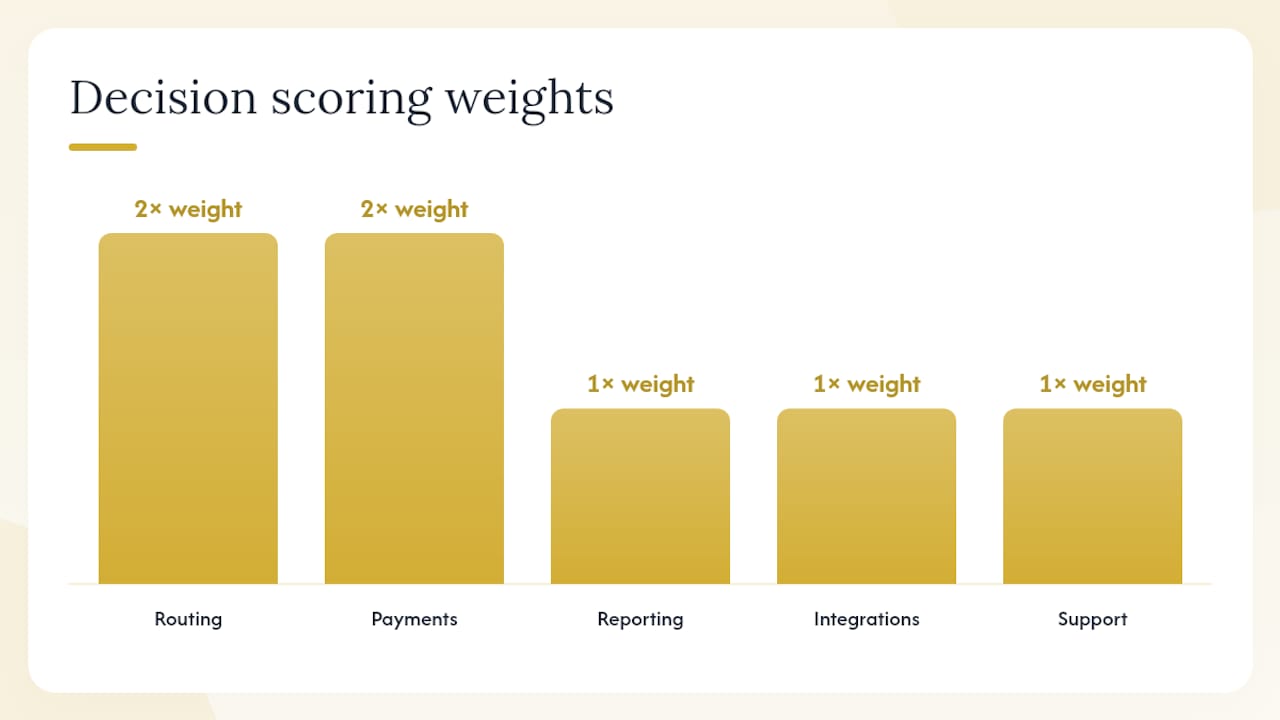
Decision scoring heuristic: Score each platform 1–5 on the five dimensions that matter most to your operation (routing, payments, reporting, integrations, support). Weight routing and payments double if those are your primary pain points. The platform with the higher weighted score is your starting point. Then model the all-in monthly cost for both and let the TCO number make the final call.
Pro Tip: Ask the sales rep to show you the renewal pricing history for your plan tier. Platforms that raise prices aggressively after year one often do so quietly. A vendor willing to show you historical renewal behavior is signaling something about how they treat existing customers.
How does your FSM choice affect lead conversion and marketing ROI?
This is the question most FSM comparisons skip entirely, and it's the one that costs small home-service operators the most money.
The conversion pathway looks like this: a marketing click generates a lead, the lead enters your CRM or FSM, a dispatcher books the job, and the tech closes it. Every point of friction in that chain drops leads. A slow booking flow, a clunky payment experience, or a missed follow-up each cost you a booked job you already paid to generate.
Where FSM friction kills conversion:
- If your booking flow requires a customer to call in rather than book online, you lose everyone who won't wait on hold.
- If your payment experience is awkward at job completion, you increase the chance of delayed payment and reduce the likelihood of a five-star review.
- If your FSM doesn't capture lead source data, you can't tell which ad campaigns are generating jobs versus just generating calls.
Recommended integration setup to preserve lead intent:
Connect your marketing source (Google Ads, Meta Ads) through UTM parameters to your CRM, then push confirmed jobs from the CRM to your FSM. This creates a chain where every job record carries its originating lead source. Track three numbers: lead source, time-to-quote, and conversion rate by source. Those three data points tell you which ad spend is actually producing revenue.
Connecting marketing UTM data to FSM job records is the single most underused tactic in home-service marketing. Most operators know their cost per lead. Almost none know their cost per booked job by channel, which means they're optimizing the wrong number.
FSM features that most directly raise booked-job conversion:
- Instant payment at job completion: Reduces friction and increases the likelihood of an immediate review request.
- Client hub approvals: Customers who approve estimates online convert at higher rates than those who approve by phone.
- Automated follow-ups: A 24-hour follow-up on an open estimate recovers jobs that would otherwise go cold.
For HVAC operators specifically, pairing FSM selection with the right lead-generation infrastructure matters as much as the platform itself. The best HVAC lead generation agencies for 2026 covers what conversion benchmarks to expect and how to structure your lead-to-job pipeline.
Pro Tip: Set up a custom field in your FSM for lead source from day one, even if you populate it manually at first. Once you have 90 days of data, you'll see clearly which channels produce jobs versus which ones produce tire-kickers. That data is worth more than any feature comparison.
What's the final recommendation and what should you do next?
For most small home-service teams in 2026, Jobber is the stronger operational platform. Its native route optimization, deeper job-tracking, and better support scores make it the right call for teams running multiple techs across multi-stop routes. Housecall Pro is the right choice for solo operators and two-to-three-tech shops that prioritize fast setup, polished consumer payments, and same-day cash flow.
Neither platform is a bad choice. The mistake is picking the wrong one for your actual workflow and then spending six months fighting the software instead of running jobs.
Next steps:
- Start both free trials this week. Run the demo task list above in each platform before talking to sales.
- Model your all-in monthly cost using your actual user count, card volume, and expected add-ons. Do this before the trial ends.
- Involve your lead tech or dispatcher in the evaluation. The person who uses the platform daily should have a vote.
- Set a go/no-go decision date 10 days into the trial. Give yourself enough time to test, not enough time to procrastinate.
- If you're integrating FSM with Google Ads or Meta Ads, map your lead-source tracking setup before you go live.
Pro Tip: Don't migrate your entire customer database on day one. Import 20–30 test records, run a full job cycle, and confirm your QuickBooks sync is clean before you commit to a full migration. Fixing a bad data migration mid-season is painful.
A note on how we approach FSM selection for clients
When we evaluate FSM platforms for home-service operators, the first question we ask isn't "which has more features?" It's "where are leads dropping out of your pipeline, and does this platform make that problem better or worse?" Reducing lead drop-off, minimizing payment friction, and building telemetry that connects marketing spend to booked jobs are the three priorities that actually move revenue.
The comparison between Jobber and Housecall Pro is genuinely close on most feature dimensions. What separates them in practice is operational fit: how many stops your techs run, how important same-day cash flow is, and whether you need native routing or a polished consumer booking experience. Those are operational questions, not software questions, and the answers should drive the decision.
For any operator who wants to instrument their FSM for marketing ROI, the setup work starts before you pick a platform. Map your lead sources, decide which data points you need in the job record, and confirm the FSM you're evaluating can carry that data through to your accounting system. That groundwork is what separates operators who know their cost per booked job from those who are still guessing.
Your FSM should be paying for itself through booked jobs
Jobber and Housecall Pro are both solid platforms. The operators who get the most out of either one aren't just using them to schedule jobs. They're using them as the operational backbone of a lead-to-revenue system where every marketing dollar is traceable to a closed job.

Leapify Media builds that system for home-service operators. The work includes Google Ads and Meta Ads management, on-premise AI lead dispatch, CRM automation, and the integration layer that connects your marketing source data to your FSM job records. The result is a setup where you know exactly which campaigns are producing booked jobs, not just clicks or calls.
If you're choosing between Jobber and Housecall Pro and want help configuring whichever platform you pick for maximum conversion, see what Leapify Media builds for home-service operators. The setup is built around your specific trade, your team size, and your current ad spend, not a generic template.
Sources and where to read vendor details
The following sources were used in this comparison. Each covers a different angle of the decision.
- Jobber vs Housecall Pro — Compare Ratings, Features, and Reviews | G2
- Jobber vs Housecall Pro (April 2026): Which Is Right for Your Business? - Field Service Guide
- Jobber vs Housecall Pro (2026) | Service Storm
- Housecall Pro Pricing 2026: What It Actually Costs (And the Add-On Trap) | Tooled Up Pro
- How Much Does Housecall Pro Really Cost in 2026? (Hidden Fees Breakdown)
- Jobber vs Housecall Pro 2026: Which is better? - BuildBite
- Jobber Reviews | G2
- Housecall Pro Reviews | G2