
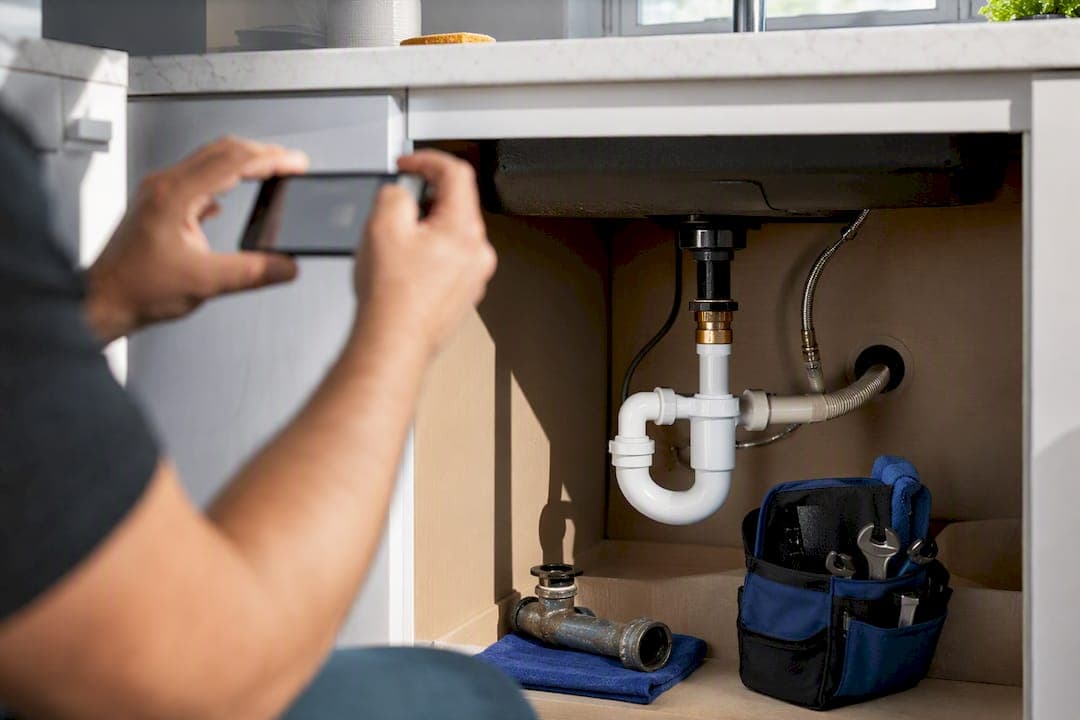
A 60 to 90 second job walkthrough or testimonial, embedded on the matching service page with one clear way to reach you, is the fastest route from viewer to booked job. Video works for contractors when you stop treating it as one-off marketing and start building an owned library of proof: testimonials, walkthroughs, and how-to clips that feed a single capture path. Adding video to a landing page can lift conversion by up to 80%, and Leapify Media has seen client campaigns built around this approach return as much as 20x on ad spend.
TL;DR:
- Upload long-form videos to YouTube and embed them on relevant service pages within a few days to maximize search visibility and conversion.
- Create short clips from the main videos for social platforms like TikTok and Reels to increase reach and drive traffic at a low cost.
- Build a detailed follow-up process that links every video view to a specific capture path and personalized CRM sequence to turn views into booked jobs.
- Film multiple assets in a single session using basic smartphone gear, batch shooting weekly to develop a consistent content library over time.
- Track video effectiveness through conversions, call and form submissions, and booked jobs, all linked to specific videos via UTM tags and CRM tagging.
Table of Contents
- Which Videos Should Contractors Make First?
- Where Should You Publish Each Video Type?
- How Do You Film Contractor Videos Without a Crew?
- How Do You Turn Video Views Into Booked Jobs?
- What KPIs Actually Prove Video Is Working?
- When Should You Handle Video In-House vs. Bring in a Partner?
- Ready to Turn Video Into Booked Revenue?
- Sources
- FAQ
Which Videos Should Contractors Make First?
Not every video pulls its weight. Four formats consistently move home-service buyers closer to booking, and each one earns a different spot in your funnel.
- Testimonial or project walkthrough (30 to 90 seconds): A homeowner or your crew narrating a finished job. This is the highest-converting format because it pre-builds trust before the phone ever rings. Put it on your homepage and every relevant service page.
- Repair-vs-replace or price-driver explainer (2 to 5 minutes): Answers the question a homeowner is actually stuck on, like why a 15-year-old water heater usually isn't worth repairing. These videos target people closer to a buying decision, so they belong on service and pricing pages.
- FAQ or how-to (3 to 5 minutes): Educational content built around your most common service calls. This format averages roughly 74% engagement versus a 43% average for other video types, which makes it worth the extra length.
- Short-form clips (15 to 60 seconds): Cut from the longer pieces above. These live on Reels, TikTok, and YouTube Shorts and exist to drive discovery, not conversion.
Getting a usable testimonial doesn't require a script. Ask three questions on camera: what problem brought them to you, what the job looked like, and whether they'd call you again. Get a signed release before you leave the driveway. A one-page form works fine.
Where Should You Publish Each Video Type?
Platform choice depends on what job the video is doing for you, not on where your competitors happen to post.
- Embed the same video on the matching service page within a day or two. A furnace repair video belongs on your furnace repair page, not buried in a blog archive. This is where the video actually converts.
- Cut three to five short clips from the raw footage within the same week. Post them to Shorts, Reels, and TikTok for reach. Organic short-form can cost you almost nothing to post and still drive traffic at a fraction of typical paid click costs.
- Upload a trimmed 30 to 60 second cut to Google Business Profile the same week. GBP viewers are close to a decision, so this slot is for trust signals, not education.
Keep titles and descriptions specific to the service and city you cover, and put one call to action in the video and one in the description. Every link should carry a UTM tag so you can trace a call back to the clip that generated it.
How Do You Film Contractor Videos Without a Crew?
You don't need a production company. You need a repeatable checklist and a filming session that produces more than one asset.
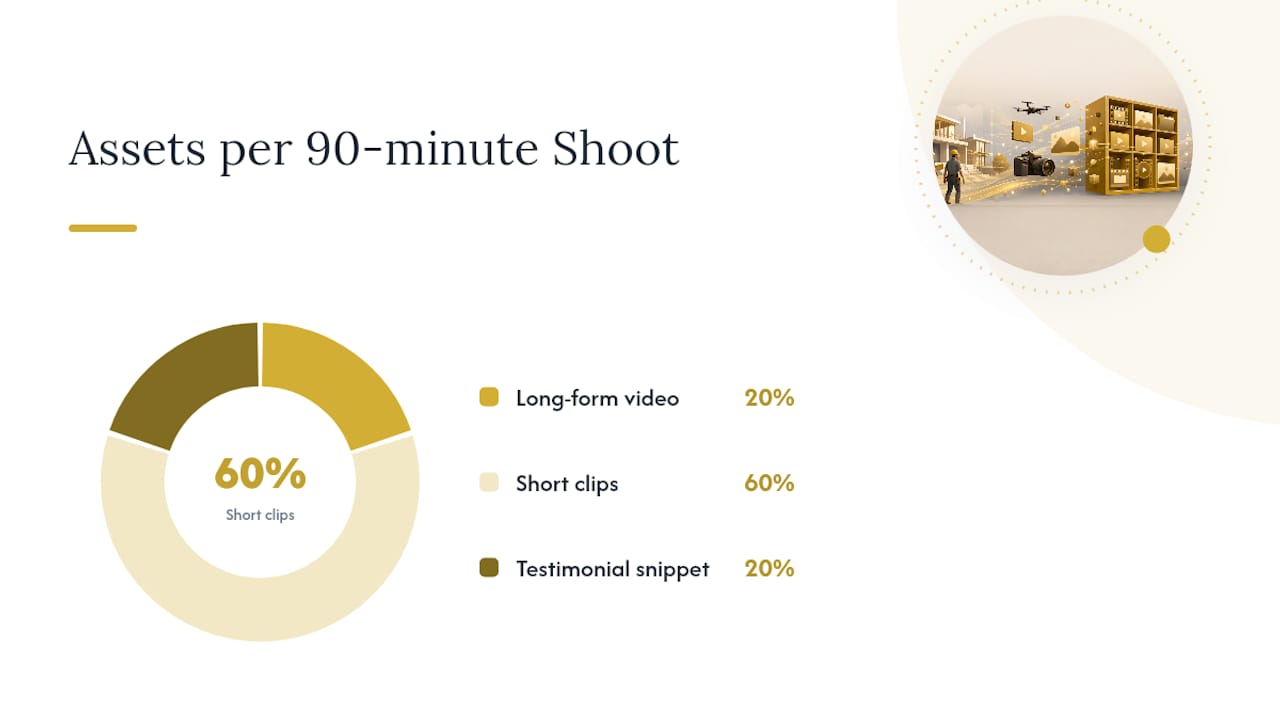
Batch your shoots. One 90-minute session on a real job site, done right, can yield a long-form YouTube video, three short clips, and a testimonial snippet. Doing this weekly or every other week builds what amounts to a compounding video asset library instead of scattered one-off clips, and the results tend to build over three to six months rather than three to six days.
Minimal gear checklist:
- A recent smartphone (iPhone 12 or newer, or a comparable Android)
- A wireless lavalier microphone in the $60 to $150 range
- A small LED panel for indoor jobs or dim crawl spaces
- A basic tripod or gimbal for steady shots
This is the same baseline gear webIQ recommends for local businesses trying to produce reliable audio and lighting without a professional camera rig.
Shot list for every job: a 10 second intro stating the problem, wide b-roll of the crew working, close-ups of the actual repair or install, and a clean before-and-after shot.
Pro Tip: Film the customer interview before the crew packs up the truck. Once the van doors close, most homeowners won't stop to redo it, and you'll lose the easiest testimonial you'll get all week.
How Do You Turn Video Views Into Booked Jobs?
Views don't pay invoices. The mechanism that does is a tight capture path wired directly into how you follow up.
- Send every video viewer to exactly one capture path. That means a short quote form or a dedicated service landing page, never a generic contact page, and every link needs a UTM tag so you know which video sent the click.
- Tag leads in your CRM by the specific video they watched. A lead who watched your "gas furnace repair" walkthrough should never get the same follow-up as one who watched a roof inspection clip. This is where most contractors leave value on the table: the highest-converting follow-ups come from matching the next message to the exact video a lead already saw.
- Build automated sequences around that tag. An immediate text within minutes ("Thanks for checking out our furnace repair video, want a same-week estimate?"), a 24-hour email with a second relevant clip, and a three-day follow-up call script if there's been no response.
- Give your office staff a short script tied to the video, not a generic pitch. "I see you were looking at our water heater replacement video. A lot of folks who watch that one are dealing with a unit over 10 years old. Want us to send someone out this week?"
That last piece matters more than people give it credit for. A lead who already watched your repair-vs-replace video has pre-answered half your sales pitch. Wasting that context with a cold script is the fastest way to lose a warm lead.
What KPIs Actually Prove Video Is Working?
Skip vanity metrics like total views. Track the numbers that connect directly to revenue.
- Calls and form submissions attributed to video-specific UTM links
- Watch-to-action rate: what percentage of viewers click through to your capture path
- Change in cost per lead on landing pages before and after adding video
- Booked jobs tagged back to the specific video a lead watched in your CRM
Set up call tracking with a dedicated number for each landing page, and add a "video watched" field to your CRM so every lead record carries that context forward. Then run three cheap tests: an A/B split on a landing page with and without an embedded video, a test moving your CTA above versus below the fold, and a short-form ad that funnels straight into your capture page. Landing pages with video can see conversion lifts of up to 80%, which makes the A/B test the cheapest proof-of-concept you can run this month.
When Should You Handle Video In-House vs. Bring in a Partner?
Filming a quick testimonial with a phone and a lav mic is something most crews can handle themselves. What breaks down is everything downstream: tagging leads by video watched, triggering the right follow-up automatically, and feeding footage into ad campaigns that actually track back to booked revenue.
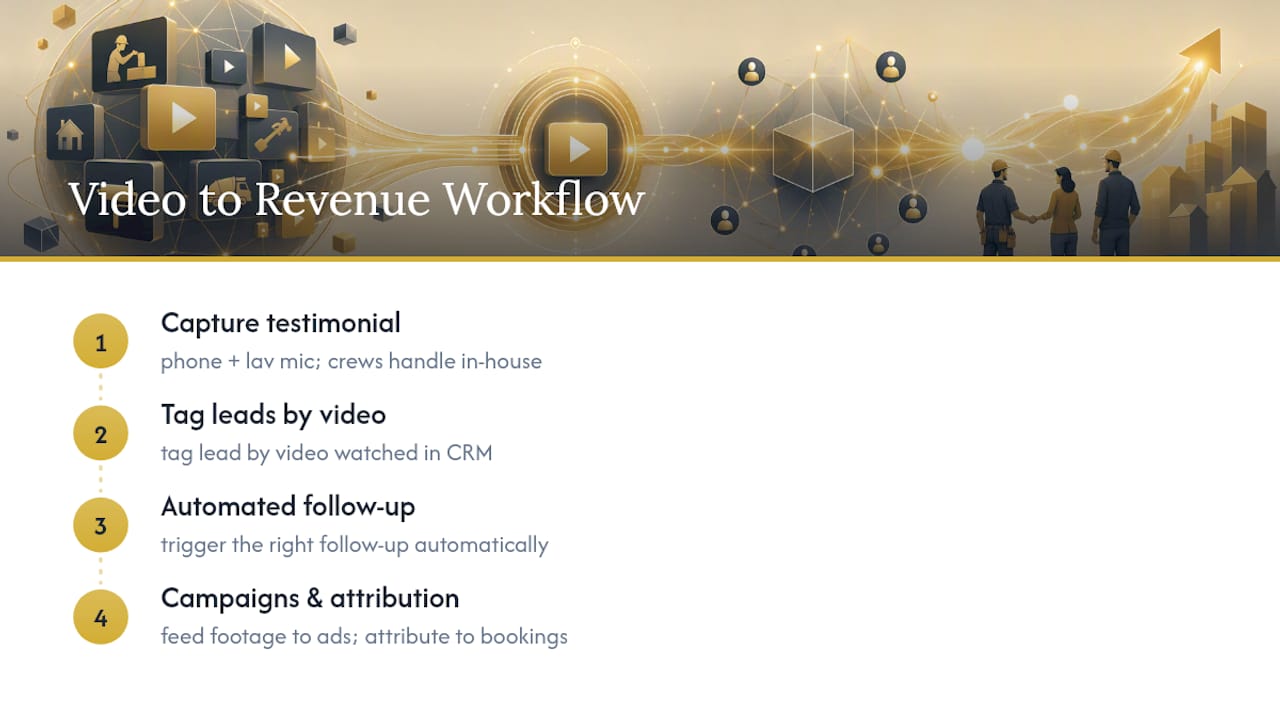
That's the gap Leapify Media was built to close. Its infrastructure ties video assets directly into CRM routing and on-premise AI lead scoring, kept in-house rather than routed through third-party AI tools, so a lead who watches a furnace repair video gets tagged and followed up automatically instead of falling into a generic queue. Leapify Media clients have reported returns as high as 20x on ad spend when video, ads, and CRM automation run as one system rather than three disconnected vendors.
Keep production in-house if you're just starting your library. Bring in a partner once you're ready to connect that footage to paid media and automated follow-up at scale.
— Everson Gorski
Ready to Turn Video Into Booked Revenue?
Most agencies hand you a video and call it done. Leapify Media builds the infrastructure around it: video production paired with Google and Meta Ads management, CRM integration, and on-premise AI dispatch that routes a lead straight to your team the moment they've watched the clip that matters to them.

A Half-Day Shoot and a Full Production Day for video production services are offered, both designed to feed directly into CRM tagging and follow-up sequences rather than sitting on a shelf as standalone marketing assets. If you want the full system, including Google Ads Management, CRM automation, and lead routing bundled together, the Growth plan starts at several thousand dollars a month. Check current pricing and plan details or browse the full service lineup to see what fits your business, then book a call to map out your first shoot.
Sources
- Video marketing: 5 tactics for lead-gen success | Forbes Agency Council (2025)
- Video Marketing for Home Service Companies | PipelineOn
FAQ
What Type of Video Converts Best for Contractors?
Testimonials and project walkthroughs convert best because they build trust before a homeowner ever picks up the phone. Educational how-to videos come in close behind, averaging around 74% engagement compared to a 43% average for other formats.
How Long Should a Contractor Marketing Video Be?
Testimonials and job walkthroughs work best at 30 to 90 seconds, while educational how-to and FAQ videos should run 3 to 5 minutes. Short-form clips for Reels and Shorts should stay under 60 seconds.
Where Should I Post My Contractor Videos?
Post long-form videos to YouTube for search visibility, embed the same video on the matching service page for conversion, and cut short clips for Shorts, Reels, and TikTok for reach. Add a trimmed version to your Google Business Profile for trust signals close to the decision point.
How Much Does Contractor Video Production Cost?
Costs vary widely depending on scope and whether you shoot in-house or bring in outside help. Leapify Media offers a Half-Day Shoot priced at 2500 dollars one-off and a Full Production Day priced at 5000 dollars one-off, both listed on its pricing page.
Can Video Actually Be Tracked Back to Booked Jobs?
Yes, when you route every video to a single capture path with UTM tracking and tag leads in your CRM by the specific video they watched. That structure lets you trace a booked job all the way back to the clip that generated the call, rather than guessing at attribution.