

The best default budget pacing strategy is stable, time-proportional (linear) pacing with automated alerts. Right now, open your platform and compare month-to-date cumulative spend against your planned trajectory for the same period.
Budget pacing is the practice of tracking how fast you're spending against a planned trajectory and adjusting in real time to stay on course. Linear pacing minimizes algorithm instability because it keeps daily spend consistent, which gives bidding systems the steady signal they need to predict conversions accurately. Erratic spend patterns corrupt that signal fast.
- Check now: Month-to-date cumulative spend vs. planned cumulative spend for the same day of the month.
- Set an alert: Target cumulative × 1.15 triggers an overspend warning; target cumulative × 0.85 triggers an underspend warning.
- Default choice: Time-proportional pacing unless you have a specific launch, event, or experimental bucket that justifies a different approach.
Key Takeaways
A sound budget pacing strategy requires time-proportional tracking, budget-tier-appropriate alert thresholds, platform-aware adjustments, and a named owner for every account.
| Point | Details |
|---|---|
| Default to linear pacing | Time-proportional pacing stabilizes algorithm learning and minimizes CPA volatility for always-on campaigns. |
| Scale tolerances to budget size | Use 85–115% variance for budgets under $5K/month; tighten to 98–102% for accounts above $100K/month. |
| Google Ads compresses scheduled campaigns | If ad scheduling restricts eligible days, recalculate daily budget as monthly target ÷ eligible days, not ÷ 30.4. |
| Monitor at the right frequency | Match check cadence to budget tier: daily for small accounts, twice daily plus real-time alerts for accounts over $50K/month. |
| Leapify Media | Provides active pacing oversight, automated alerts, and AI-driven lead dispatch for home service Google Ads accounts. |
Table of Contents
- What budget pacing actually is and the problem it solves
- Types of pacing strategies and when to use each
- Key metrics and formulas every pacing manager needs
- How Google Ads handles pacing — and what that means for your campaigns
- How often should you check pacing — and what should you do about it?
- When strict pacing is the wrong choice
- Diagnose and fix the five most common pacing problems
- The operational playbook: monitoring, alerts, roles, and communication
- Copy-ready templates and two worked examples
- The pacing mistake most practitioners make
- Leapify Media manages pacing so your budget converts to booked jobs
- Sources
What budget pacing actually is and the problem it solves
Budget pacing is the process of monitoring cumulative spend against a planned spend trajectory over a defined period, then making adjustments to keep the two in alignment. It's not just about staying under budget. It's about spending the right amount at the right time so your campaigns don't run out of money on day 22 of a 30-day month, and don't underspend so badly that the algorithm never learns who converts.
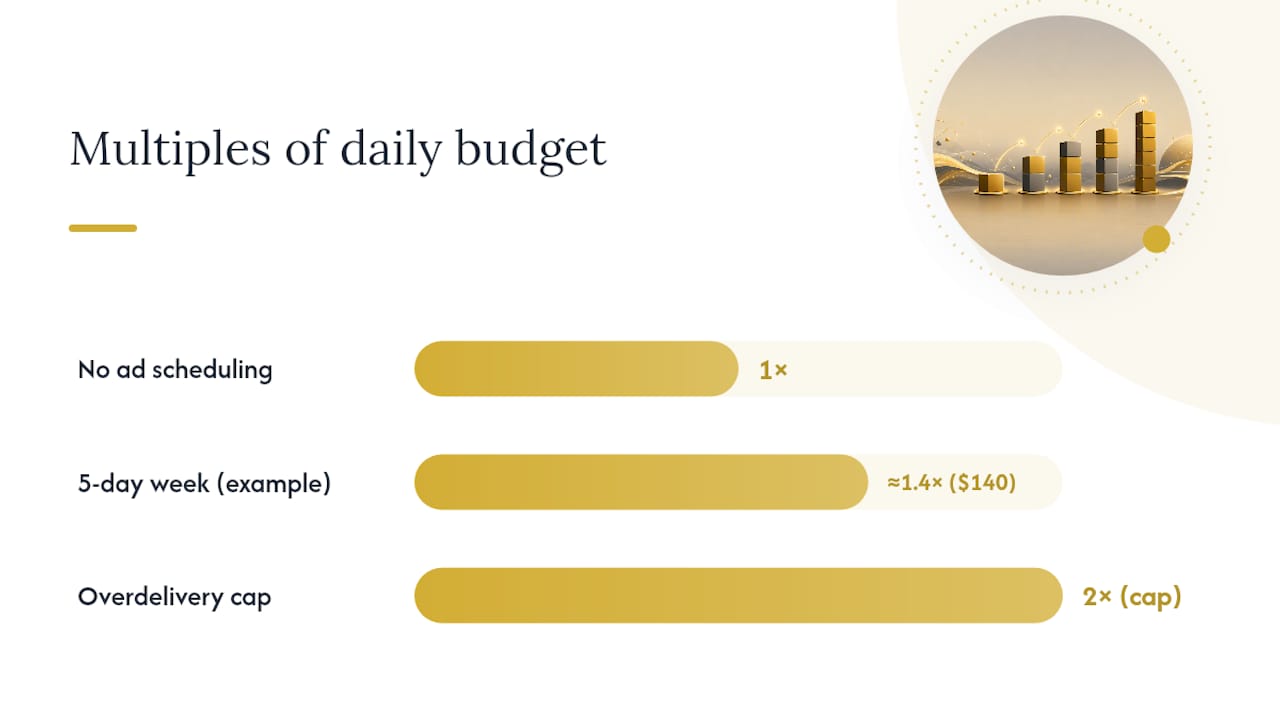
Ad platforms interact with pacing in ways that aren't always obvious. Google Ads, for example, operates on a monthly model: it multiplies your daily budget by 30.4 to calculate a monthly target, then manages delivery toward that figure. On any given day, it can spend up to twice your daily budget if inventory is strong, compensating by spending less on slower days. Meta's Campaign Budget Optimization (CBO) adds another layer, redistributing spend across ad sets based on real-time auction signals rather than fixed allocations. These platform behaviors mean that even a well-planned budget can drift significantly without active oversight.
Poor pacing creates predictable problems:
- Early exhaustion: Ads stop serving mid-month, leaving conversion opportunities on the table.
- Chronic underspend: Budgets go unspent, underperforming against revenue targets.
- CPA volatility: Spend spikes and troughs destabilize the algorithm's conversion predictions, widening your cost-per-acquisition range.
- Loss of learning signal: Bidding algorithms need consistent data volume. Irregular spend breaks that continuity and can reset or degrade the learning phase.
The standard default is monthly linear pacing: divide the monthly budget by the number of days in the month and track cumulative spend against that daily increment. Lifetime pacing, where the platform manages delivery across a fixed flight, is appropriate for campaigns with a defined end date and no need for daily control. Linear is the right default for always-on acquisition because it gives you the most predictable signal and the clearest deviation trigger.
Types of pacing strategies and when to use each
No single approach fits every campaign. Here's a practical catalog of the core strategies, with honest tradeoffs for each.
-
Time-proportional (even/standard) pacing. Spend tracks a straight line from day one to the last day of the period. Best for: Always-on acquisition, brand awareness, and any campaign where algorithm stability matters. Tradeoff: You may miss high-intent moments if inventory spikes and your daily cap prevents capture. Standard delivery smooths spend and helps algorithms learn; accelerated delivery front-loads spend and costs more per impression.
-
Accelerated/front-loaded pacing. Spend as fast as possible early in the period. Best for: Product launches, flash sales, and time-sensitive events where early visibility matters more than efficiency. Tradeoff: Higher CPMs, faster budget depletion, and limited recovery time if early results are poor.
-
Front-test (experimental heavy-early) pacing. Concentrate spend in the first third of a flight to gather data quickly, then shift to the winning variant. Best for: Creative tests, audience experiments, and new market entries where you need signal fast. Tradeoff: Requires a clear decision rule at the midpoint; without one, you just burn budget.
-
Back-loaded/seasonal pacing. Reserve a larger share of budget for the end of the period or a known demand peak. Best for: Seasonal businesses (HVAC in summer, roofing after storm season) where conversion rates spike at predictable times. Tradeoff: Underdelivery risk early in the period; requires confidence in the demand forecast.
-
Dynamic/opportunity-based pacing. Adjust daily spend in real time based on auction signals, conversion rates, or external triggers (weather, competitor activity). Best for: Mature accounts with strong historical data and the infrastructure to act on signals quickly. Tradeoff: High operational overhead; requires automation or dedicated analyst time.
-
Daily budget pacing. Set a fixed daily cap and let the platform manage delivery within that day. Best for: Campaigns with no fixed end date and stable, predictable demand. Tradeoff: No built-in mechanism to recover underspend from slow days.
-
Lifetime budget pacing. Set a total budget for a fixed flight and let the platform distribute spend across the duration. Best for: Campaigns with a hard end date (promotions, events, seasonal flights). Tradeoff: Less control over day-to-day spend; platform may front-load or back-load based on its own signals.
One structural rule worth applying: the 70/20/10 budget split. This keeps your core campaigns stable while giving experiments the early data they need.
Key metrics and formulas every pacing manager needs
The math here isn't complicated, but teams that skip it are the ones who get surprised by a $40,000 overspend on day 28. These are the formulas to have in your spreadsheet.
Core formulas:
- Pacing %: (Spend to date ÷ Planned cumulative spend for the same day) × 100
- Planned cumulative spend at day N: (Monthly budget ÷ Days in month) × N
- Remaining recommended daily spend: (Remaining budget) ÷ (Remaining days in period)
- Overspend alert threshold: Target cumulative × 1.15
- Underspend alert threshold: Target cumulative × 0.85
| Formula | Calculation | When to use it |
|---|---|---|
| Pacing % | (Spend to date ÷ Planned cumulative) × 100 | Daily check to confirm on-track status |
| Planned cumulative at day N | (Monthly budget ÷ Days in month) × N | Set the target line in your tracking sheet |
| Remaining daily spend | Remaining budget ÷ Remaining days | After a deviation, recalculate the corrective daily rate |
| Overspend alert | Target cumulative × 1.15 | Trigger warning before budget is exhausted early |
| Underspend alert | Target cumulative × 0.85 | Flag chronic underdelivery before month-end crunch |
Acceptable pacing variance scales with budget size: campaigns under $5K/month can tolerate an 85–115% pacing range; $5K–$25K should stay within 90–110%; $25K–$100K within 95–105%; and accounts above $100K should hold 98–102%.
Worked example (30-day month, $30,000 monthly budget):
- Daily target: $30,000 ÷ 30 = $1,000/day
- Planned cumulative at day 12: $1,000 × 12 = $12,000
- Actual spend at day 12: $10,200
- Pacing %: ($10,200 ÷ $12,000) × 100 = 85%
- Underspend alert triggered (below 85% threshold)
- Remaining budget: $30,000 – $10,200 = $19,800
- Remaining days: 18
- Corrective daily spend needed: $19,800 ÷ 18 = $1,100/day
If the underspend has a structural cause (narrow targeting, low bids, impression cap), the corrective action goes deeper than just raising the daily budget.
Coefficient of variation (CV) as a red flag: Calculate the standard deviation of your daily spend divided by the mean daily spend.
How Google Ads handles pacing — and what that means for your campaigns
Google Ads is the platform most advertisers need to understand first, because its monthly model creates behavior that surprises even experienced managers.
Google calculates a monthly spending limit based on your daily budget multiplied by the average days in a month, allowing higher daily spend on strong inventory days balanced by lower spend on others. Google Ads provides budget pacing insights with three statuses: Limited by budget (your budget is restricting impressions), Budget remaining (you're on track to underspend), and On track (delivery is aligned with your targets). Each status comes with recommended actions in the interface.
Practical implications for Google Ads:
- Ad scheduling compresses your monthly target. Google's ad-scheduling behavior means that if your campaign only runs Monday through Friday, the platform still targets the full monthly cap (daily × 30.4) but compresses delivery into the eligible days. A $100/day budget running five days a week effectively needs to deliver $140/day on active days to hit the monthly target. Recalculate your daily budget accordingly, or remove strict schedules where the restriction isn't necessary.
- Overdelivery is by design, not a bug. Google may overdeliver up to 2× your daily budget to capture high-intent moments. This is expected behavior, but it means your daily spend report will regularly show figures above your stated daily cap.
- Pacing insights live in the Campaigns tab. Filter by the "Budget pacing" column to see status at a glance. A "Limited by budget" status on a high-performing campaign is a clear signal to raise the daily budget or restructure the campaign.
Other platforms in brief:
Meta's daily budget operates similarly to Google's, but lifetime budgets give the algorithm more flexibility to front-load or back-load based on predicted conversion windows. CBO can shift spend dramatically between ad sets within a campaign, so monitoring at the ad-set level is necessary if you care about individual audience performance. TikTok tends to front-load spend aggressively, especially on new campaigns, which can exhaust budgets before the algorithm has enough data to optimize. LinkedIn's learning phase often produces underspend in the first two weeks of a new campaign, which can look like a pacing problem but is actually the algorithm calibrating. Cross-platform monitoring that aggregates total client spend is the only reliable way to manage pacing across multiple channels simultaneously.
Pro Tip: When running campaigns with ad scheduling restrictions in Google Ads, divide your intended monthly spend by the number of eligible days (not 30.4) to set the correct daily budget. A campaign running 22 weekdays in a 30-day month needs a daily budget of monthly target ÷ 22, not ÷ 30.
How often should you check pacing — and what should you do about it?
Monitoring frequency should match the risk profile of the account, not the preference of the analyst. Checking a $3,000/month campaign twice a day is overkill. Checking a $150,000/month account once a week is negligent.
Decision factors that determine monitoring frequency:
- Monthly budget size and daily spend rate
- Bidding strategy (manual CPC vs. automated bidding like Target CPA or Maximize Conversions)
- Account maturity and historical spend stability
- Auction volatility (seasonal spikes, competitor activity)
- Ad scheduling restrictions that compress delivery
Recommended monitoring cadence by budget tier:
- Under $5,000/month: Daily check, end of business day. Alert threshold: 85–115% of planned cumulative.
- $5,000–$25,000/month: Daily check, plus a mid-day review on Mondays and the last five days of the month. Alert threshold: 90–110%.
- $25,000–$50,000/month: Twice daily (morning and afternoon). Alert threshold: 95–105%.
- $50,000–$100,000/month: Twice daily plus automated alerts. Alert threshold: 95–105%.
- Over $100,000/month: Real-time automated alerts plus twice-daily manual review. Alert threshold: 98–102%.
The four-step decision workflow:
- Detect: Pull cumulative spend vs. planned cumulative for the current day. Calculate pacing %.
- Diagnose: Is the deviation structural (targeting too narrow, bids too low, impression cap) or situational (holiday, competitor pullback, creative fatigue)?
- Act: Apply the corrective action matched to the diagnosis (see troubleshooting section below). Recalculate remaining daily spend.
- Verify: Monitor for 24–72 hours post-correction. Confirm the adjustment is holding before making a second change.
Never make two major changes simultaneously — you lose the ability to attribute the outcome to either action.
When strict pacing is the wrong choice
Time-proportional pacing is the right default for most campaigns. But applying it rigidly to every situation is a mistake.
- One-day or very short events. A 24-hour flash sale or a single-day event has no use for linear pacing. Front-load aggressively and set a hard spend cap.
- Aggressive launch tests. New campaigns need data fast. Front-loading the first 7–10 days accelerates the learning phase and gets you to optimization decisions sooner. Linear pacing on a new campaign can leave you waiting three weeks for enough data to act.
- Experimental budget buckets. The 10% experimental allocation in a 70/20/10 structure should be front-loaded by design. You're buying signal, not conversions.
- Long B2B sales cycles. Evaluate B2B campaigns on 60–90 day windows rather than 30-day periods. Attribution lag means a campaign that looks like it's underpacing on conversions in week two may be generating pipeline that closes in week eight. Cutting budget based on a 30-day pacing view destroys campaigns that are actually working.
- Always-on brand awareness. If the goal is reach and frequency rather than direct response, spend smoothing matters less. The platform's delivery algorithm handles distribution well enough that strict daily monitoring adds little value.
- Hybrid approaches. Segment your campaigns into buckets with different pacing rules. Performance campaigns pace linearly. Brand campaigns use lifetime budgets. Experimental campaigns front-load. Managing them as a single pool with one pacing rule guarantees the wrong rule applies to at least one bucket.
Diagnose and fix the five most common pacing problems
Pacing failures follow predictable patterns. Here's how to identify each one and what to do about it.
-
Budget exhausted by midday (severe overpacing). Symptom: daily spend hits cap before noon, ads stop serving for the rest of the day. Diagnosis: daily budget is too low for the auction volume, or a bid spike is driving up CPCs. Fix: raise the daily budget, apply bid caps, or pause the lowest-ROI campaigns to free budget for higher-performing ones. Apply an account-level monthly spend limit as a safety net.
-
Chronic underspend (structural underpacing). Symptom: pacing % consistently below 85% for three or more consecutive days. Diagnosis: targeting is too narrow, bids are too low, impression frequency caps are too restrictive, or creative is underperforming. Fix: widen audience targeting, raise target CPA or ROAS bids, remove or loosen impression caps, refresh creative.
-
Sudden mid-month spend spike. Symptom: pacing was on track, then jumped 20%+ in 48 hours. Diagnosis: competitor pulled budget (your auction share increased), a seasonal event drove demand, or a broad match keyword started triggering unexpected queries. Fix: review search term reports, check auction insights, tighten match types or add negative keywords, and reduce bids temporarily while you diagnose.
-
Learning-phase underspend. Symptom: new campaign consistently underspends in the first 10–14 days despite adequate budget. Diagnosis: platform algorithm is in the learning phase and hasn't found its delivery rhythm yet. Fix: don't cut budget during the learning phase. Give the campaign at least 50 conversions (Google's threshold for exiting learning) before making structural changes. Reducing budget during learning extends the phase.
-
Cross-platform budget mismatch. Symptom: total client spend across platforms is on track, but one platform is significantly over while another is under. Diagnosis: budget allocation between platforms wasn't adjusted when one platform's performance shifted. Fix: reallocate budget toward the better-performing platform, but do it in increments of 15–20% to avoid triggering new learning phases.
These aren't analyst-level fixes.
Post-correction checklist: After any corrective action, monitor for 24–72 hours before making another change. Check that attribution lag isn't masking results — a conversion that happened yesterday may not appear in the platform until tomorrow. Verify the correction is holding by comparing pacing % at the same time of day across three consecutive days.
Pro Tip: Set-and-forget account management is the primary cause of expensive pacing failures. Build a recurring calendar reminder for end-of-month pacing reviews and assign a named owner to each account. Unowned accounts drift.
The operational playbook: monitoring, alerts, roles, and communication
Good pacing discipline isn't just about the math. It's about who's watching, what they're watching for, and what they do when something's wrong.
Monitoring checklist:
- Pull spend data from the platform directly (not just agency reports, which can lag 24–48 hours).
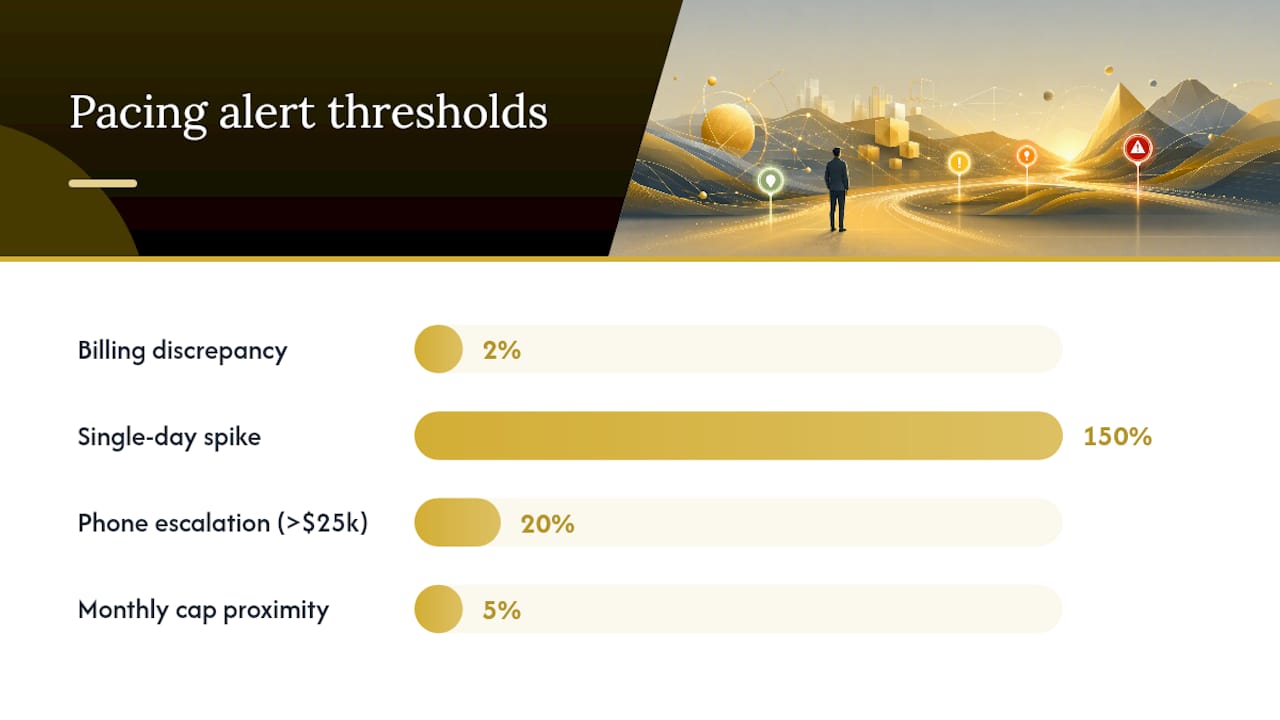
- Reconcile platform-reported spend against billing statements monthly. Discrepancies above 2% need investigation.
- Track cumulative spend in a shared spreadsheet or dashboard updated at least daily.
- Log every corrective action with a timestamp, the pacing % at the time, and the action taken.
Alert thresholds and escalation rules:
- Email alert: Pacing % outside the warning band for the account's budget tier.
- Slack alert: Pacing % outside the immediate action band, or any single-day spend more than 150% of the daily target.
- Phone escalation: Pacing % deviation above 20% on accounts over $25,000/month, or any account-level monthly cap within 5% of being hit.
Roles and responsibilities:
- Analyst: Daily pacing checks, alert triage, first-line corrective actions.
- Campaign manager: Structural diagnosis, bid and targeting adjustments, weekly pacing review.
- Director: Escalation decisions, budget reallocation across campaigns, stakeholder communication.
- Finance: Monthly reconciliation, billing verification, budget approval for mid-month increases.
Sample stakeholder messages:
- Underpacing: "Campaign X is at 82% of planned spend through day 15. We've identified narrow targeting as the cause and are widening audience parameters today. We expect to recover to 90%+ by day 20 without increasing the monthly budget."
- Overpacing: "Campaign Y is at 118% of planned spend through day 15. We've applied a bid reduction and paused two low-ROI ad groups. Monitoring over the next 48 hours to confirm the correction holds."
Pro Tip: Use account-level monthly spend limits in Google Ads as a hard ceiling, separate from your campaign-level daily budgets. This prevents a runaway campaign from blowing past your total monthly commitment even if a daily budget is set incorrectly. Combining platform guardrails with automated monitoring is the most reliable way to prevent both overspend and underspend.
Copy-ready templates and two worked examples
These are the exact cells and formulas to drop into a Google Sheet or Excel file. No pivot tables, no macros — just the columns you need.
Spreadsheet template structure:
| Cell/Column | Label | Formula |
|---|---|---|
| A | Day of month | 1, 2, 3… 30 |
| B | Daily budget target | Monthly budget ÷ Days in month |
| C | Planned cumulative | B × A (or =SUM($B$1:B1)) |
| D | Actual spend (daily) | Manual entry or API pull |
| E | Actual cumulative | =SUM($D$1:D1) |
| F | Pacing % | =(E ÷ C) × 100 |
| G | Overspend alert | =C × 1.15 |
| H | Underspend alert | =C × 0.85 |
| I | Corrective daily spend | =(Monthly budget – E) ÷ (Days in month – A) |
Worked example 1: Small budget ($3,000/month, 30-day month)
- Daily target: $100/day
- Planned cumulative at day 10: $1,000
- Actual spend at day 10: $920
- Pacing %: 92% — within the 85–115% tolerance for this budget tier, no action needed.
- Monitoring cadence: one daily check at end of business.
- If pacing drops significantly below target thresholds, consider widening targeting or raising bids moderately.
Worked example 2: Enterprise budget ($120,000/month, 30-day month)
- Daily target: $4,000/day
- Planned cumulative at day 10: $40,000
- Actual spend at day 10: $41,800
- Pacing %: 104.5% — within the 98–102% tolerance? No. This is outside the immediate action band for an account this size.
- Overspend alert threshold: $40,000 × 1.15 = $46,000 (not yet triggered, but trending there).
- Corrective daily spend to normalize: ($120,000 – $41,800) ÷ 20 = $3,910/day.
- Action: reduce bids by 5%, pause the two lowest-ROAS campaigns, monitor twice daily.
- Escalation: if pacing % exceeds 110% by day 12, escalate to director and finance.
The difference between these two examples isn't just scale. Tolerance bands exist for a reason.
The pacing mistake most practitioners make
Most guides treat budget pacing as a monitoring problem. Check the numbers, set an alert, fix the deviation. That framing is correct but incomplete.
The real leverage in pacing isn't in the correction. It's in the structure you build before the campaign launches. Accounts that pace well consistently aren't staffed by faster responders — they're built with segmented budget buckets, pre-set alert thresholds, named owners for each account, and a documented decision rule for what to do at each deviation band. When a problem appears, the response is already written. The analyst isn't deciding what to do; they're executing a plan.
The second thing most practitioners underestimate is the cost of learning-phase disruption. Cutting a budget mid-learning-phase because pacing looks weak in week one is one of the most expensive mistakes in paid media. The algorithm needs consistent data volume to calibrate. Interrupt that, and you don't just lose a week — you restart the clock. For home service accounts running Google Ads, where lead volume is the primary signal, this can mean two to three weeks of degraded performance after every budget cut made for the wrong reason.
Pacing discipline and campaign performance aren't separate concerns. They're the same concern, viewed from different angles.
Leapify Media manages pacing so your budget converts to booked jobs
Most home service businesses running Google Ads are leaving money on the table — not because their budgets are wrong, but because no one is watching the spend trajectory closely enough to catch deviations before they compound.

Leapify Media's Google Ads management for home service companies includes active pacing oversight, automated alert infrastructure, and AI-driven lead dispatch that connects ad spend directly to booked jobs. Every client account gets a named campaign manager, a documented pacing protocol, and monthly reconciliation against billing. No set-and-forget. No surprises at month-end.
If you're an HVAC, plumbing, roofing, or restoration company spending at least $2,000/month on ads and not seeing consistent returns, the problem is usually operational, not creative. See what Leapify Media builds for home service operators and get a direct conversation about your current pacing setup.
Sources
These are the primary references behind this guide, each worth bookmarking for the specific use case noted.
- About budget pacing insights - Google Ads Help
- Marketing Budget Pacing Guide for 2026 | Improvado
- PPC budgeting in 2026: When to adjust, scale, and optimize with data — Search Engine Land
- Mastering Google Ads Budget Pacing: 2026 Spend Control Guide — Sarah Stemen | Paid Ads Consultant
- Ad spend pacing: what it is and how to stay on budget | Go Insights
- Pacing in advertising: what it is and how it works — Climb The Ladder