
You can cut the majority of junk leads within 24 hours by combining five quick blocks with a lightweight verification step. Add a honeypot field to every form, reject submissions from disposable email domains (Mailinator, Guerrilla Mail, and similar), block the most obvious personal-email patterns for B2B campaigns, enable IP exclusions in your Google Ads account, and require phone OTP for any high-value lead flow. That five-minute layer alone stops most naive bots and low-intent submissions.
For the next 24 hours: if you're running native lead forms on Google or Meta, switch at least one campaign to a landing page so you can apply server-side controls. Add a simple rate limit (no more than three submissions per IP per hour is a reasonable starting point), insert an email or phone verification step before leads enter your CRM, and tag every incoming lead with a source and quality flag so your sales team can triage quickly.
- 5-minute actions: Add a CSS honeypot field, block disposable email domains, reject obvious personal-email patterns (Gmail/Yahoo for B2B), enable IP exclusions in your ad account.
- 24-hour actions: Move at least one campaign from native lead forms to a landing page, add server-side rate limiting, require email or phone verification before CRM entry, and tag leads for manual triage.
Key Takeaways
Blocking spam leads requires layered defenses applied in sequence: quick blocks first, then technical controls, then conversion signal hygiene, then ongoing monitoring with a sales feedback loop.
| Point | Details |
|---|---|
| Start with the 5-minute checklist | Add a honeypot, block disposable emails, enable IP exclusions, and reject personal emails on B2B forms before anything else. |
| Fix your conversion signal | Send only verified MQL/SQL events via Conversions API; raw form fills teach the algorithm to find more bots. |
| Use progressive rollout | Start with quarantine mode, review false positives for 7–14 days, then move to soft-blocking before hard-blocking. |
| Monitor quality metrics weekly | Track contact-to-contacted rate, disposable email rate, and hour-of-day conversion spikes, not just raw conversion volume. |
| Leapify Media | Provides done-for-you spam protection including layered form defenses, Conversions API hygiene, CRM automation, and weekly quality monitoring for home service businesses. |
Table of Contents
- What are spam leads and why do they hurt your campaigns?
- What types of spam leads should you watch for?
- Quick tactical fixes you can implement right now
- How do technical form controls stop sophisticated spam?
- What Google Ads controls reduce spam leads from campaigns?
- How should you verify and route leads before they reach sales?
- Which metrics tell you spam is getting worse or better?
- How do you test and roll out spam defenses without hurting real conversions?
- How Leapify Media reduces spam leads for home service clients
- Leapify Media's done-for-you spam protection for home service businesses
- An agency practitioner's perspective on what actually moves the needle
- The metric most teams measure is the one that lies to them the most
- Sources
What are spam leads and why do they hurt your campaigns?
Spam leads are fake, low-intent, or malicious form submissions that inflate your conversion counts while producing zero revenue. They come from bots, click farms, incentivized signups, and sometimes deliberate competitor sabotage. The damage runs deeper than an annoying inbox.
Wasted ad spend is the most direct hit. Every fake conversion trains your ad platform's algorithm to find more of the same traffic. Google Ads and Meta both use conversion signals to optimize bidding and audience targeting, so when raw form fills flood your conversion data, the system learns from garbage and bids up on garbage traffic. Teams that send only validated MQL and SQL events via Conversions API instead of raw form fills report a 20–40% improvement in SQL quality as the algorithm recalibrates toward real buyers.
Polluted analytics is the second problem. When your lookalike audiences are built from a mix of real customers and bot submissions, every targeting decision downstream is skewed. Your cost-per-lead looks low, your conversion rate looks high, and your sales team is working a pipeline full of dead ends.
According to ClickzProtect's audit data, bot or non-converting traffic can account for 30–45% of spend on high-CPC emergency keywords in home-services verticals. A basic manual audit often recovers 8–15% of wasted spend in the first week alone.
Sales time is the third casualty. A sales rep who dials ten leads and reaches two real prospects isn't just frustrated — they're burning payroll on a problem that started in your ad account.
What types of spam leads should you watch for?
Not all junk looks the same. Knowing the type tells you which defense to deploy first.
Bots and automated form fills are the most common. They submit in under two seconds, often at odd hours, with generic or nonsensical field entries. The IP frequently resolves to a data center ASN rather than a residential address.
Disposable-email signups use services like Mailinator, Temp Mail, or Guerrilla Mail. The email address works long enough to pass a basic format check, then disappears. These are common in free-trial abuse and contest farming.
Incentivized and contest submissions come from real humans who want the prize, not your service. They fill out forms accurately but have zero purchase intent. Job titles are often vague ("self-employed," "other"), and phone numbers are real but go unanswered.
Competitor sabotage is rarer but real, especially in high-CPC local verticals like HVAC and plumbing. A competitor clicks your ads repeatedly and submits fake contact forms to drain your budget and inflate your cost-per-acquisition.
Click farms use low-wage workers or device farms to simulate real user behavior. They're harder to catch because the IP is residential and the time-to-submit looks human. Behavioral fingerprinting and JS checks are your best tools here.
Solved-CAPTCHA services bypass reCAPTCHA v2 and similar challenges using human solvers for pennies per solve. A CAPTCHA alone is not a complete defense.
Red flags for sales teams triaging leads:
- Submission time outside business hours (especially 2–5 AM local time)
- Time-to-submit under three seconds or over 45 minutes (bot or tab-left-open)
- Personal email domain on a B2B form (Gmail, Yahoo, Hotmail)
- Phone number fails format check or is a known VoIP prefix
- Identical or near-identical message text across multiple submissions
- IP resolves to a data center, VPN, or known proxy ASN
- Job title is blank, "N/A," or implausibly generic
- No UTM parameters or referrer when the campaign should have them
Quick tactical fixes you can implement right now
No developer required for most of them.
1. Disable native lead forms if they're producing junk. Google's lead form extensions and Meta's Instant Forms are convenient but offer almost no server-side control. Switching to a landing page lets you add honeypots, rate limits, and validation. Blocking personal email domains and adding CAPTCHA are effective quick fixes that reduce low-intent submissions immediately.
2. Block disposable email domains. Maintain a blocklist of known disposable providers and reject submissions server-side before they hit your CRM. Open-source lists like disposable-email-domains on GitHub are updated regularly.
3. Require work emails for B2B campaigns. A simple regex check that rejects Gmail, Yahoo, Hotmail, AOL, and similar personal domains on B2B forms removes a large share of low-intent submissions with one line of server-side code.
4. Add phone OTP for high-value leads. For any campaign where a booked job is worth $500 or more, a one-time SMS code adds a friction layer that bots and incentivized submitters almost never clear.
5. Add negative keywords and placement exclusions. Broad-match terms like "free," "DIY," and "how to fix" attract zero-intent traffic. Audit your search term report weekly and add negatives aggressively.
6. Enable IP exclusions in your ad account. Google Ads allows up to 500 IP exclusions per campaign. Pull your highest-volume non-converting IPs from your CRM and block them at the campaign level.
| Fix | Ease | Conversion impact | Best for |
|---|---|---|---|
| Block disposable email domains | Low effort | Minimal for real users | All campaigns |
| Require work email (B2B) | Low effort | Slight drop in raw volume | B2B lead forms |
| Phone OTP verification | Medium effort | Noticeable volume drop, higher quality | High-value campaigns |
| IP exclusions in Google Ads | Low effort | None for legitimate traffic | All paid campaigns |
| Disable native lead forms | Medium effort | Depends on landing page quality | High-junk campaigns |
| Negative keywords | Low effort | Reduces irrelevant clicks | Search campaigns |
How do technical form controls stop sophisticated spam?
A layered server-first approach combining honeypot fields, rate limiting, AI scoring, and a lazy CAPTCHA fallback is the current best practice for stopping sophisticated spam without hurting legitimate conversion rates.
CSS honeypot fields
A honeypot is a hidden form field that real users never see or fill. Bots that crawl and auto-fill forms will populate it. Your server checks: if the field has a value, reject the submission silently. Implementation takes under 10 minutes.
<input type="text" name="website" style="display:none" tabindex="-1" autocomplete="off">
Reject any submission where website is non-empty. According to tested defense data, honeypots alone block roughly 50–75% of naive bots. They won't stop sophisticated scrapers, but they're free and have zero UX cost.
Time-to-submit checks
Log the timestamp when the form loads and when it's submitted. Reject submissions under three seconds (bot speed) or flag those over 30 minutes (tab-left-open, possibly incentivized). This is a soft signal best combined with others.
Per-IP and per-form rate limits
Set a hard limit: no more than three submissions from the same IP within one hour, and no more than ten per day. This stops both bot floods and manual click-farm abuse. Cloudflare's rate-limiting rules handle this at the edge with no backend changes.
Disposable-email detection and device fingerprinting
Check submitted email domains against a maintained blocklist on the server side. For higher-value forms, add JS-based device fingerprinting (FingerprintJS is a widely used option) to detect headless browsers, emulators, and known bot environments. Behavioral signals like mouse movement patterns and keystroke timing add another layer.
Lazy CAPTCHA fallback
Only trigger a visible CAPTCHA challenge when other signals flag a session as suspicious. Cloudflare Turnstile and hCaptcha both support this invisible-first mode. Showing a CAPTCHA to every user costs you real conversions; showing it only to flagged sessions costs you almost nothing.
False positives on real leads are more damaging than letting a few bots through while you calibrate.*
Tested layered stacks show AI classifiers reaching 96–99% detection rates, but that upper range comes with a 1.5–4% false positive rate depending on threshold. Tune carefully.
For additional lead capture tools that support these controls, the lead generation tools overview covers options worth evaluating.
What Google Ads controls reduce spam leads from campaigns?
Use IP exclusions, tighten location presence settings, configure conversion actions carefully, and feed only verified MQL or SQL events to your Conversions API. Those four moves address the most common sources of wasted spend in paid search.
Step-by-step controls:
- Add the Invalid Clicks column to your Google Ads campaign view. A rate above 2% on a specific campaign or ad group is a signal worth investigating.
- Pull hour-of-day conversion reports. A spike in conversions between midnight and 5 AM with no corresponding sales calls is a strong bot signal. Segment by hour in the Dimensions tab.
- Set geo-targeting to "Presence: People in or regularly in your targeted locations." The default setting includes people who show interest in your location, which opens the door to out-of-market clicks. Switching to presence-only is a one-click change that meaningfully tightens your audience.
- Add placement exclusions. For Display and Performance Max campaigns, exclude low-quality app placements and parked domains. Download your placement report, sort by conversions with zero calls, and exclude the worst offenders.
- Use campaign-level IP exclusions. Google Ads allows up to 500 IP exclusions per campaign. Cross-reference your CRM's uncontactable leads against server logs to build your exclusion list.
Conversion signal hygiene is where the real leverage is. Sending raw form fills to Google's conversion tracking teaches the algorithm to find more form-fillers, not more customers. Switching to validated MQL/SQL events via Conversions API gives the system accurate signal about who actually became a paying customer. The same principle applies to Google Local Services Ads, where LSA management requires active dispute submissions for fraudulent leads with supporting documentation.
For a broader look at how these controls fit into a full campaign setup, the Google Ads management guide for home service businesses covers the full configuration workflow.
How should you verify and route leads before they reach sales?
Add an automated verification stage before leads enter your sales queue. Email or phone OTP, combined with immediate quality scoring, keeps junk out of the pipeline without slowing down real prospects.
Here's a practical workflow:
- Landing page capture. The form fires server-side validation on submit: honeypot check, rate limit check, disposable-email check, time-to-submit check.
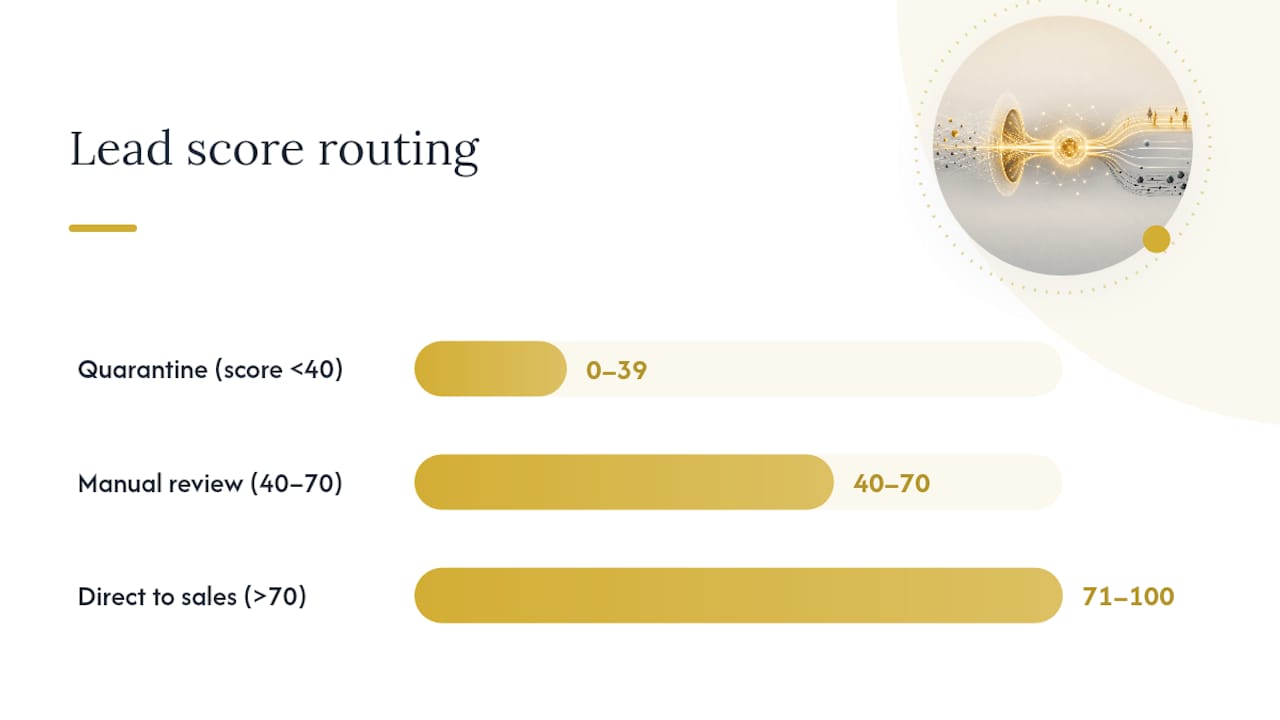
- Scoring. Assign a quality score (0–100) based on signals: email domain type, phone format, IP reputation, device fingerprint, time of day, and campaign source. Leads below 40 go to quarantine; leads above 70 go directly to sales.
- Quarantine queue. A human reviewer (or a simple CRM automation) checks flagged leads once daily. Legitimate leads get promoted; confirmed spam gets tagged and used to refine blocking rules.
- SMS OTP for high-value leads. Any lead scoring above 70 on a campaign where the average job value exceeds $500 gets an automated SMS with a verification code before the lead is assigned.
- CRM tagging and assignment. Verified leads get tagged with source, campaign, quality score, and verification status. Automated routing assigns them to the right sales rep based on service type and geography.
- Sales feedback loop. Reps tag every lead outcome: "booked," "uncontactable," "wrong service area," "bot/spam." Those tags feed back into scoring rules and CRM automation weekly.
For CRM fields, at minimum track: lead_source, quality_score, verification_status, disposition (booked/uncontactable/spam), and first_contact_attempt_timestamp. Simple business rules: auto-close any lead tagged "uncontactable" after three attempts within 48 hours, and escalate any lead tagged "bot/spam" to your blocking rules review.
Treating disposable email detection as a contextual signal rather than an automatic hard block is worth noting here. For service businesses where customers might use personal emails, soft-flag first and hard-block only after confirming the pattern.
Which metrics tell you spam is getting worse or better?
Track both traffic-side and post-conversion quality metrics. Conversion rate alone tells you nothing about lead quality.
Metrics to watch:
- Invalid click rate (Google Ads): pull weekly; anything above 2% warrants an IP audit.
- Conversion rate by hour of day: a spike outside 7 AM–9 PM local time is a bot signal.
- Contact-to-contacted rate: what percentage of leads does your sales team actually reach? Below 50% is a red flag.
- Percent uncontactable leads: tag these in your CRM and trend them weekly.
- Disposable email rate: what share of submissions use known disposable domains? Trend this after each blocking change.
- Lead-to-booked-job rate: the ultimate quality metric for home service businesses.
ClickzProtect's home-services audit data shows bot or non-converting traffic reaching 30–45% of spend on high-CPC emergency keywords. Manual audits using the Invalid Clicks column, hour-of-day reports, and IP exclusion lists recover 8–15% of wasted spend in week one for local accounts.
Alert rules worth setting up:
- Conversion volume spikes more than 40% day-over-day with no corresponding increase in sales calls: investigate immediately.
- More than 15% of a day's leads come from disposable email domains: trigger a review.
- Conversion lift concentrated between midnight and 6 AM: pull the IP list and cross-reference with your exclusion list.
Weekly audit routine: Every Monday, pull the previous week's Invalid Clicks report, hour-of-day conversion breakdown, and CRM disposition tags. Compare the uncontactable rate to the prior week. If it's rising, identify which campaign or ad group is driving it and apply exclusions before the week runs.
How do you test and roll out spam defenses without hurting real conversions?
Always A/B test defenses and use a progressive rollout rather than flipping site-wide controls at once. A change that blocks 200 bots might also block 20 real customers if the threshold is wrong.
Testing checklist:
- Establish baseline metrics before any change: conversion rate, contact rate, uncontactable rate, cost-per-lead.
- Run control (current setup) vs. treatment (new defense) simultaneously, not sequentially.
- Run the test for 7–14 days minimum to account for day-of-week variation.
- Audit the quarantine queue daily during the test period for false positives.
- Define rollback criteria upfront: if legitimate conversion rate drops more than 10% in the treatment group, pause and investigate before expanding.
- Document every change with a timestamp, the specific rule added, and the campaign or form it applies to. Share the log with your sales team so they can flag unexpected drops in lead volume.
Safe rollout pattern:
Start with quarantine mode: suspicious leads go to a review queue, not the trash. After one week of reviewing quarantined leads, you'll know your false positive rate. After another week of clean data, move to hard-blocking (silent rejection, no error message). Never start with hard-blocking on a new rule.
How Leapify Media reduces spam leads for home service clients
For a representative HVAC client running Google Ads on high-CPC emergency keywords, Leapify Media's approach starts with a full audit: Invalid Clicks column review, hour-of-day conversion breakdown, IP and ASN analysis, and CRM disposition tagging to establish the baseline junk rate.
From there, the methodology layers defenses in sequence:
- Audit phase: Identify the top sources of junk (bot IPs, disposable emails, problematic placements) and quantify wasted spend.
- Layered defenses: Deploy honeypot fields, server-side rate limits, disposable-email blocking, and device fingerprinting on landing pages. Disable native lead form extensions where junk rates are high.
- MQL/SQL event mapping: Stop sending raw form fills to Google's conversion tracking. Map only verified, sales-qualified events via Conversions API so the algorithm optimizes for real buyers.
- Sales feedback loop: Tag every lead disposition in the CRM. Feed "uncontactable" and "bot/spam" tags back into blocking rules and negative audience lists on a weekly cadence. Sales tagging and CRM feedback loops compound improvements over 30–60 days as the data accumulates.
- Continuous tuning: Weekly audit routine, monthly threshold review, and quarterly placement exclusion refresh.
Leapify Media's done-for-you spam protection for home service businesses
Wasted ad spend on junk leads is the most common reason home service businesses plateau on paid search. Leapify Media's growth infrastructure for home service operators addresses the full stack: Google Ads and Meta Ads management with conversion signal hygiene, on-premise AI lead scoring, CRM automation with quality tagging, and ongoing monitoring so you're not manually auditing Invalid Clicks reports every Monday morning.

The core deliverables for spam protection specifically include a full lead audit, layered form defenses (honeypot, rate limiting, disposable-email blocking), Conversions API event mapping for MQL/SQL signals, CRM tagging and automated routing, and a weekly quality dashboard. You get the same methodology described in this guide, implemented and maintained by a team that runs it daily for HVAC, plumbing, roofing, and restoration clients.
Book a strategy call with Leapify Media to get a baseline audit and a concrete plan.
An agency practitioner's perspective on what actually moves the needle
The metric most teams measure is the one that lies to them the most
Raw conversion volume is the most-watched number in any paid campaign, and it's also the most misleading one when spam is present. Every team I've seen struggle with lead quality was optimizing for volume.
The single most important operational shift is measuring quality, not quantity. That means your primary dashboard metric should be booked jobs per dollar spent, not leads per dollar spent. Everything else follows from that: the conversion signal you send to Google, the threshold you set for your quarantine queue, the spend level at which buying a third-party anti-fraud tool makes economic sense.
On that last point: manual audits (Invalid Clicks column, hour-of-day reports, IP lists) recover meaningful budget for most local accounts before you need to spend on tooling. Anti-fraud platforms earn their cost when residential-proxy bots dominate your traffic and manual exclusions can't keep up. For most home service businesses under $50K monthly ad spend, the free manual audit recovers more than the tool costs.
The other lesson: sales tagging is not optional. If your sales team isn't tagging lead dispositions in the CRM, you're flying blind on quality. A weekly 15-minute feedback call between the ads manager and a sales rep, reviewing the previous week's disposition tags, compounds faster than any technical fix.
Sources
- How To Fix Google Ads Spam Leads Problems
- HVAC and Plumber PPC Fraud: Why Home Services See 40% Bot Clicks (And How to Stop It) | ClickzProtect
- Form Spam Protection: 8 Defense Layers Tested (2026)